
hlhfnpbjlanadonkeggjnccpnjcfkncp
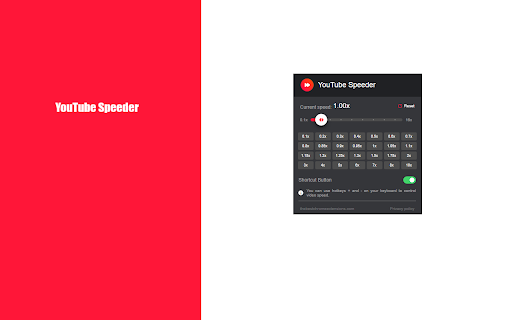
Extension allows to adjust the playback speed on YouTube according to preference Get in control of the playback speed on YouTube. This extension will allow you to either speed up or slow down videos to enjoy watching your favorite content at your own pace. Didn't catch that fast-talking dialogue? Want to experience your favorite scenes in slow-motion? Or maybe you'd like to fast forward the less interesting part to enjoy the finale? You're in the right place! Here's the solution for changing the video speed. All you need to do is to add the extension to your browser and run the pop-up control panel which enables you to choose buttons ranging from 0.1x up to 10x speed rates. You can also use slider or hotkeys on your keyboard to control it. It is as simple as that! How to find YouTube Speeder's control panel: 1. After installation, click the small puzzle piece icon next to your Chrome profile avatar (top right corner of the browser window) 2. You'll see all your installed and enabled extensions. 3. You can pin YouTube Speeder to have it always on top in your browser. 4. Click and try different speed settings. This extension is part of the Quality Viewership Initiative, a collaborative effort to enhance the understanding of audience engagement. It collects anonymous, aggregated viewing insights to support creators and studios in improving the quality of their content. You can stop sharing your information at any time by switching the toggle on the options page. ❗**Disclaimer: All product and company names are trademarks or registered trademarks of their respective holders. This extension holds no association or affiliation with them or any third-party companies.**❗

YouTube Row Fixer
A browser extension for customizing the videos per row and to fix big thumbnail issue ✨ Features 🔧 Customizable Layout Options > Set videos per row to suit your preference. > Control posts per row for a tailored feed. > Adjust shorts per row for optimal browsing. 💖 Able to hide shorts. 🙈 Hide Channel Profile 📝 Full Video Titles 📐Automatically adjust the number of videos per row based on screen size. 🌗 Light & Dark Theme Support

Tubi Speeder: adjust playback speed [QVI]
Extension allows to adjust the playback speed on Tubi according to preference Get your skates on and be in control of the playback speed on Tubi. This extension will allow you to either speed up or slow down shows and movies to enjoy watching your favorite content at your own pace. Didn't catch that fast-talking dialogue? Want to experience your favorite scenes in slow-motion? Or maybe you'd like to fast forward the less interesting part to enjoy the series finale? You're in the right place! Here's the solution for changing the video speed. All you need to do is to add the extension to your browser and run the control panel which enables you to choose from 0.25x up to 16x speed rates. You can also use hotkeys on your keyboard to control it. It is as simple as that! How to find Speeder's control panel: 1. After installation, click the small puzzle piece icon next to your Chrome profile avatar (top right corner of the browser window) 2. You'll see all your installed and enabled extensions. 3. You can pin Speeder to have it always on top in your browser. 4. Click the Speeder icon and try different speed settings. ❗**Disclaimer: All product and company names are trademarks or registered trademarks of their respective holders. This extension holds no association or affiliation with them or any third-party companies.**❗ This extension is part of the Quality Viewership Initiative, a collaborative effort to enhance the understanding of audience engagement. It collects anonymous, aggregated viewing insights to support creators and studios in improving the quality of their content. You can stop sharing your information at any time by switching the toggle on the options page.

Youtube Accelerator
Set custom playback speeds on your Youtube videos Supports up to 16x speed. For those videos where 2x just doesn't cut it. Made and openly sourced by https://github.com/TheNunoGomes.

Custom Youtube Playback Speed
Chrome extension that enables changing YouTube video playback speed from 0 to 10 with a custom step. The controls are integrated with the YouTube player in the form of: - a draggable bar below the quality option in the player settings, - numeric input - by detecting pressed keys provided by the user (by default '-' or 'a' to subtract and '+' or 'd' to add). The feature of dynamic video playback speed enables the playback speed to begin at a specified rate and then gradually increase until it reaches the desired rate at the specified duration percentage. Source code: https://github.com/MarekNowak250/Change-youtube-playback-speed-chrome-extension Have any improvement suggestion? You can create an issue here: https://github.com/MarekNowak250/Change-youtube-playback-speed-chrome-extension/issues
