
hklelmapknohkloodklljapfbhjjgnpo
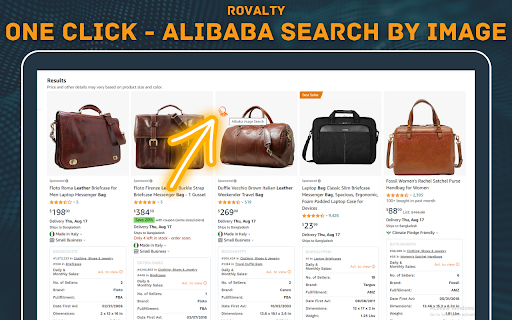

Alibaba Search by Image | Rovalty - Your Ultimate Product Discovery Tool! Introducing the Alibaba Search by Image Chrome Extension - Your Ultimate Product Discovery Tool! Are you tired of typing in product names and keywords to find what you're looking for on Alibaba? Say goodbye to manual searches and welcome an innovative way to explore the world of products effortlessly! With the Alibaba Search by Image Chrome Extension, you can now search for products on Alibaba using images instead of text. Simply right-click on any image you come across while browsing the web or upload an image from your device, and let our extension do the rest. Image-Based Product Search: Say goodbye to language barriers and enjoy a seamless shopping experience. Use our extension to find similar products or visually identical items with a single click. Instant Results: Our powerful image recognition technology quickly analyzes the image and presents you with a curated list of matching products from Alibaba's vast catalog. Save Time and Effort: No more typing long descriptions or endless scrolling. Find your desired products with accuracy and precision in just seconds. Discover Unique Items: Explore a wide range of products you might not have found through traditional text searches. Uncover hidden gems and unique offerings. Enhanced Shopping Experience: The Alibaba Search by Image Extension is designed to make your shopping journey smoother and more enjoyable. Whether you're a casual shopper or a seasoned entrepreneur, this tool is your key to unlocking new possibilities. Get ready to revolutionize the way you shop on Alibaba! Download the Alibaba Search by Image Chrome Extension now and elevate your product discovery to a whole new level. Explore the world of endless possibilities at your fingertips. Note: The Alibaba Search by Image Chrome Extension is an independent tool and is not affiliated with Alibaba Group or its services. Embrace the future of shopping and experience the magic of visual product discovery with our cutting-edge Chrome Extension! Install now and let your images lead you to extraordinary finds on Alibaba! Affiliate Disclosure: This extension participates in the Alibaba Affiliate Program. If you click on a search result or make a purchase after using this tool, we may receive a small commission at no extra cost to you. This helps us maintain and improve the extension for our users.

AiPrice(AliPrice) Search by Image for China Import Beta
AiPrice Search by Image allows you to easily find the source goods on e-commerce websites. Key Features: 1. Search by Image - The most comprehensive image search tool on the web, supporting e-commerce platforms like Amazon, AliExpress, Alibaba, and Taobao. For more platforms, please visit the AiPrice official website: https://www.aiprice.com - Image Search Methods: Click the AiPrice icon above the product image; right-click and select Screenshot Search; upload a local image to search. - Image Zoom: On the product list page, hover your mouse over an image to zoom in. 2. Utility Toolbar - Download Images: Batch download product images and videos from Taobao, Amazon, Pinduoduo, and other sites; export image links; translate text on images; and enlarge images in HD. - Copy Links: One-click copy of product links from Alibaba, Taobao, etc. When copying long links, the selected product SKU is included, and it will automatically display when you open the link again. - Copy Titles: Copy product titles and use translated titles to search for similar products on Taobao. - Shipping Fee Checker: Instantly check shipping costs for different regions. - Export All Store Products: Export all items from a store into an Excel file. - SKU Viewer & Price Calculator: View all SKU details of AliExpress products with one click. 3. Price History and Order History - View the price history of products on platforms like AliExpress, and Amazon for free, helping users distinguish genuine discounts from fake ones. Users can add products to their favorites and receive notifications when prices drop. - Trends: View the one-year price and order history of products on platforms like Amazon. 4. Translation - Aliwangwang Translation: Translate conversations with sellers in both the source and target languages for seamless communication. - Web Translation: Right-click to translate an entire webpage. - Screenshot Translation: Right-click to take a screenshot and translate the text within it. 5. Product Related - Advanced Search: Includes features like comparing similar products, filtering and sorting, and exporting data to Excel, helping users more accurately find the products they need. - Product Information PRO: Display extra details on product listings such as shipping cost, order price, minimum order quantity, annual sales, listing time, and store opening date. 6. Review Relevance - Review Analysis: Analyzes the country distribution of reviewers on AliExpress product details. - Download Reviews: Download product reviews and images from Amazon and AliExpress. 7. Currency Converter - Displays prices on Taobao converted to dozens of foreign currencies, including US dollars and Korean won. - Displays prices in RMB on websites like Temu, Amazon, and Alibaba International. 8. Logistics Monitoring - View parcel tracking details directly on the order list pages of Taobao. 9. Copy Search Suggestions - Copy suggested and related keywords from Amazon and other platforms’ search boxes. 10. Export Shopping Cart - Export products from your Taobao shopping cart to an Excel file. 11. Browsing History - View your browsing history on, Taobao, AliExpress, and other websites in the lower-left toolbar. 12. Highlight Ad Tags - Highlight “AD” tags to clearly distinguish sponsored products. 13. Minimize Plugin - Collapse or expand the plugin window in the lower-left corner. By installing the AiPrice plugin, you agree to the AiPrice Terms of Service and consent to the plugin redirecting you to advertising links, including those on platforms like Ali: https://www.aiprice.com/information/index?page=term_of_use If you have any questions or suggestions, please feel free to contact us. https://www.aiprice.com/information/index?page=contact

rule5
Extension for sales teams to learn about their prospective customers and key people to engage with. rule5 is where go-to-market teams go for sales intelligence. 👋 Know everything about your customer: ⮕ Learn about your customers, their strategic priorities, initiatives, business challenges, trends (financial, industry and technology) and much more. 👋 Generative AI powered account intelligence, personalized email creation, strategic sales asset creation and more: ⮕ Ask questions and get answers to deeply understand your prospect. Draft context specific emails to a prospect, create strategic sales assets including executive summary, POV slides, RFP responses, security questionnaires and more. 👋 Intelligence that goes where you go in Salesforce and on the web: ⮕ Access account and people intelligence while in Salesforce or from your prospect’s website 👋 Identify the best path to decision makers with rule5 teamConnect: ⮕ Share critical relationships that exist within your ecosystem of partners, board members, advisors, and customer advocates so your sales teams can see the direct path to the key stakeholders they need to engage.

GimmeThat - Universal Wishlist for Shopping
Simplify shopping with a universal wishlist. Save anything you want to buy from any store globally. See your favorites with a click! Tired of forgetting things you want to buy? Too many open tabs and bookmarked product pages? Give GimmeThat a try! It's a universal wishlist that lives right in your browser. You can save anything you want to buy from any store worldwide. All your favorites in one handy wishlist: see them with one click. Save time and stay organized while shopping. GimmeThat puts a handy button next to your browser's address bar. Seen something you like - but aren't quite ready to buy? Those cool shoes? That new phone? Click the GimmeThat button to add it to your universal wishlist. You can save from any store. Want to see your wishlist? Click the GimmeThat button again. You’ll see all your saved products right away. Ready to buy something? Click on the product, and you'll go straight to its store page. Get started with GimmeThat today. Click 'Add to Chrome' at the top of this page. It's easy, and there's a quick guide to get you started. ➤➤ Your Questions Answered Yes. You can save products from stores worldwide. Just click the GimmeThat button on the product's store page to add it to your wishlist. GimmeThat works its magic and grabs all the product's details from the store page. You can fix things easily if needed. Yes. GimmeThat is free to use. And no annoying ads - we make money from affiliate links. We can earn a commission when you click on product links in your wishlist. There may be paid accounts in future for extra features. ➤ Why does GimmeThat need to "Read and change all your data on all websites"? We need some permissions to work, and only ask for what's needed. When you save a product to your wishlist, this permission lets us fetch the product's image from the website. That's it! Yes. Keeping your data safe and private is top priority. We only store the data needed to work, like your email and products you save. All data is securely stored on our cloud servers. GimmeThat only works for desktop and laptop browsers right now. But we do work to make things better, so watch out for updates. If you have any questions, suggestions or problems, email us at support@gimmethat.me. We're here to help!

Email Finder | Email Extractor By LeadStal
Email Finder | Email Extractor tool to easily extract email addresses from websites in a second and Download csv files or copy Extract Emails Effortlessly with Our Free Email Finder Extension Finding emails from websites has never been easier! Introducing our Email Finder | Email Extractor Extension, a powerful yet user-friendly tool designed to simplify the email collection process. Whether you're a marketer, recruiter, or researcher, this extension will save you time and effort by fetching email addresses from any website or search engine—all for free. 🔳 Why Choose Our Email Finder Extension? Easy Email Collection: Simply visit a website, and the extension will automatically extract all visible email addresses for you. Free to Use: Get full access to all features without spending a dime. Quick Downloads: Downloads All Emails button the collected emails directly to your device with a single click. Time-Saving Solution: Perfect for lead generation, outreach campaigns, or research. 🔳 How to Use the Extension Install the Extension: Visit your browser's store, search for "Email Finder | Email Extractor," and click "Add to Chrome" (or your preferred browser). Navigate to a Website: Go to any website where you want to collect emails. Activate the Extension: Click on the extension icon to view the extracted emails. Download or Copy Emails: Click "Download All Emails" to save them in a convenient file format or copy individual addresses directly. 🔳 Frequently Asked Questions (FAQ): Q. How do I install the Any Website Email Finder extension? Visit the Chrome Web Store, search for "Any Website Email Finder," and click the "Add to Chrome" button. Follow the prompts to install the extension on your browser. Q. How do I sign up and start using the extension? After installing, click on the extension icon in your Chrome toolbar and sign up using your Google account. It's quick and easy! Q .How does the extension find email addresses on websites? The extension scans the webpage you're visiting to detect and extract any publicly available email addresses present on the page. Q. Is it legal to collect email addresses from websites? Yes, the extension only collects email addresses that are publicly available on websites. However, please ensure you comply with all applicable laws and regulations, including GDPR and anti-spam laws, when using the collected emails. Q. Does the extension store any of my browsing data? No, your privacy is our priority. The Any Website Email Finder does not collect or store any of your browsing data. Q. Can I use this extension on any website? Absolutely! The extension is designed to work on any website across the internet where email addresses are publicly available. Q. How do I copy the extracted email addresses? After clicking the extension icon, the extracted emails will be displayed. Simply click the "Copy" button next to each email to copy it to your clipboard. Q. What if the extension doesn't find any emails on a website? If no emails are found, it may be because there are no publicly available email addresses on that webpage. Try checking other pages of the website or use the website's contact form. Start discovering email addresses effortlessly today with the Any Website Email Finder and take your outreach efforts to the next level!
