
hkghghbnihliadkabmlcmcgmffllglin

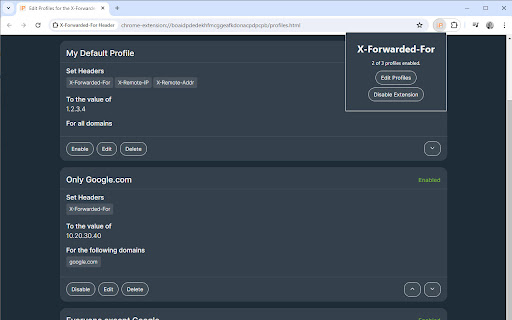
This extension allows you quickly to set the X-Forwarded-For HTTP Header This extension allows you to quickly update the X-Forwarded-For, X-Originating-IP, X-Remote-IP, X-Remote-Addr, and many other HTTP headers for various testing purpose. You can create different profiles for different domains, headers, and IP values.

X情报查询助手
鼠标上的情报专家。简化查询流程,提升分析效率。步刻科技有限公司出品 鼠标上的情报专家。简化查询流程,提升分析效率。步刻科技有限公司出品 鼠标上的情报专家。简化查询流程,提升分析效率。北京步刻科技有限公司出品 X情报查询助手:简化查询流程,提升分析效率,帮助您在高强度的情报查询中发现可疑信息。 具体使用: 鼠标取词,即时获取X情报中心情报: 结合X情报中心标签与判定,快速判定威胁风险类别; 结合关键情报数据,快速判断资产是否具有溯源价值; 高强度红蓝对抗中,快速识别Hash相关样本信誉情况。

WebRTC Leak Prevent
Prevent WebRTC leaks using the official API. Test for leaks here - https://diafygi.github.io/webrtc-ips/ Compatible only with Chrome version 88+ and updated to comply with Manifest V3. WebRTC-based services may be affected by this extension. Please open the options page and read the instructions before use.

Hack-Tools
The all in one Red team extension for web pentester HackTools, is a web extension facilitating your web application penetration tests, it includes cheat sheets as well as all the tools used during a test such as XSS payloads, Reverse shells and much more. With the extension you no longer need to search for payloads in different websites or in your local storage space, most of the tools are accessible in one click. HackTools is accessible either in pop up mode or in a whole tab in the Devtools part of the browser with F12. - Dynamic Reverse Shell generator (PHP, Bash, Ruby, Python, Perl, Netcat) - Shell Spawning (TTY Shell Spawning) - MSF Venom Builder - XSS Payloads - Basic SQLi payloads - Local file inclusion payloads (LFI) - Data Encoding - Obfuscated Files or Information - Hash Generator (MD5, SHA1, SHA256, SHA512, SM3) - Useful Linux commands (Port Forwarding, SUID) - RSS Feed (Exploit DB, Cisco Security Advisories, CXSECURITY) - CVE Search Engine - Various method of data exfiltration and download from a remote machine

Modify Header Value (HTTP Headers)
Add, modify or remove a header for any request on desired domains. Modify Header Value (HTTP Headers) is an extension that can add, modify or remove an HTTP-request-header for all requests on a desired website or URL. This Addon is very useful if you are an App developer, website designer, or if you want to test a particular header for a request on a website. Key features: 1. Easily add, modify or remove a header for any request on desired domains. 2. For a complete list of HTTP headers, please take a look at the list of all HTTP Header Fields on the Wikipedia page (https://en.wikipedia.org/wiki/List_of_HTTP_header_fields). 3. Clicking on the Toolbar icon opens a UI to quickly switch the Addon ON or OFF, or open the options page. 4. Each header item has several options to adjust (see add-on's Options page for details) 5. You can add several header items and active or inactive them separately. 6. An example in the options page shows a tutorial on "How to add a custom header". Note: to report bugs, please visit addon's homepage (https://mybrowseraddon.com/modify-header-value.html) and fill out the bug report form.
