
hjohibofdldajbdngfdieklopkjhplck
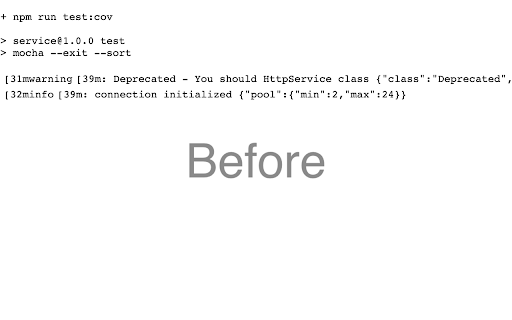

Replace tags that contains ansi colors with colored tags Colorize ANSI in Jenkins log preview and raw GitHub Actions

GitHub Action Raw Log Viewer
Display GitHub Action Raw log in color, converting the Ansi colors to HTML By default the GitHub Actions raw logs are in plain text and often contains special color symbols (ANSI) that makes them very difficult to read. This extension not only removes these extra symbols but also use convert them to actual colors to make the log a lot more readable - the text will look as it would in your terminal window. GitLab also offers its logs in raw format so the extension should work with it too.

AWS CloudWatch ANSI colors
This extension replaces ANSI escape sequences with the HTML equivalent in AWS CloudWatch (V1 and V2) This extension replaces ANSI escape sequences in AWS CloudWatch to make logs easier to read. This is very useful for logs generated by a Spring Boot or Node.js application for example.

RetroTxt
Turn pieces of ANSI based text art and ASCII, NFO plain text into HTML. Turn pieces of ANSI, ASCII, and NFO documents into HTML. RetroTxt is the browser Extension that takes legacy and plain text files and stylizes them into a more acceptable, valid format to view or copy from a web browser tab. - View color ANSI, ASCII, NFO, Japanese text art as HTML - View system, server and dev-op logs styled with colored text Built using modern service workers that are more efficient and use far less browser resources than traditional web extensions. ** Please note that when installing RetroTxt requests, Read and change all data permissions. While necessary, RetroTxt ignores all websites except those you tell it to monitor in the background and never collects or transmits any data. Learn more: https://docs.retrotxt.com/usage/secure/ Features - Open-source - Swappable palettes for different color simulations - Customizable font and background colors - SAUCE metadata parsing - Support for multiple text encodings - Automatic fixes for block character and line artifacts - Hundreds of IBM PC font choices - Various Amiga and microcomputer fonts

Virtru Email Protection
Surprisingly easy email protection and control for Gmail. Easily protect Gmail messages and attachments, and maintain control wherever they’re shared. At Virtru, we understand that data is an organization’s most valuable asset and sharing it is critical for business success. But sharing data creates significant risk. We believe no one should have to choose between protecting data and sharing it. We help more than 6100+ organizations, large and small, across almost every industry, protect data wherever it’s created or shared so they can collaborate with confidence. Privacy Ensure Gmail messages and attachments stay private so you don’t have to trust Google with your data. Compliance Maintain compliance with data privacy regulations such as HIPAA, GDPR, CJIS, ITAR, CCPA, FERPA, CMMC, NIST, and more. Secure, Seamless Sharing Protect Gmail messages and attachments and maintain control wherever they’re shared - both internally and externally, beyond Google. End-to-End Encryption Data-centric protection and object-level encryption for email messages and attachments directly within the Gmail client with a simple Chrome extension. Granular Access Controls Set expiration, disable forwarding, and watermark attachments with recipients’ names to deter them from leaking sensitive files. Instant Revocation Revoke access to messages and attachments immediately when emails are sent in error, or after the data within has become more sensitive. Persistent File Protection Keep attachments protected and controlled anywhere files are shared and stored (i.e. Gmail, Google Drive, desktops, network drives, and more) to ensure compliance with data privacy regulations and privacy throughout the full collaboration lifecycle. Data Loss Prevention (DLP) Automatically enable encryption with DLP rules that detect and protect sensitive data or reinforce security awareness with alerts that warn users to encrypt email. Contact us to learn more or try Virtru at your organization: https://www.virtru.com/contact-us/ By clicking the “Install” button above, or by otherwise downloading or installing the Virtru software referenced above, you consent to be bound by the Virtru Terms of Service (https://www.virtru.com/terms-of-service), which governs your access to and use of the Virtru software. If you are downloading or installing the Virtru Software, or otherwise accepting the Virtru Terms of Services, on behalf of an entity (such as your employer), you represent to Virtru that you have the legal authority to accept that Virtru Terms of Service on behalf of that entity.
