
hjidpagohjgejmpcbjeebhcpabpbnmmm


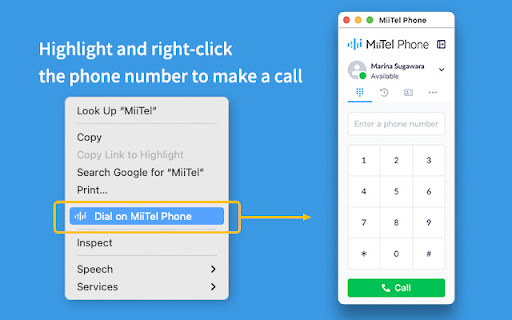
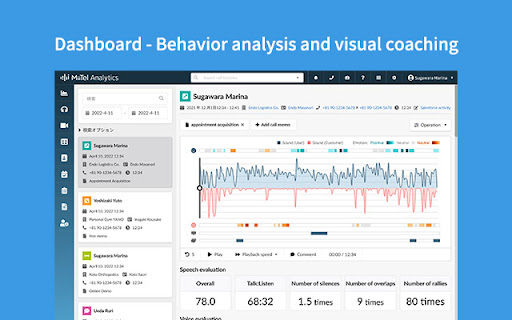
MiiTel Phone は、Chrome ブラウザ上から電話が発信できます。 MiiTel (ミーテル) は、電話営業を可視化する音声解析AI搭載型のクラウドIP電話です。 電話営業の内容をAIがリアルタイムに解析し、会話の質を評価し、アドバイスを行うことで、成約率の向上に貢献できます。

Pickupon
pickuponはインサイドセールスに向けて開発されたAI搭載クラウド電話です。pickuponで通話すると通話内容の重要箇所を、AIが自動でpick upしSFAに入力。正確な一次情報の共有を支援し、営業活動の生産性を大幅に向上させます。 pickupon AI搭載クラウド電話 pickuponは、インサイドセールスに向けて開発されたAI搭載クラウド電話です。 pickuponで通話すると、通話内容の重要箇所をAIが自動でpick upし、お使いのSFAへ入力してくれます。 それによってインサイドセールスの入力コストを大幅に削減し、簡単に正確な一次情報の共有を支援し、電話による営業活動の生産性を大幅に向上させます。 特徴1 通話のやり取りをテキストデータとして記録・分析できます。 特徴2 顧客の発言の課題発言をpick upし、チームにシェアできます。 特徴3 電話するだけで性格傾向を定量的に分析できます。 このアプリはpickuponユーザーのみが利用することができます。 pickuponのサービスの詳細、無料トライアルのお申し込みはこちらになります。 https://pickupon.io/ インストールにより実施できること ・ブラウザ画面で電話番号をクリックするだけでpickuponから架電ができます

Chatwork Input Tools
Add text decoration icons to ChatWork. 選択したメッセージをタグで囲むことができます。 タグの効果については公式サポートページをご覧ください。 http://support-ja.chatwork.com/hc/ja/articles/203127904-投稿に装飾はできますか- -- 2017/03/15 ChatWorkの仕様変更に対応しました。 2016/07/10 メッセージ入力欄にリスト作成のサポートを追加しました。 TOリストにすべて選択 (アイコンのみ)を追加しました。 2015/12/25 TOリストの大きさを2倍にしました。 2015/10/28 公開しました。

Calendar Selector for Google Calendar
Save and restore groups of calendars selected Version 0.1.7 - Bug fix: More resilient finding of calendar in the left panel, will skip list items that do not appear to be built-in Google calendar entries Version 0.1.6 - Enhancement: quick fix for Chrome deprecating Manifest v2, upgraded to v3. Some keyboard shortcuts for preset management don't work, but functionality is available in the UI. Version 0.1.5 - Bug fix: Breakage introduced by Google Calendar changing the page HTML structure Version 0.1.4 - Bug fix: Agenda view displays items correctly - Enhancement: Added a license file to the repository (MIT), and provided privacy policy and data practices in the store listing (no data is ever shared or leaves the user's browser). See https://gitlab.com/bluenexa/google-calendar-selector for all version updates This extension creates a set of buttons in the Google Chrome UI that allow you to easily create, save, and display groups of calendar presets. If you have many calendars and often need to switch between which calendars are shown (such as colleagues and teams), this extension is for you. Your presets are stored in your local browser storage and sync across devices automatically (using Chrome's built in syncing mechanism). Keyboard Shortcuts: Press Ctrl+Alt and the highlighted key for the main functions (highlighted key is one of e, s, r, c, i, x, or p). Except Chrome's built-in sync mechanism, the extension functions completely offline in the browser and no data leaves the user's computer. Local storage in the browser is used to persist saved calendar groups and to sync saved groups across computers via Chrome's built-in sync mechanism (tied to the logged in Chrome user). All software is fully open source and available at https://gitlab.com/bluenexa/google-calendar-selector. Built by the team at Bluenexa.

The Conference system Screen Sharing
Add Screen Sharing to the conference system. Screen Sharing Extension for Chrome.
