
hjcjiolonimpgblkjnfphffjgjbcinkc
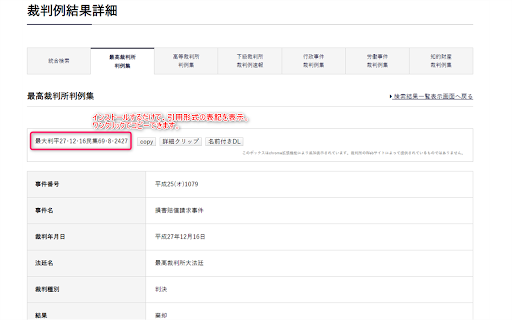
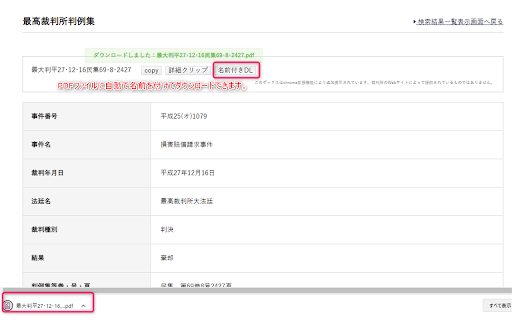
インストールするだけで裁判所の判例検索画面が使いやすくなります。 ◆概要 裁判所Webサイトの判例検索結果の画面に、簡易なツールボックスを追加します。 「最大判平27・12・16民集69・8・2427」といった引用表記や、まとめメモを自動で生成して、ワンクリックでコピーできるようになります。 「裁判例結果詳細」を表示すると、自動的にスクリーンショットのような画面になります。 ◆開発元 シンプルな操作で事件記録を整理・活用することに特化したソフト、『弁護革命』の関連サービスです。 https://www.bengo-kakumei.jp/ ★開発を応援していただける方はこちら(ドネーション:寄付) https://buy.stripe.com/7sI5nFfs260u3oA6oo ◆対象サイト https://www.courts.go.jp/app/hanrei_jp/search1 (検索結果画面の表示が変わります) ◆機能 1.引用表記の自動表示と、ワンクリックコピー 「最大判平27・12・16民集69・8・2427」といった引用に適した表記を自動で生成し、表示します。→ワンクリックでコピー 2.まとめメモを生成して、ワンクリックコピー 引用表記、判事事項、裁判要旨、オリジナルリンクをまとめて文章を生成し、ワンクリックでコピーできます。 3.名前付きでPDFをダウンロード ファイル名を1の引用表記にして判決のPDFをダウンロードできます ◆導入方法 1.このchrome拡張をインストールします 2.裁判所の判例検索結果画面を表示すると、ツールボックスが自動的に追加されています。 ◆制限事項 ・2021年12月時点の裁判所Webサイトの仕様に対応して作成されています。裁判所Webサイトの仕様が変更された場合には、本拡張機能が正常に動作しなくなる可能性があります。 ・生成された表記等が正確であることを保証するものではありません。 ◆注意事項 ・本拡張機能は、裁判所からなんらの賛助等を受けているものではありません。 ・本拡張機能はクライアントサイドで動作しており、裁判所Webサイトのサーバーの動作をなんら変更するものではありません。 ◆アップデート履歴 v1.3.0 地裁以下に対応 v1.2.0 高裁判例に対応 v1.1.0 名前付きDL機能を追加 v1.0.0 公開

e-Gov AmiAmi R
e-Govの括弧内を網掛けします。 e-Gov法令検索において法令を閲覧する際、条文に含まれる括弧内の文言を網掛けすることにより可読性を向上させます。 「e-Gov AmiAmi」では「網掛」ボタンを左上に表示していましたが、「e-Gov AmiAmi R」では右上に表示します。お好みの方をご利用ください。

その本、図書館にあります。
amazonで今、見ている本が近所の図書館にあるかどうかが分かります。 amazonで見ている本が近所の図書館にあるか調べます。 もしかすると、その本を買う必要がないかもしれません。 amazonのページ内に検索結果を表示するので、いつも通りamazonを利用するだけで図書館にその本があるかシームレスに分かります。 図書館では無料で本を読むことができますし、新しい本との出会いもあります。 久々に図書館に足を運んでみませんか? -最近のお知らせ 2024/04/03 再開しました。(ver.3.0.3) - 注意 このエクステンションは図書館蔵書検索サイト カーリル (http://calil.jp/) のAPIを利用しています。APIの仕様上で1000リクエスト/時という制限があるため、利用時間帯によっては検索が実行されない時があります。

NotebookLM Web Importer
Import web pages and YouTube videos to NotebookLM with one click NotebookLM Web Importer is a powerful Chrome extension for saving web pages, YouTube videos, links, browser tabs, RSS feeds, and more directly to Google NotebookLM. Stop copying URLs, switching tabs, and manually organizing sources. With NotebookLM Web Importer, you can capture online content in seconds, add it to the right notebook, and start using NotebookLM to summarize, ask questions, generate insights, and create Audio Overviews. Built for students, researchers, creators, writers, analysts, and anyone who uses NotebookLM as an AI research assistant. ## One-Click Web Page Import Save the current web page to NotebookLM instantly. Turn articles, blog posts, documentation, reports, and reference pages into NotebookLM sources without copy-paste. ## YouTube to NotebookLM Import YouTube videos into NotebookLM so you can study lectures, interviews, tutorials, podcasts, webinars, and long-form videos more efficiently. ## Bulk Import Add multiple sources at once from link lists, open browser tabs, YouTube playlists, RSS feeds, and more. Build a complete research notebook faster. ## Notebook Management Manage your notebooks in one place and keep your NotebookLM research workflow organized while you browse. ## Audio Overview Management Manage NotebookLM Audio Overviews and sync them to a podcast feed, making it easier to listen, review, and learn on the go. ## Full WebSync Workflow Send pages and videos to NotebookLM from your browser, then chat with your sources, generate summaries, create study materials, or produce podcast-style Audio Overviews inside NotebookLM. NotebookLM is great for understanding sources. NotebookLM Web Importer makes it much faster to collect those sources. Use it to: - Save articles, reports, and documentation to NotebookLM - Import YouTube videos and playlists for research or learning - Collect sources from multiple tabs in bulk - Build notebooks from RSS feeds or link lists - Organize research for school, work, writing, or content creation - Turn saved sources into NotebookLM summaries, Q&A, study guides, and Audio Overviews - Reduce repetitive copy-paste work while browsing # Perfect For ## Students Collect lecture videos, course readings, articles, and research materials in NotebookLM. ## Researchers Build source collections from papers, websites, reports, documentation, and reference links. ## Creators and Writers Save inspiration, competitor research, scripts, articles, and YouTube videos into structured notebooks. ## Professionals Gather market research, product docs, news, client materials, and internal knowledge sources for faster analysis. 1. Install NotebookLM Web Importer from the Chrome Web Store. 2. Browse the web or watch YouTube as usual. 3. Click the extension icon. 4. Choose where to import your source. 5. Open NotebookLM to chat with your sources, generate insights, or create an Audio Overview. NotebookLM Web Importer helps you turn the web into a searchable, organized AI knowledge base. If you use NotebookLM for research, learning, writing, analysis, or content creation, this extension saves time every day. Works with Google NotebookLM. This extension is not affiliated with Google.

D1-Law瞬間検索
選択したテキストからD1-Law.comで判例を検索する拡張機能 判例検索を劇的に効率化!D1-Law瞬間検索 選択したテキストからD1-Lawで判例を瞬時に検索できるChrome拡張機能です。 【主な機能】 ・右クリックでワンクリック検索 ・判決年月日または事件番号から検索可能 ・既存タブを再利用してスムーズに操作 【使い方(3ステップ)】 1. 判決年月日と裁判所名、または事件番号を含むテキストを選択 2. 右クリックして「D1-Lawで検索」を選択 3. 自動でD1-Law.comが開き、検索フォームに自動入力完了! 【対応検索パターン】 ・判決年月日と裁判所名、事件番号のいずれにも対応 ・元号の略記(令和→令、平成→平など)や裁判所名の略称(最判、東京高判など)にも対応 ※D1-Law公式の拡張機能ではありません。 【バージョン1.1の新機能】 ・検索フォームの自動クリア機能を追加
