
gnhapcdjgaldlaeniiobdjfaiiabkoom
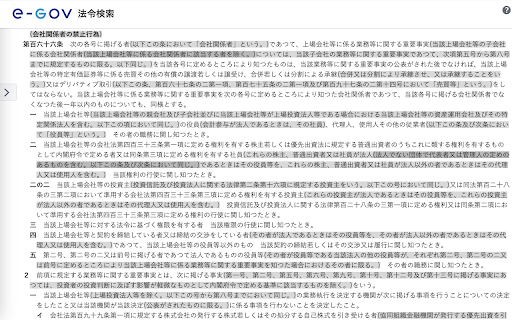
e-Govの括弧内を網掛けします。 e-Gov法令検索において法令を閲覧する際、条文に含まれる括弧内の文言を網掛けすることにより可読性を向上させます。 「e-Gov AmiAmi」では「網掛」ボタンを左上に表示していましたが、「e-Gov AmiAmi R」では右上に表示します。お好みの方をご利用ください。

e-govにある法律などの条文を算用数字に変換します
法律の条文番号を算用数字に変換するChrome拡張機能です。例えば「第一条」は「第1条」のように自動で変換されます。 【概要】 e-Gov法令検索のウェブサイトで表示される漢数字(条文番号や数値)を、読みやすく検索しやすい算用数字に自動変換する拡張機能です。 【主な機能】 条文番号の算用数字 「第百二十条」→「第120条」のように変換します。 これにより、特定の条文を探したい時に Ctrl + F で「120」と入力するだけで素早くジャンプできるようになります。 単位の記号化 法令中の物理単位を一般的な記号に変換し、視認性を向上させます。 速度「五十キロメートル毎時」→「50km/h」 長さ・重さ:「百キロメートル」→「100km」、「一・五トン」→「1.5t」 面積・体積:「三十平方メートル」→「30m²」 その他:「五〇パーセント」→「50%」など 小数のサポート 「〇・七五メートル」のような漢数字の小数表記も「0.75m」へ正確に変換します。 【こだわり(誤変換防止)】 法令の構造を崩さないよう、変換ルールを細かく調整しています。 「号」は漢数字のまま維持 「第一号」や「一 道路」などの「号」は、元々算用数字で書くことが一般的である「項」と混同しないよう、あえて漢数字のままにしています。 枝番の処理 「第2条の2」のような条文の枝番は変換しますが、「三の二」のような号の枝番は漢数字を維持します。 githubリポジトリ https://github.com/Usuiensan/LawArticle

NotebookLM Web Importer
Import web pages and YouTube videos to NotebookLM with one click NotebookLM Web Importer is a powerful Chrome extension for saving web pages, YouTube videos, links, browser tabs, RSS feeds, and more directly to Google NotebookLM. Stop copying URLs, switching tabs, and manually organizing sources. With NotebookLM Web Importer, you can capture online content in seconds, add it to the right notebook, and start using NotebookLM to summarize, ask questions, generate insights, and create Audio Overviews. Built for students, researchers, creators, writers, analysts, and anyone who uses NotebookLM as an AI research assistant. ## One-Click Web Page Import Save the current web page to NotebookLM instantly. Turn articles, blog posts, documentation, reports, and reference pages into NotebookLM sources without copy-paste. ## YouTube to NotebookLM Import YouTube videos into NotebookLM so you can study lectures, interviews, tutorials, podcasts, webinars, and long-form videos more efficiently. ## Bulk Import Add multiple sources at once from link lists, open browser tabs, YouTube playlists, RSS feeds, and more. Build a complete research notebook faster. ## Notebook Management Manage your notebooks in one place and keep your NotebookLM research workflow organized while you browse. ## Audio Overview Management Manage NotebookLM Audio Overviews and sync them to a podcast feed, making it easier to listen, review, and learn on the go. ## Full WebSync Workflow Send pages and videos to NotebookLM from your browser, then chat with your sources, generate summaries, create study materials, or produce podcast-style Audio Overviews inside NotebookLM. NotebookLM is great for understanding sources. NotebookLM Web Importer makes it much faster to collect those sources. Use it to: - Save articles, reports, and documentation to NotebookLM - Import YouTube videos and playlists for research or learning - Collect sources from multiple tabs in bulk - Build notebooks from RSS feeds or link lists - Organize research for school, work, writing, or content creation - Turn saved sources into NotebookLM summaries, Q&A, study guides, and Audio Overviews - Reduce repetitive copy-paste work while browsing # Perfect For ## Students Collect lecture videos, course readings, articles, and research materials in NotebookLM. ## Researchers Build source collections from papers, websites, reports, documentation, and reference links. ## Creators and Writers Save inspiration, competitor research, scripts, articles, and YouTube videos into structured notebooks. ## Professionals Gather market research, product docs, news, client materials, and internal knowledge sources for faster analysis. 1. Install NotebookLM Web Importer from the Chrome Web Store. 2. Browse the web or watch YouTube as usual. 3. Click the extension icon. 4. Choose where to import your source. 5. Open NotebookLM to chat with your sources, generate insights, or create an Audio Overview. NotebookLM Web Importer helps you turn the web into a searchable, organized AI knowledge base. If you use NotebookLM for research, learning, writing, analysis, or content creation, this extension saves time every day. Works with Google NotebookLM. This extension is not affiliated with Google.

eGov Viewer
e-Gov法令検索をより閲覧しやすくする拡張機能 特徴 ✓ 条文全体の画面を最大化し,より多く情報を表示 ✓ 条文中の「第〜条」「第〜項」といった同一条文を参照する単語にページ内リンクを設定(参照条文には非対応) ✓ 条文を参照する単語にマウスオーバーさせると参照先をツールチップ表示 ✓ 条文中の括弧書きをグレーアウト・非表示・強調表示 ✓ 数字キーの入力で該当条文へ移動.入力後,一定時間(デフォルト1秒)入力がないとリセット.ー(ハイフン)で枝番へ移動

When in Japan
和暦に西暦を併記します インストール後、画面右下に表示される「𝕁」をクリックすることで、閲覧中のウェブサイトに含まれる和暦(元号)に西暦を付記します。 対応年は、明治23年(1890年)以降です。 この拡張機能は全てのウェブサイトで作動するように作られている一方、和暦の記載方法が多様な関係で、相性の悪いウェブサイトもございます。ご理解の上ご利用頂けますと幸いです。
