
hjbdgionekajacbeocbgopledpkegkmo
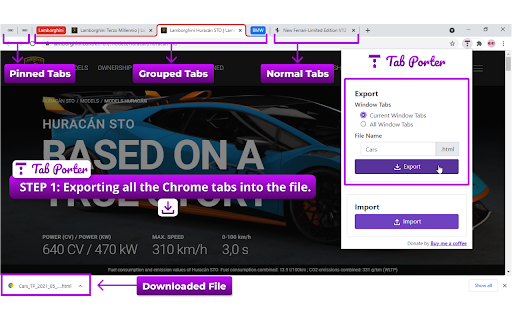
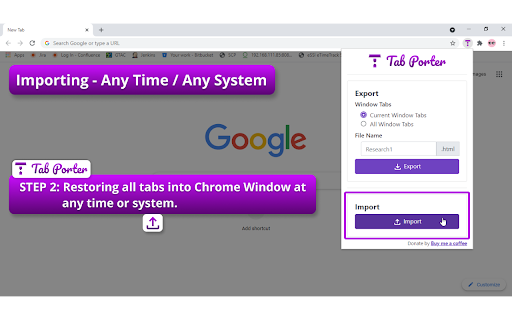
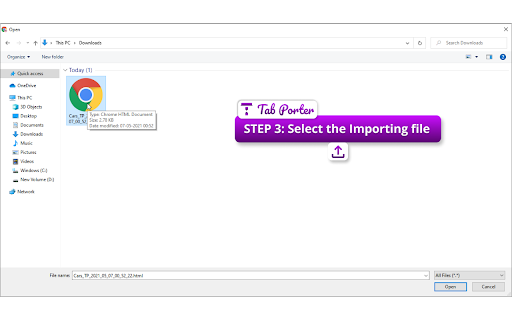

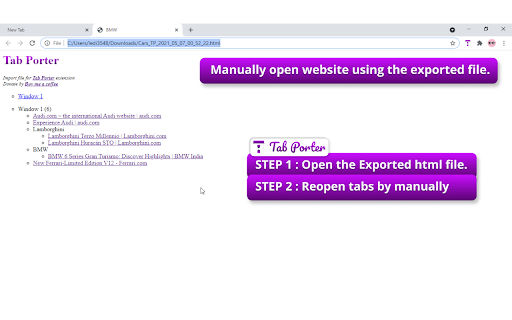
Export all the Chrome tabs into an HTML file. Reopen all the tabs into Chrome Window at any time or any system. Feature : - Export/Reopen also work for Current Chrome Window or All Chrome Window. - Automatically all tabs are reopened in Chrome Window using the extension. - Manually open website using the exported HTML file. The file having all website links is present according to Windows and Tabs order. - Normal Tabs, Pinned Tabs, and Grouped Tabs properties also will be restored. - Reopen will support collapsed/expand for grouped tabs on the Chrome Window. You are researching something called research1. In-between of research1 you need to move to other research. At this point, you can export research1 by using the TabPorter. After completing the other research you can resume research1 by importing the file. Or you can send the exported file to a friend or colleague. He can resume the resarch1. Export Step: 1. Select the TabPorter. 2. Select the options Window Tabs - Current/All Window Tabs 3. Enter the File name prefix. 4. Click the Export button. Import Step: 1. Select the TabPorter. 2. Click the Import button. 3. Select the importing research file. 4. Automatically all tabs are reopened in Chrome Window. Html Step: 1. Open the Research HTML file. 2. Website link will under the Window(Single/Multiple Window) or Groups. 3. You can manually reopen the website. Export or backup all the Google Chrome tabs into an HTML file. Reopen all tabs into Google Chrome Window at any time or any system.

Tab Restore
Tab Restore helps to restore recently closed tabs and window sessions. Welcome to Tab Restore. With the help by chrome.sessions API released in Chrome 37, Tab Restore can restore the tabs you closed, not only reopen a page with the same URL, but also with the full navigation histories, and even the tabs you closed in the last time you using Chrome. 1. When you just open Chrome, the tab restore lists may be empty. You need to press Ctrl+Shift+T to restore some closed sessions, and then the last time Chrome closed sessions will be activated. (For Windows users. Chrome for OS X seems OK) * Thanks to BoB3R@GitHub for helping update the project for Manifest V3 compatibility! * Window session (n Tabs) now can be expanded and open tab independently. * Text selectability fixed. * Icon set fixed.

Save Tabs
Export and Import Tabs. Save Tabs allows users to export all the tabs currently opened in the browser to a file and easily import it whenever they want to continue with the same set of browser tabs. For whom? One who open lots and lots of tabs in a single browser and want to revisit the same sets of browser tabs after a while Features : 1. Easy Export and Import of Tabs. 2. Export tabs with a custom name. 3. Grouped tab support. 4. Logs Section. 5. Cross Browser Support (as of now for Firefox) Data & Privacy: This extension does not collect any data in any form. All data processed is stored on the user's local storage and deleted after 10 min from the last usage.

Export Tabs as Text File
Save all tab URLs with one click and exports to a text file. Import URLs to reopen tabs in normal or incognito mode. The "Export Tabs as Text File" Chrome extension lets you quickly save the URLs of all tabs in your current Chrome window with a single click. Now with version 1.1.1, you can also import those URLs back and reopen them in normal or incognito mode. Just click the extension icon and choose: • Export Tabs as Text File — instantly saves all open tab URLs to a .txt file. • Import text file — Choose a previously saved file and reopen the tabs in the current browser or incognito mode. Important Notes: • Some tabs may not reopen such as internal or local pages • Reopened websites from text file may require you to log in again if your session has expired or the site needs you to sign in again for security reasons. What's New in Version 1.1.1: • New Feature: Import a .txt file of URLs and reopen them as tabs in the current browser or in incognito mode. • UI Enhancement. ☕ Buy Me a Coffee If you enjoy this extension, please consider buying me a coffee. Thanks! https://www.buymeacoffee.com/bethesk

Tab Saver Pro - Export & Backup Tabs
Save all your open tabs as an HTML file. Perfect for freeing up memory, backing up research, and organizing browsing sessions. Tab Saver Pro is the ultimate solution for managing your browser tabs and preserving your research. With just one click, save all your open tabs across all windows as a beautifully organized, interactive HTML file. 🚀 KEY FEATURES: • Export all tabs from all windows instantly • Interactive HTML output with search and filtering • Multiple view options: Recent, Alphabetical, URL-based, and Domain-grouped • Preserve favicons, titles, and last access times • Bulk tab reopening • No account required, works offline • Zero data collection - everything stays on your device Perfect for: 📚 Researchers collecting reference materials 💻 Developers managing documentation 🎓 Students organizing study resources 👩💼 Professionals handling multiple projects 🔍 Anyone who keeps too many tabs open! Use cases: • Free up system memory without losing your tabs • Create shareable collections of resources • Backup tabs before system updates • Transfer browsing sessions between devices • Organize research materials by project • Archive important browsing sessions Privacy First: • No data collection • No cloud storage • Everything stays on your device • No tracking or analytics Installation is quick and simple. Just click "Add to Chrome" and you're ready to start saving your tabs!
