
hilefmojhkljioblglkdpaoddmheppkk
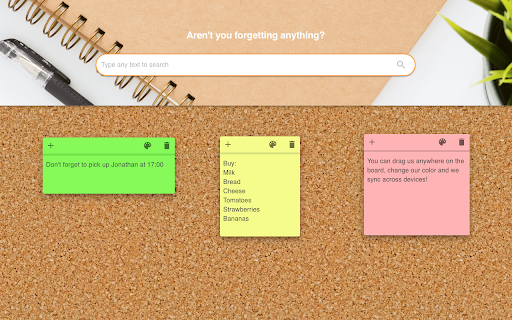
Enjoy this interactive new-tab extension that enables you to log all your tasks using colorful sticky-notes that you can drag anywhere on the screen. These notes sync across all your browsers so you can start working on your pc and continue on your laptop. By installing this extension and its Search services you hereby accept its Privacy Policy and Terms of Use. The search features within this extension are provided by Microsoft Bing.

Sticky Notes
A simple sticky notes extension with download and clear options Mini Sticky Notes: Your Digital Sticky Companion Streamline your thoughts with Mini Sticky Note, the lightweight sticky note extension for Chrome. Perfect for busy professionals, students, and anyone who loves to jot down ideas on the fly. Key Features: - 📝 Instant note-taking: Type and save with a single click - 💾 Auto-save: Never lose a thought again - 📥 One-click download: Export notes as TXT files - 🎨 Distraction-free interface: Clean design for focused writing - 🔒 Privacy-focused: Your notes stay local and sync across devices Boost your productivity and keep your ideas at your fingertips with Sticky Note. Simple, fast, and always there when inspiration strikes!

Sticky Notes
Welcome to Sticky Notes—An extension that simplifies the process of adding and organizing quick reminders directly from your new tab! Easily jot down and access important information, ensuring nothing slips through the cracks. Stay organized and productive with this convenient tool at your fingertips. By clicking "Add to Chrome", I accept and agree to installing the Sticky Notes extension and setting Chrome New Tab search provider to Microsoft Bing as described by the service in the Terms of Use and Privacy Policy Uninstall Instructions: https://www.getstickytab.com/uninstall.html EULA/Terms of Use - https://www.getstickytab.com/terms.html Privacy Policy - https://www.getstickytab.com/policy.html Contact Us: http://www.getstickytab.com/terms.html#terms-contact To remove our extension from Google Chrome: 1) Click on the three horizontal lines icon in the upper right-hand corner of your Chrome browser. 2) Go to "Settings". 3) In the menu that appears click on "Extensions". 4) From the list of installed Extensions, find the name of the toolbar extension you wish to uninstall. 5) Click on the trash can icon to the right of "Enable" (for the toolbar extension you wish to uninstall). 6) Close your browser completely and reopen it. Our toolbar extension should be removed from your Chrome browser.

Stickies Everywhere
Enhance your web browsing experience with Stickies Everywhere, the ultimate Chrome extension for adding notes to any website! Whether you're conducting research, managing tasks, or simply jotting down ideas, Sticky Everywhere lets you seamlessly integrate notes into your browsing routine. With just a few clicks you can keep track of your thoughts across the internet. Key Features: Unlimited Notes: Create as many sticky notes as you need, without any limitations. Customization: Personalize your notes with different colors to suit your preferences. Privacy Protection: Your notes are securely stored locally on your device, ensuring your privacy and confidentiality. Whether you're a student, professional, or casual internet user, Sticky Everywhere empowers you to stay organized and productive while browsing the web. Download now and start adding sticky notes to your favorite websites today!

Sticky Notes New Tab
Sticky Notes New Tab adds sticky notes to your new tab page. The Sticky Notes New Tab offers markdown-friendly, draggable, and minimizable sticky notes for your new tab page. It also features a calculator, canvas for drawing, a timer, games, movies, and a customizable search engine bar that supports Google, Bing, and DuckDuckGo. Users can drag and edit shortcuts, tailor the date and time display, select from a variety of default gradient wallpapers, modify the background color, and delve into numerous other personalization options.
