
hikddkkkekpmeikdipgbofmfpimhnlcd
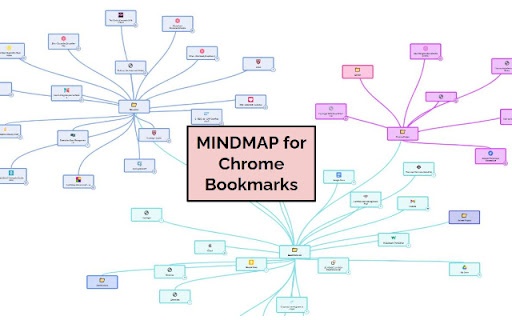
Manage & Clean your Bookmarks faster with this Visual MindMap. Clean your bookmark with this Mind Map for your Chrome Bookmarks. It helps access, delete & rename bookmarks faster.

Popup my Bookmarks
A more efficient way to view and manage your bookmarks menu. - Search bookmarks when you type - Do what Bookmark manager can do and more (e.g., Sort bookmarks by name, Add separator) - Save 24px of your vertical workspace (Rock on Chromebook!) - Take as few permissions as possible, we never put your privacy at risk - No background running application, save computer memory and your privacy!

Vertically Listed Tabs
Manage your tabs vertically and browse quicker! ================ BEFORE YOU BEGIN Browser check: Vertically Listed Tabs is built for Chrome, Brave, and Edge. Beyond that, I cannot guarantee it will work. Please do not review the extension unless you are using Chrome or Brave. Other browsers can be added if you submit a GitHub issue or email support@onlyhumn.org. About reviews: If something is preventing you from using the extension, please contact me before leaving less than a 5-star review. Email, GitHub issue, or Chrome Web Store support all work. I will fix the problem so you can leave a 5-star review. Thanks. ============ THE PROBLEM Lots of horizontal tabs at the top of the browser pile up and become tiny. When they share the same favicon, or even similar titles, finding the right tab becomes slow and frustrating. If you multitask with many tabs open, this wastes time every day. Vertically Listed Tabs opens a panel window ("VLT") and attaches it to the left or right of your normal browser window. It is not inside the tab strip or existing window. It is its own window, docked beside your browser. This allows you to even move it to a different window if needed. Inside VLT, tabs and groups are listed vertically. You can see many tabs at once while keeping full tab titles readable. Scan the list, click the tab you want, and it becomes active in the main window. 1. Install the extension. 2. Click the puzzle piece in the top-right to open the extensions menu. 3. Pin Vertically Listed Tabs so its icon appears next to the puzzle piece. 4. Click the VLT icon. If your window is maximized or fullscreen, VLT will resize the window so the panel can attach on the side. 5. In the list, hover over a tab's favicon (the small image on the left) to show the toolbar for close, group, pin, pause, and more. • Side panel: VLT opens on the left or right (set in Options) and adjusts when you resize the window. Windows and macOS may look slightly different due to window borders. • Options: Right-click the extension icon and open Options to change background color, default width, and more. • Click to focus: Click a tab in VLT to switch to it in the main window. • Drag to reorder: Click, hold for about one second, then drag tabs to reorganize. • Hover toolbar: Hover the tab favicon to close, group, pin, or pause a tab. • Rename groups: Edit group titles directly in the VLT window. • Detach and move: Detach VLT from the main window and move it to another monitor. • Snap and tile: Works with Windows Snap and macOS tiling so VLT can sit beside a full-screen window. Example: https://i.imgur.com/Nwg2h6z.png • Linked focus: When you switch away and click either VLT or the main browser window, both windows come to the front together. 1.0.3 - fix for focusing on main window 1.0.2 - fixed detatch and attach button in top menu 1.0.1 - Fixes for windows 1.0.0 - Bunch of minor fixes. 0.12.0 - All remaining bugs fixed. Hovering over a tab shows an animation indicating how long until the full title appears.

Bookmark Manager
Powerful bookmark manager: Easily and quickly manage your browser bookmarks 🚀Find any bookmark in seconds — even if you forgot its name. 📚Turn your bookmarks into a clean, visual and smart knowledge hub. Bookmark Manager is more than just folders and lists. It’s a faster, smarter and more visual way to organize everything you save online. ⚡ Instant search Quickly find any bookmark with powerful full-text search. No more digging through folders. 🧠 Smart organization Organize bookmarks with collections and tags — or let them structure naturally as your personal knowledge base. 🎨 Visual experience Browse your bookmarks as a clean and intuitive interface designed for clarity and focus. 🧩 Your knowledge hub Save, group and rediscover useful content — articles, tools, resources — all in one place. 🧘 Minimal and distraction-free No clutter. No unnecessary complexity. Just a fast and focused bookmarking experience. 🎉 Meet this advanced bookmark manager, a powerful chrome extension designed to help you manage bookmarks with ease. The manager offers a efficient and modern way to keep your bookmarks organised, and always accessible 💡 With this manager-focused tool, you can easily: 📌 sort and filter 📌 rename and move items 📌 add tags and find pages instantly If you’ve ever wished saving pages felt simpler, cleaner, and more intuitive, this manager gives you exactly that experience. 🚀 Getting started is quick and simple: 1️⃣ Install the extension from the Web Store. 2️⃣ Open the bookmark manager chrome button in your toolbar. 3️⃣ Save links instantly using the built-in bookmark saver. 4️⃣ Organise your collections into folders or categories. 5️⃣ Enjoy smoother navigation with full manage bookmarks functionality. 📂 The improved panel blends naturally into your browser, giving the manager a clean, lightweight layout that keeps your workspace uncluttered. It feels modern, responsive, and efficient. 🔁 The interface works like an upgraded version of the google bookmark manager, offering more flexibility, more control, and a more refined workflow overall. 🧭 Key capabilities include: • Fast search to help you find items instantly • Smart auto-sorting for cleaner organisation • Seamless access to online bookmarks across your devices • One-click cleanup for duplicates or outdated pages • A flexible chrome bookmarks manager dashboard for full control 🔧 Use this extension it as your personal organizer — a streamlined manager where you store, edit, refine, and manage collections effortlessly. 💡 Additional features that make this manager stand out: ➤ custom folder options ➤ drag-and-drop organisation ➤ visual tag-style grouping ➤ advanced filtering tools ➤ reliable tools for everyday use Whether you need to manage bookmarks, reorganise large sets of saved pages, or refresh older collections, this manager handles everything smoothly. 📌 Common use cases: 1️⃣ Save articles quickly with bookmark saver 2️⃣ Build structured libraries using a bookmark organizer for chrome 3️⃣ Keep work and personal items separate 4️⃣ Boost workflow with the chrome bookmark addon 5️⃣ Maintain cleaner folders with bookmarking in chrome automation 🎓 Students appreciate the manager because it helps: ➤ organise study materials ➤ return to useful resources instantly ➤ speed up research navigation ➤ simplify managing large collections during long-term projects 💼 Professionals rely on the manager to: ➤ build structured link libraries ➤ gather online resources for planning ➤ maintain organised content hubs ➤ save time using manage bookmarks chrome features ✨ Users who handle large amounts of information enjoy a balanced system combining simplicity with powerful structure. The manager avoids clutter while offering full flexibility. 📚 Everyday users also benefit: ➤ save recipes and guides ➤ organise tutorials or project ideas ➤ keep inspiration boards tidy ➤ access content faster through clean shortcuts ❓ Frequently Asked Questions 💡 How do I organise links? Use the built-in panel to drag, drop, rename, and structure folders. The bookmarks manager chrome interface keeps everything simple. 💡 Can I find pages quickly? Yes — the smart search enhances managing bookmarks and helps you locate items in seconds. 💡 Does the extension replace the default system? It upgrades your workflow while remaining compatible with the original chrome bookmark manager. 💡 Do I need an account? No, the manager works immediately after installation. 💡 Is it safe? Absolutely. It never accesses personal data and simply helps you organise and manage saved content. 🥇 Try the improved bookmark manager today and enjoy a cleaner, more structured, and more productive browsing experience! 🚀 Update for version 1.0.5: 🎨 Collection Color Labels You can now assign a color to each collection. A colored indicator strip is displayed on the left side of the collection card — both in the sidebar and in the Quick Access panel. Colors are set when creating a new collection or through the collection settings at any time. Existing collections without a color assigned are not affected and continue to look the same as before. 🔍 Improved Search: Full-Text Search Search now works across both tags and bookmark titles. Simply type any word in the search bar — the extension will instantly find all matching bookmarks by title or URL across all your collections. Tag-based filtering continues to work alongside text input. 🗂️ Improved Search Results Interface When search is active, the main panel now displays a dedicated Search Results page that groups matching bookmarks by collection. Each group shows the collection name and icon at the top, followed by the matching bookmarks below. This gives you a clear picture of where each result belongs. The search results page is triggered automatically when you type in the search bar from any section of the app. 🖱️ Browser Context Menu Integration Right-click on any webpage and select "Add to collection" to instantly save the current page to one of your collections — without opening the extension. A submenu lists all your collections. After saving, a brief notification confirms the action. The context menu updates automatically when you create, rename, or delete collections. Works on both page background and links. 🚀 Update for version 1.0.6: 🎨 Color picker in "Add to collection" modal When adding a tab to a collection directly from the "This Browser" section, you can now choose a color for a newly created collection — same as when creating collections from the main settings screen. 🔍 Improved search — now searches by URL The search bar now matches bookmarks by URL in addition to title and tags. For example, typing github or docs.google will find all matching bookmarks across all collections. Works in both the main panel and the side panel. 🔤 Updated search placeholder The search field now clearly shows its full scope: "Search by tags, title or URL..." 💾 Export & Import collections as JSON Back up your collections by exporting them to a .json file — click the download icon next to "Collections" in the sidebar. Restore or transfer your data at any time by importing the file back via "Move My Bookmarks" → "Import from file".

Bookmarks Automatic Cleaner || MarkTidy
Bookmark manager that helps you manage your bookmarks automatically. Tidy Up Your Bookmarks with MarkTidy. This extension helps you manage your Chrome bookmarks cleanly and efficiently. - Remove Stale Bookmarks (time-based) - Remove Duplicate Bookmarks (URL) - Remove Dead Bookmarks (connection checks) - Remove Empty Folders - Automatic Bookmark Cleaning: Efficient, hands-free bookmark management. - Removal Target Notifications: Review and approve changes before they happen. - Exclusion List: Protect critical bookmarks from automatic cleaning. Icons: "settings" and "open_in_new" from Google Material Icons (https://fonts.google.com/icons), licensed under the Apache License, Version 2.0 (https://www.apache.org/licenses/LICENSE-2.0).
