
hifgomfddachdehjgpadkfamkjhehjcd

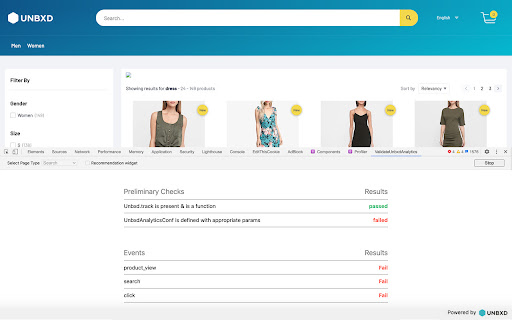
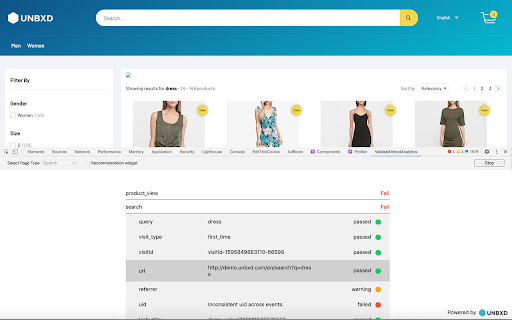

Validate Unbxd Analytics events and show errors and warnings This extension can be used to validate Unbxd Analytics on an eCommerce website using Unbxd for on-site search. The extension provides you with clear success, warning & error messages in case of missed events or improper parameters in the events sent to Unbxd. This helps you validate the Unbxd Search/Browse/Recs Analytics in a quick & efficient manner. Install the extension. Click Start Testing button on your eCommerce page integrated with Unbxd Site Search. Validate that you are able to pass all the events successfully to Unbxd with the right set of parameters. What does it validate? ------------------------------------ We have currently classified analytics issues broadly into following 2 categories: 1. To detect which version of Analytics SDK is loading on the site, Check for UnbxdSiteName and print it, Check if Analytics Tracking is disabled & if `Unbxd.track` method is available on the window. 2. Are relevant events fired correctly: - Are all events required for a particular page type fired (search or browse page along with recommendation widgets) - Are the events having all the required mandatory parameters (for example, "pid" must be sent for a click event) - Are there any other additional parameters that can be sent in each event to improve analytics -> these are shown as warning items Once all the events are detected, the validator plugin then generates a CSV report, which can be downloaded to be shared across the team. How to install & use the extension --------------------------------------------------------- 1. Install the extension from the this page by clicking on "Add to Chrome" button 2. Go to any Unbxd customer website & open the developer tools. Refresh the page. 3. Click on the "ValidateUnbxdAnalytics" tab in the developer toolbar. 4. Select your page type (either Search or Category Page) & check the "Recommendation widget" checkbox if you want to test Recommendation events as well. 5. Click on "Start Testing" 6. Go to the site, perform all the usual activities that a user does on an eCommerce site like, search for something, click a product from the search results, add that product into the cart, place an order etc. All of these activities would generate Unbxd Analytics tracking events. These will be shown in the extension's UI. 7. Once you are done with performing all actions to generate events, click on the "Stop" button. This will generate a report which highlights successful events as well as any missing mandatory or good to have events. 8. You can also download a CSV report of the same by clicking on the "Download CSV" button Release History -------------------------- VERSION 2.1.2 - RELEASE DATE JULY 16, 2024 ChangeLog: [Add] Validation of the revamped 'facets' event under analytics v2 [Add] Validation of a new 'sort' event VERSION 2.1.1 - RELEASE DATE JUNE 27, 2024 ChangeLog: [Add] Enable validation of product_Impression event for v2 VERSION 2.1.0 - RELEASE DATE JUNE 04, 2024 Our Analytics Tracking just got a major boost! We’ve bid farewell to the old tracking method and embraced the efficiency of navigator.sendBeacon. ChangeLog: [Add] Check 'misc' payload data for all the events, validate special AS types passed into the 'misc' object. [Add] Check for the window variable 'UnbxdSiteName' and print it. [Add] Check if analytics tracking is disabled [Add] Check special AS types like FIELD_TYPE_SUGGESTION & TRENDING_QUERIES in the 'misc' data [Modified] field_name & field_value made optional if the AS docType is IN_FIELD [Modified] Check for pid & src_query for AS docType POPULAR_PRODUCTS_FILTERED [Removed] Removed validation on the event 'DwellTime', as it is not being used. [Removed] Removed 'warning' msg from the summary of analytics validation report. We have come up with a newer version of Analytics SDK, where new events are added and existing event's payloads are modified. Hence the release of v2.0.0 version of validator plugin will accommodate all the new behaviours along with maintaining the backward compatibility to track and validate existing events. [Add] Auto detect v1 & v2 Analytics SDK, based on the http request call present in network tab. [Add] Added a new event 'pageView' and validate their payloads. [Add] New logo, both for dark mode and lite mode & added favicon. [Add] Added 'Error message' column which shows descriptive error messages for payloads. [Add] Added a differentiator text 'recs' for click event to differentiate between recs click vs search/category product click. [Add] Added validations for recs click event, both v1 and v2 recs product. [Add] Validation for autosuggest payloads [Add] Added missing payloads like 'path', 'identifier' & 'pr'. [Add] V1 vs V2 segregation of flow & show summary accordingly after validation is stopped. [Modified] Remove warning status for event, an event is either passed or failed. [Modified] Change some mandatory payloads to optional. [Modified] order event validation base on payload data for analytics v1 [Fixed] Handle export CSV for null & undefined values. [Removed] validating attribution. VERSION 0.0.3 - [Feature] Support Dark Mode. - [Fix] Add error, warning and dropdown icons. - [Fix] Show Warning Msg if some other page is accessed instead of the PageType selected from Dropdown. - [Fix] Track recs widget only if the checkbox is checked.

Analytics Debugger
Your Single Source of Truth (SSOT) for debugging analytics implementations Formerly known as "GTM/GA Debugger," our tool is your ultimate Single Source of Truth (SSOT) for debugging analytics implementations! Are you a developer, analyst, or marketer committed to achieving top-tier web analytics and tracking results? Look no further! Our powerful debug tool is meticulously crafted to simplify your life. Analytics Debugger streamlines your daily debugging tasks, boasting user-friendliness for all while delivering in-depth insights to advanced users. v2.4.6 - Adds support for Chartbeat - Fixed Amplitude Regional Collection Endpoints 🛠️ Wide Compatibility: Our tool seamlessly supports a variety of analytics and tracking tools, including: - Google Tag Manager - Google Analytics - Tealium - Piwik Pro / Matomo - Adobe tools - and most commonly used Marketing Pixels. to mention some of them (Check the full list here) 🔒 Privacy Enhancement: Rest assured, our tool injects code only after DevTools has loaded, with no background monitoring. 🚀 Tools: Supercharge your tracking implementation with a rich toolkit including - GTM Preview Enhancer: USe this tool to bypass all the limitations from the original Preview Mode - Google Analytics Debug Libraries Loader - Block GA3/GA4 Hits: Prevent your - Export Features - Real-Time Data - Enhanced Ecommerce Reports - Data Filtering for Focused Insights - Clicks Blocker: Prevent being redirected to next page - and much more! Get started today and elevate your analytics debugging and optimization process effortlessly. Unlock the full potential of your analytics and tracking endeavors – streamline your workflow, enhance privacy, and gain profound insights seamlessly. Download now and experience the transformation! Changelog: You can check out our latest updates on our GitHub repository. https://github.com/analytics-debugger/analytics-debugger-browser-extension Support / Feedback: Offered via the Store or using the Github Repository Official Documentation: For detailed guidance, visit our official documentation at https://www.analytics-debugger.com/tools/browser-extension Don't miss out on this game-changing tool. Elevate your analytics game today!

Datalayer Checker
The easiest way to debug and check the dataLayer implementations without having to use the browser console! We are happy is happy to release Datalayer Checker 3 with several new features and a revamped design! NEW VERSION AVAILABLE! 🔹 Redesigned interface and intuitive user experience 🔹 Integrated event search engine 🔹 Flexible variable visualization: table format or JSON object 🔹 Google Tag Manager container injection removed (to respect manifest v3 rules) EXCLUSIVE FEATURES: 🔹 Capture what matters! Save up to 100 dataLayers with our revolutionary "Snapshot" function 🔹 Deep analysis! Verify your dataLayers in batches by methodically inspecting your captures 🔹 Organize efficiently! Structure your workspace with intelligent filters by domain, dataLayer name, or specific search (e.g.: event_name) to automatically classify your snapshots 🔹 Stay up-to-date! Reopen all your snapshot URLs to capture new data and compare them instantly Transform your analytics experience with Datalayer Checker! Because we're passionate about analytics...

Params Editor
Edit URL query parameters with smart input types Query Param Editor is a lightweight Chrome extension to easily view and modify URL query parameters. ✅ Features: - Parse and display query parameters from the current URL. - Smart input fields: - Number inputs for numeric values - Date picker for dates - Boolean toggle for true/false - Tag editor for comma-separated values - JSON object & array editor - Search keys & values - Add, edit, or remove query parameters. - Apply changes on-demand by pressing Enter or using the Apply button. - Clean, minimal interface optimized for quick edits. - View the full URL with highlighted parameters for better readability. 🎯 Designed for developers, QA, and anyone needing rapid URL param changes.

dataslayer
Debug and test tag management (Google Tag Manager, DTM, Tealium) and analytics implementations. dataslayer adds a panel to Chrome Developer Tools that monitors tag management data layers and displays changes in an easy-to-read, user-friendly format. Supported TMS/variables include: - Google Tag Manager dataLayer variable - Adobe Launch rules and data elements - Adobe DTM page load rules and detection - Tealium data layer - TagCommander data layer - custom data layers (any variable represented as a JavaScript object) dataslayer supports multiple data layers / GTM containers on a single page, including those in embedded iframes. dataslayer also decodes and displays tags (including pageviews, variables, and click events) from: - Google Analytics (including App + Web, Universal Analytics / analytics.js, dc.js, and ga.js) - Adobe Analytics / Omniture SiteCatalyst - Floodlight For feature requests and bug reports, please either use the 'Send Feedback' option in the Chrome Web Store or reach out directly to info@dataslayer.org Source lives at https://github.com/sean-adams/dataslayer if you'd like to contribute!
