
hidneipdiamkkokccepfbfchfdhlipmn


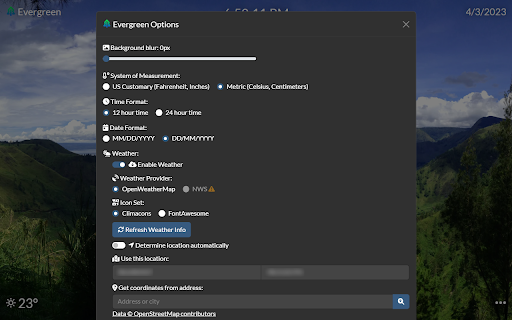
A minimalistic, functional, and beautiful new tab extension. Evergreen New Tab is a new tab extension designed to be minimalistic and beautiful. Random Background Evergreen sources a new background every time you open a new tab. Simple HUD Evergreen shows the time, date, weather, and a google search bar for productivity. They can be clicked on for more detailed information such as the full date or a calendar view of the current month. Detailed Weather If you click on the weather icon, you will see a forecast for the day and for the week presented in a beautiful customizable color-coded chart. Fully customizable Many features in Evergreen are customizable, including: background blur, temperature units, date and time formats and types of backgrounds. Image caching Evergreen has extremely little loading time, since it saves and displays the last shown background and downloads a new one in the background. You can also tell Evergreen to only download a background every so often to save data. Works offline Evergreen shows the last background and last weather report to display when offline. --Evergreen requires your location to show the weather. Evergreen exclusively uses your location to get the weather, and uses it for nothing else.--

Renewed Tab
A customisable New Tab page, with widgets and beautiful backgrounds - Powerful Widgets System: you can add, move, resize, and configure widgets on a grid using intuitive controls. - Beautiful Backgrounds: see a random curated background every 15 minutes. You can also choose a solid color, an Unsplash collection, an RSS/Atom feed, or a custom background image. - Customisable: change the background, the theme, and configure each widget independently. - Multi-lingual. Translations are community-maintained, allowing users to contribute support for their language. https://renewedtab.com/translations/ - RSS and Atom feeds: can be used to see the news or follow a website. - Weather - To do: track things you need to do. - Quick Links: show links, with optional icons and subheadings. - Top Sites: shows your most frequent websites. - Daily Goals: enter a daily goal. - Bookmarks: shows your bookmarks toolbar. - Greeting: be greeted based on the time of day. - Quotes: shows a random quote, with categories. - Clock: show the current time, choose between 12 and 24 hours. - Notes: jot down notes in a freeform text area. - Age: shows your current age with way too much precision. - Search: a search bar with support for most search engines. - Currencies: shows exchange rates, supporting forex currencies and crypto. - Web Comics: show the most recent panel from a web comic. - Year Progress: shows the progress through the year as a progress bar. - Upcoming Space Flights - and more: buttons, images, HTML, and IFrames. We design with privacy in mind! We require only minimal permissions: to store data on your computer, and see the default search engine. Other permissions are optional and are requested at runtime, when needed. All your data is stored in your browser, not on our servers. For more information, see the Privacy Policy.

Re-newtab
A redesigned, productive and pragmatic new tab alternative. Overview: This extension provides 19 desktop widgets, plus bookmarks manager, history manager, extensions manager, downloaded files manager and quick search function in your new tab page (so chrome will show you these permissions when you install it). The core idea of this extension is to help user quickly find web pages that you want to open. The home panel shows links, information and functions by different widgets. Of course, you can customize these widgets. Sometimes if you just want to see a wallpaper on new tab, there is a wallpaper mode that hide all elements on the page and only show the wallpaper and a toggle button. 0. Quick Search You can use keyboard shortcuts to search for bookmarks, history, opened tabs and downloaded files, similar to Alfred. 1. Home Panel Home panel contains many versatile widgets(cards), like clock, calendar, recently closed tabs. You can add/remove widgets, drag and drop widget to a new position, change widget's title and color. Main widgets: • Most Visited: show default newtab most visited pages. • Bookmarks Bar: show Bookmarks. • Todo List: a simple but powerful todo(task) list. • Opened Tabs: a simple tabs manager, which shows all current opened tabs. You can jump to or close a tab by click, and more functions in context menu. • Recently Closed: recently closed tabs. • Analog clock and digital clock: highly customizable clocks. • Calendar: A month view calendar. • Calculator: A super calculator powered by math.js. • Google Drive widget: quick access recent, starred, shared drive files or search files. • Google Calendar widget: list your Google Calendar events. • Translate: a Google Translate widget. • Notepad: a simple notepad. • Search Engine: search via your browser's default search provider. • YouTube Subscriptions: list video updates for all your subscriptions. • Google Sites: top google services. • Office: ms office web apps. • Chrome Misc: chrome internal pages. 2. Bookmarks Manager Bookmarks are an important concept, because they are your own collections and what you need. This extension provides a more productive bookmarks manager. Similar to Mac Finder in columns view, you can manage and navigate bookmarks by mouse or keyboard shortcuts, for example: • Navigate all bookmarks using mouse or arrow keys. • Open a bookmark by double click or enter key. • Open all bookmarks in a folder by context menu. • Drag and Drop a bookmark to a new location. • Create, edit or delete bookmark or folder by context menu. • Select multi bookmarks to move, delete or open. • Copy/cut/paste bookmarks(except folders) by shortcuts. • Sort bookmarks by name • Support many keyboard shortcuts. 4. Downloads Manager Show your downloaded files. You can open downloaded files or open their folders, and clear download history. 6. Extensions Manager Manage all extensions and apps. You can enable/disable/remove the extensions and open their options.

FlowTab
A beautiful, elegant, and minimalist new tab for your browser. 👋 Thanks for checking out FlowTab! Experience elegance and minimalism like never before in a clean new tab for your browser. Keep a modern look without sacrificing your productivity, and customize to make FlowTab just the way you like it. ✅ Features include: - Custom quick links - Custom wallpaper from URL - Dark, light, and custom theme - Selection of 5 search engines - 12 and 24 hour time format Check out our GitHub (https://github.com/flowshade/flowtab) to post issues and see what we used to make this project.

Embark - New Tab Page
A minimalistic new tab page. Embark replaces Chrome's default new tab page with a pared back design and beautiful photography allowing you to focus on what matters. There's a handful of features but each one is highly customisable through the options page: - 60+ inspirational photographs - A 12 or 24 hour clock - The date Embark loads blazingly fast and uses almost zero resources.
