
hiadibhippamgikegbcbfagpalmfoonh

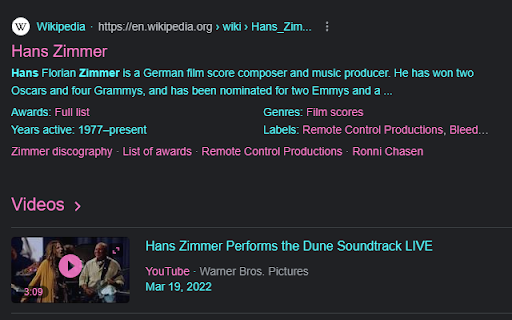
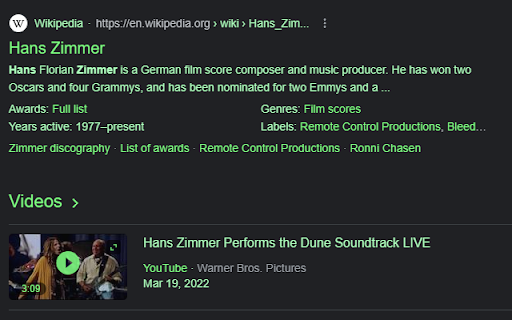

the application allows you to customize the interface of google and youtube. Select separate colors for the text of the background links using the full RGB palette for each site separately, the colors can be reset if necessary

Custom Colors
Give color to your favourite websites! [ 💬 This extension is still in development. It has a notable performance impact on complex sites like YouTube or Twitch, specially when using the color cycle mode. Besides, colors are applied in a flashy way that can be quite annoying. At this point, this extension’s main purpose is to provide a bit of fun when trying and exploring new colors on your favourite websites. It needs a few issues to be solved to be able to be considered an accessibility improvement too. 💬] Custom Colors allows you to change the colors of the websites you visit. You can choose, for every specific site, the colors you want for all backgrounds and texts. These settings can be saved so every time you open these sites the colors you have chosen will be applied. Pick the colors you want for a specific site using the extension’s pop-up from a tab where that site is opened. To open the pop-up, you need to click on the extension’s icon. You can find all your active extensions at the top right corner of Chrome windows, clicking on the puzzle’s piece icon (🧩) [Here is where extensions are located in June 2021]. Once you have opened the pop-up, you will be able to see the list of sites with custom settings. Initially, there will not be any of them. Also, you will see one or two plus icons (➕). Use them to add the site of the current tab you are seeing the pop-up from to your list of customized sites. You can add a domain (e.g. youtube.com) or an specific URL (e.g. youtube.com/watch?v=BBSqiqqt_7E). Custom colors can be defined for backgrounds, texts that contain visited links (recently clicked), texts that contain unvisited links and texts that do not contain any links 😊. Customized sites are displayed in a table, and four of its columns correspond with these four possible selections. You can choose the colors you want for any of your saved sites by clicking on the table’s cells that belong to these four columns. When one of these cells is clicked, a little window with a color palette is opened. Here you can select any color you want from it for your site! There are a few options more: a random color can be generated every time you load the page (❔), colors can change continuously along the RGB spectrum (🔄) and you can also keep original colors (🚫), for instance, if you want to change backgrounds’ colors but not links’ ones. Don’t forget to save your settings clicking on the tick icon (✔). There are also settings defined for ‘all sites’: if these are enabled, they will be applied on every site you visit except on those you have defined custom settings for, because they will be prioritized on them. Custom settings can be removed or deactivated anytime, and even if ‘all sites’ settings are enabled, they won’t have an effect on saved sites that are not activated. Settings are applied automatically on sites that are opened, so you can have a preview of the colors you choose (if you discard your choice, colors are removed too). If at some time these automatic changes don’t work properly, they will function as they’re supposed to if you reload the page. FYI: Extensions are not activated automatically when they are installed. This extension, like many others you have tried probably, starts working on all the corresponding tabs at the right moment it is installed, but this is not the default behaviour. Take in mind that if you install an extension sometime and it doesn't work on the tabs you have already open, you may need to refresh those tabs with F5 key or by clicking on the reload button located in the browser's top left corner.

Sketch Tab
Replace new tab page with a personal space where you can search and doodle however you desire. Be able to doodle straight from your new tab with Sketch Tab. The features this extension entails: • Switch into draw mode to start doodling • Save your doodles with the click of a button • The ability to search from any new tab • Set your new tab background to any image you desire • Upload image related functionality • Change UI text color This extension gives you the opportunity to quickly use a whiteboard and draw immediately from your new page tab, draw mode is equipped with a variety of tools to use with ease. Another amazing feature is the ability to change your background, which then saves for the next time you load up a new tab.

Youtube Color Pallet
A simple and easy to use app to change Youtube background color to some fun and exciting colors.

Web Shuffle
Hit the "Web Shuffle" button and you will be sent to a random website from the most influential sites across the web. Welcome to Web Shuffle – the ultimate browsing companion. We understand that you're often stuck in a browsing rut and can't seem to find something interesting on the internet. That's why we've created a browser extension that brings excitement back to web surfing! Our browser extension adds a "Web Shuffle" button to your browser's toolbar, giving you instant access to our curated list of the internet's most valuable and influential websites. With just one click, you'll be taken to a randomly selected website that's sure to capture your interest. It's free to use, open source, lightweight and easy to install. Don't waste another moment aimlessly browsing the internet. Download the Web Shuffle browser extension today and start discovering the best of the web!
