
hgphbmgpkindhnldhjafhfflhjodpfmn
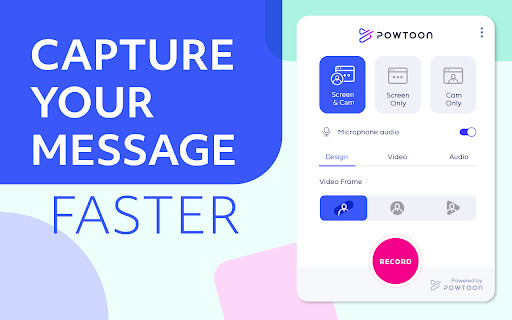


Make a video recording from a website, application, or anything else you can show on your screen to start communicating visually. Powtoon Capture is a free screen and webcam recorder that allows you to easily record your screen, face, or both. What can you do with Powtoon Capture: 1. Record a video message from a website, application, or anything else on Chrome 2. Enhance your video message with visual effects, shapes, animation, and text 3. Go Live – Use Powtoon Capture while hosting on Zoom, Google Hangouts, or any of your favorite virtual meeting tools 4. Share your video message anywhere – download as MP4 or copy URL Here’s how to get started: 1. Download the extension in the Chrome Store 2. Select your video and audio settings and hit record 3. Instantly share your Capture with your team USE POWTOON CAPTURE FOR👇 💼 Sales — Tease a product demo or offer a meeting recap of key points 👩🏻🏫 L&D/Training — Demonstrate steps that are easy to follow and adopt 💬 Internal Comms — Spotlight wins, updates, and announcements 🏆 Support/Customer Success — Answer FAQs visually that turn users into fans 💡 Marketing — Produce webinars and videos to create that ‘Aha’ moment 🙋🏽♀️ Leadership — Inspire your talent to do their best work

Vmaker - Free Screen Recorder
Asynchronous Video Messaging tool for all Record your screen, webcam, mic, and computer audio in just a click. Vmaker is a free screen recorder that can easily be downloaded as a Chrome Extension. The Vmaker Chrome Screen Recorder lets you record, edit, host, and share your videos effortlessly in just a matter of a few minutes. It has no watermark, comes with a built-in video editor, and allows you to export your recordings in MP4 file format. 🎥 Screen + Webcam Recording 🎥 ▪️ Record multiple tabs and windows ▪️ Record videos without any watermark ▪️ Record unlimited videos ▪️ Record dual screen ▪️ Record screen, webcam, or screen + webcam ▪️ Record both computer and mic audio ▪️ Highlight mouse clicks and add annotations ▪️ Customize webcam background with AI-powered virtual backgrounds (for screen + webcam mode) ▪️ Blur Tool: blur sensitive information before or while recording ▪️ Save your videos to the cloud ✂️ Video editing ✂️ ▪️ Trim, rotate, flip, or resize your recording ▪️ Merge external videos with your existing recording ▪️ Add cool intros and outros ▪️ Export in MP4 format at HD quality 💾 Video hosting, sharing, analytics, and more 💾 ▪️ Host and save unlimited videos to the cloud ▪️ Track view data ▪️ Add brand colors, logo, and CTA to your videos ▪️ Share the video as a copied link ▪️ Upload the video directly to social media platforms like YouTube, Facebook, Twitter, LinkedIn, etc. ▪️ Embed your video to your blog or website 👀 AVAILABLE FOR FREE 🚀Join our massive community of video creators today! ✔ 1 Million + videos recorded ✔ 350K+ users worldwide ✔ Available in 7 global languages ✔ Works on all versions of Chrome browsers ✔ Also available as Mac and Windows standalone applications. How to Record Your Screen Using Our Screen Recorder Chrome Extension? Step 1: Download Vmaker's Chrome plug-in Step 2: Pin the plug-in to your Chrome browser Step 3: Launch the plug-in Step 4: Customize your recording requirements Step 5: Record your video, edit, and share with everyone How Does Vmaker's Chrome Screen Recorder Promote Communication & Collaboration? ▪️ Record training videos, how-to videos, tutorials, and presentations ▪️ Provide video feedback for students ▪️ Record FAQ videos ▪️ Review code & provide feedback ▪️ Create onboarding guides & manuals for new joinees ▪️ Provide a visual walkthrough of your project status ▪️ Share design feedback ▪️ Report UX bugs Record video messages to communicate your ideas with your design team ▪️ Record unlimited live streams & game plays ▪️ Record gaming reviews, comparison & highlights with crisp editing

Google Meet Breakout by Robert Hudek
Only the teacher needs to install. Completely Free and your Data is Private. Google Classroom integration, Slider Control. Welcome to Google Meet Breakout Rooms Extension ***** Only the teacher needs to install this extension. ***** ***** Please do not ask your students to install it, as they will not use it **** NEW Feature: Practice using the Extension on your own computer by simulating students, perfect for teachers to rehearse before going live.https://youtu.be/QMurrSyCPmY The Google Meet Breakout Rooms Extension has 5 key features: 1) See All Students: The teacher can always see ALL of the students in ALL of the breakout rooms. 2)Free: The extension is completely free to use. I am a software engineer and created this for my personal use as a teacher and then improved it for all teachers to use. I make no money off of this extension, there are no ads, and no data is shared with me or any third parties. 3) Private: Your breakout rooms data is privately stored in your personal computer's chrome browser. Your breakout rooms data is NOT shared with anyone and it is NOT stored on a server. Even the creator of this extension has no knowledge of any of your data. 4) Hassle-free: Only the teacher needs to install this extension. Please do not ask your students to install it, as they won’t need to use it. The extension is only for the teacher, and it will not affect the students in any way. Students will continue to use Google Meet as they normally do. 5) Online Help: The online help menu is completely updated and now has screen shots of every step of the way for setup and operation. This software is created by Robert Hudek and all rights are reserved. No part of this extension may be copied without the express written consent of Robert Hudek at Hudek Tech LLc. This extension is not affiliated with Google, Inc. 1) Breakout rooms may be viewed in either tab or tiled mode 2) A slider may be used to quickly move between rooms 3) Breakout assignments may be created at any time or in advance if desired 4) Teachers may broadcast their video and audio to all the breakout rooms 5) Customize themes! 6) Can use Google Meet Nicknames (if your Google subscription supports nicknames) 7) Basic reporting 8) Mute and Remove Students buttons 9) Import, Export functions 10) Google classroom integration *** Slovak: A big thank you to Lenka Zustiaková from SOŠ GaHS, Farského 9 in Petržalka (www.farskeho.sk) for the translation into Slovak. *** Ukrainian: A big thank you to Igor Kozachuk (email: disk.igor@gmail.com) for the translation into Ukrainian *** If you want a translation of this extension to your language, please send me an email and I will be happy to work with you to get this done. My email is robert@hudektech.com. I would like to add Spanish, Portuguese, German, Japanese, and Korean but any language is fine with me. *** This extension is owned and developed by Robert Hudek. This extension is independent from Google and is not owned by or part of Google or Google Meet. This extension is designed to enhance and extend the functionality of Google Meet. *** If you find a problem please inform me at robert@hudektech.com and I will try my best to reply as soon as I can. Data Privacy: I have a detailed data privacy section on my web page, but the short version is that I do not copy, transmit or share any of your data with anyone including myself. I also do not use cookies, nor do I drop third party cookies on you. Warranty and Guarantee: There is no warranty and there is no guarantee for this extension. I have a detailed warranty (none) and guarantee (none) description on my web page but the short version is this: By using this Extension, you understand and agree that the Extension is provided "as is" and "as available". The developer Robert Hudek EXPRESSLY DISCLAIMS ALL WARRANTIES AND CONDITIONS OF ANY KIND, WHETHER EXPRESS OR IMPLIED, INCLUDING, BUT NOT LIMITED TO THE IMPLIED WARRANTIES AND CONDITIONS OF MERCHANTABILITY, FITNESS FOR A PARTICULAR PURPOSE AND NON-INFRINGEMENT.

Vimeo Record - Screen & Webcam Recorder
Record and share free video messages from your browser Record and share free video messages from your browser Did you know we speak up to 7x faster than we type? Next time you’re thinking about sending a long email or a chat message, consider whether a video recording might communicate your ideas better—and faster. Whether it's a product demo, design feedback, or a knowledge transfer session, with Vimeo’s screen recorder you can quickly record and share video messages. Choose to record your screen, voice, face or a combination. Once you’re done recording, you can instantly share your video with a private link. Every recorded video is automatically uploaded to Vimeo, which gives you a variety of tools such as organizing and replacing videos, customizing the player, sharing videos with your teams, adding chapter markers, and much more. Join over 200M users who have chosen Vimeo as the home for their videos. ***HOW TO SET UP SCREEN RECORDING*** + START RECORDING FAST: Our extension takes you directly into Vimeo so you can record from your browser in just two clicks. Screen record with audio, webcam, or both: Select the entire screen or an app. Camera on or off. + SHARE PRIVATELY OR EMBED ANYWHERE: Instantly share your recording with a private link or embed it on your website or social channels. + VIEWER ANALYTICS: Get notified when someone watches your video and get insights into your audience. + REVIEW AND COMMENT: Collect and resolve feedback from team members or clients to keep projects moving. + UPLOAD VIDEOS: You’ve got videos. We’ve got the place to host and organize them. Upgrade to do so much more with Vimeo’s online collaboration tools: + ADD CHAPTERS AND CTAS: Make it easy for your viewers to navigate your video and get the information they need with chapter markers and calls-to-action. + INVITE THE WHOLE TEAM: Add team members to keep everyone in the loop with notifications. + SECURE WITH SSO: Easily administer access to the team with single sign-on. ***WHO USES VIMEO’S SCREEN RECORDER?*** CREATIVE TEAMS, FREELANCERS, AGENCIES Record a walkthrough of your work, collect feedback, and streamline the approval process. HR MANAGERS, TRAINERS, EDUCATORS Simplify knowledge sharing by creating reusable tutorials and onboarding videos for employees and customers. PRODUCT, DESIGN & ENGINEERING Submit bug reports, review designs and code, demo products, and share feedback and ideas without scheduling another meeting. CUSTOMER SUPPORT Resolve issues fast with a visual walkthrough of what you’re seeing. EXECUTIVES Record and send company updates with a humanizing touch. ***WHY USE VIMEO’S SCREEN RECORDER*** RECORDING IS FREE Access to the Vimeo screen recorder is free, allowing you and your team to get started quickly and easily. Plus, upload any video file and use a variety of tools to organize, manage, and publish your videos. TAKE BACK CONTROL OF YOUR TIME Sending a video message can provide the context and value of a meeting in a fraction of the time. Simply record your screen and start talking to get your message across. CONNECT ON A PERSONAL LEVEL A lot gets lost in translation with text. Be understood and build strong relationships remotely by expressing yourself through your voice and face as you would in person. Convey tone, emotion and empathy. TRANSFER KNOWLEDGE INSTANTLY Spend less time training and re-training. Record reusable assets like how-to videos, demos, presentations, and walkthroughs to onboard and educate team members and customers and resolve support tickets. SIMPLIFY THE FEEDBACK PROCESS Consolidate and resolve feedback directly in your video recordings. Comment and tag your teammates to keep projects moving. SECURE ACCESS FOR THE WHOLE TEAM Organize your recordings in team folders to automatically notify anyone with access to the folder of new content. Set permissions and invite clients and stakeholders as viewers to specific folders.

Meet Attendance
Meet Attendance requires logging in and Syncing your Chrome browser. When in Meet select the participants view. Accept the permissions. Close and reopen the people to capture attendance. Click the Attendance icon to open the Attendance Spreadsheet. Mouse over for further options, Add a sheet in the Spreadsheet, Create a new Spreadsheet, Turn Attendance collection off, Auto Scroll through participants, Snapshot attendance. Attendance duration will be tracked. Premium: Compare your classroom roster to the participants in the meet. Know who is absent from your Meet. Set the frequency for auto capturing attendance. Leaving the Participants view open attendance will be captured at the set frequency. Subscribe to premium for $2.50 monthly. Subscription management at claycodes.web.app
