
hgnemfnljgekelcoiohjeefokppaccmd
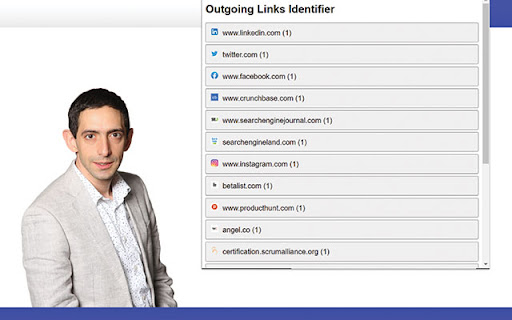
This extension identifies, analyses, and displays the outgoing links from the active webpage. "External Links Identifier" is a… This extension identifies, analyses, and displays the outgoing links from the active webpage. "External Links Identifier" is a lightweight and efficient tool for SEO professionals, web developers, and curious users alike. It identifies and lists all outgoing links on the active web page. This includes parsing both static HTML links and links dynamically added by JavaScript, providing a comprehensive view of the external references on a webpage. The extension details the URL of each link, its 'rel' attribute, target, and HTTP status code of the destination URL. It also groups these links by domain, giving you a high-level view of where the active webpage directs traffic. To use this extension, simply click on the extension icon when you're on a webpage you want to analyze. The extension will display the outgoing links and their associated information in a convenient popup.

Extract links from pages
Extract Links from Pages Discover and Organize All the Links on Any Web Page with Ease Welcome to "Extract Links from Pages," the… Extract Links from Pages Discover and Organize All the Links on Any Web Page with Ease Welcome to "Extract Links from Pages," the ultimate Chrome extension for web enthusiasts, SEO professionals, content creators, and digital marketers. Our tool offers a simple yet powerful solution to extract, analyze, and manage all the hyperlinks on any web page you visit. With just one click, you can unveil a comprehensive list of links along with their anchor texts and determine whether they are dofollow or nofollow links. Key Features: Instant Link Extraction: Extract all the links from any web page with a single click. Our extension scans the entire page and provides you with a detailed list of hyperlinks, saving you time and effort. Comprehensive Data: Get detailed information about each link, including the URL, anchor text, and link type (dofollow or nofollow). This feature is particularly useful for SEO audits, content analysis, and competitor research. Clean and Organized Interface: The extracted data is displayed in a clean, organized table format, making it easy to review and analyze. The interface is designed to be user-friendly and intuitive, ensuring a seamless experience. Professional Design: Enjoy a professionally designed interface with a soothing blue color scheme and an aesthetically pleasing layout. Our design focuses on enhancing usability and visual appeal. Enhanced Privacy Practices: We respect your privacy. Our extension only accesses the current tab to extract links, without storing or sharing your data. We have implemented strict privacy practices to ensure your information remains secure. Use Cases: SEO Professionals: Easily identify and analyze all the links on a web page, including internal and external links. Determine which links are dofollow or nofollow to optimize your link-building strategies. Content Creators: Extract and review all the hyperlinks in your content to ensure they are correctly linked and relevant. This helps in maintaining the quality and credibility of your content. Digital Marketers: Analyze competitor websites to understand their linking strategies. Extract links from landing pages, blog posts, and other content to gain insights into their SEO tactics. Web Developers: Quickly extract and review all the links on a web page to ensure proper linking and functionality. This can be especially useful during website audits and quality assurance checks. How to Use: Install the Extension: Add "Extract Links from Pages" to your Chrome browser from the Chrome Web Store. Open a Web Page: Navigate to any web page from which you want to extract links. Click the Extension Icon: Click on the "Extract Links from Pages" icon in your Chrome toolbar. View the Extracted Links: A popup window will appear, displaying a table with all the extracted links, their anchor texts, and link types. Analyze and Utilize: Review the extracted data for your analysis, SEO audits, content review, or any other purpose. Why Choose Us: User-Friendly: Our extension is designed with simplicity and ease of use in mind. You don’t need any technical expertise to extract and review links. Accurate and Reliable: We provide accurate and reliable data extraction to ensure you get the information you need without any hassle. Privacy-Focused: We prioritize your privacy and data security. Our extension does not store or share your data, ensuring complete confidentiality.

Website Links Checker
This tool helps you check all links from a page you are currently viewing. Enhance your browsing experience with LinkHighlighter, the must-have Chrome extension that revolutionizes the way you explore the web. Say goodbye to the hassle of searching for links on a page – with LinkHighlighter, every hyperlink becomes a visual masterpiece, right at your fingertips. 🔗 Highlight Every Link: Tired of scanning a page for clickable links? LinkHighlighter empowers you to instantly highlight all links on any webpage, making navigation a breeze. Whether it's articles, references, or resources, you'll spot every link effortlessly. 🔍 Easy to Use: With a user-friendly interface, LinkHighlighter seamlessly integrates into your Chrome browser. Activate link highlighting with a single click, and adjust settings according to your browsing style. 🌐 Web Developers' Tool: Web developers and designers can ensure proper link placement and structure by instantly visualizing the interconnected web of links on their projects, leading to a more polished user experience. 🚀 Lightweight and Fast: LinkHighlighter is engineered for speed and efficiency, adding no extra burden to your browsing. Experience smooth performance while reveling in the convenience of enhanced link visibility. 🎯 Find hidden links inside your content (if any): The main purpose of this tool is to highlight links inside pages that have similar hyperlink color that with the surrounding text.

SEO LinkChecker — Follows, External & Internal
Find nofollow, dofollow, broken, internal & external links on any page. Export CSV/JSON with color-coded highlights. Link Checker chrome extension helps you to find all do follow, no follow and broken links on a webpage. It also tells you internal and external links along with anchor text. Just add to your chrome and done! Click the extension and you will get the number of all links on the webpage. If you click analyze it will analyze all the links and show you a table. You can download the full report in excel and fix all seo bugs. ** Update ** We have also included to highlight links on the page so you can see all the links even hidden links on the page only.

Outbound Link Checker
Easily analyze and highlight outbound and external links on any webpage with this powerful outbound link checker tool. Outbound Link Checker: Effortlessly Analyze Outbound Links with the Free Outbound Link Checker 🚀 Take control of your link audits with our free outbound link checker, designed to highlight and analyze all external links on any webpage. Perfect for SEO professionals, digital marketers, and webmasters, this tool makes link scanning simple and efficient. 🌟 What Does It Do? * Highlights External Links: Instantly identify outbound links on a webpage, distinguishing between dofollow and nofollow links. * Total Outbound Links: Displays the total number of outbound links on the webpage for quick audits. * Anchor Text Insight: Provides the anchor text for each link, helping you evaluate link context and relevance. * Scan Website Links: Acts as a free website external link scanner, giving you a detailed view of all outbound connections. * Skip/Toggle Between Links: Easily navigate through highlighted links on a webpage with the skip/toggle feature. * Export Reports: Download external backlink data to enhance your SEO strategy. * Improves SEO Audits: Whether you’re auditing backlinks or optimizing for better rankings, this tool simplifies the process. * Quickly check external links of a website with accuracy. * See follow/dofollow status for every external link. * Get a complete count of outbound links for efficient link management. * Export detailed reports to track and manage your link profile. * A completely free external link checker tool for seamless website audits. Start using the free outbound link checker now to ensure your website’s links are optimized and avoid SEO penalties. 🌐🔗
