
hghclhobdckanihokojbkjmifbhcficg
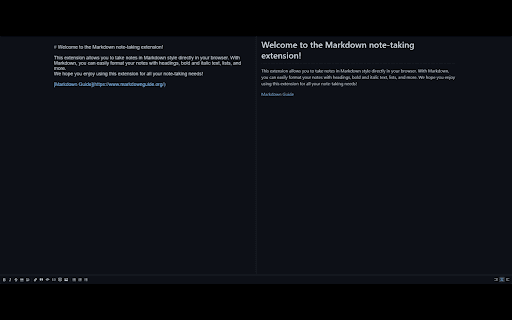

Transform your home page into a distraction-free Markdown editor. Get organized and productive with this easy-to-use extension. Transform your browser's home page into a simple and efficient Markdown editor with this extension. Take notes, write to-do lists, or brainstorm ideas directly in your browser with Markdown formatting. This extension provides a clean and minimalist interface that's perfect for distraction-free writing. Start taking notes right away with no setup required. Get organized and productive with this powerful yet easy-to-use Markdown extension.

Page Edit
Make any webpage into a content editable document and modify it via toolbar popup! Page Edit is an extension that let you make changes to any HTML webpage. To work with this add-on, simply open the toolbar popup UI and then click on the big toggle button on the left side. Once the add-on is active, the icon turns to blue color. A - Design Mode - banner will also be shown in the current tab at the top left corner. Now, the document is ready for editing; make desired changes with the text editing buttons available in the toolbar popup UI. Once your edits are completed, click on the toggle button again to turn off the add-on. Note: to work with text editing tools in the toolbar popup UI, please first select a text and then click on the desired button in the popup. If you found a bug to report, or have a feature request in mind, please fill out the bug report form on the add-on's homepage (https://mybrowseraddon.com/page-edit.html).

HTML to Markdown
As a developer, I kept needing to pull high-quality documentation off the web and reformat it for AI chat tools, READMEs, and notes. So I built HTML to Markdown: a free, privacy-first extension that turns any page into clean Markdown instantly — perfect for feeding into large language models like ChatGPT and Claude, or anywhere else you write. WHAT YOU CAN DO • One-click convert — turn the current page into Markdown instantly. • Choose your scope — grab just the Main Content (skips nav, ads, and sidebars) or the Full Page, exactly as rendered. • Select Section — click or drag to capture only the part of the page you want. • Built-in editor — every conversion opens in a Markdown editor with live split preview, a formatting toolbar, and a document library. • Copy, download, or print — copy to your clipboard, save as a .md file, or print in one click. • Clean output — headings, lists, tables, code blocks, links, and images convert faithfully. PRIVATE & FREE • 100% free — no account, no sign-up, no subscription. • Privacy-first — everything runs locally in your browser; your content is never sent to a server. • Works offline after installation. PERFECT FOR • Developers — pull docs and code snippets into READMEs, project notes, or LLM prompts. • AI users — capture web content as Markdown to feed ChatGPT, Claude, and other AI chats. • Bloggers & content creators — repurpose articles and research into your own posts. • Students & researchers — extract information from online sources for papers and reports. • Technical writers — convert web content into guides and documentation. • Note-takers — save articles and docs as clean Markdown notes. Install HTML to Markdown and turn the web into clean Markdown in one click.

Markdown To Word
Convert Markdown to Word and back. Easily transform md to docx and Word to Markdown with one click. Fast, offline! Markdown to Word is a versatile Chrome extension built for people who work daily with text, documentation, and structured content. It solves the most common problem: .md to docx and any types of files ms word to markdown conversion in a fast, clean, and predictable way. If you need a reliable document conversion tool directly in your browser, this extension is designed for you 🙂 The extension helps you transform both file types between each other without breaking formatting. Headings, lists, links, tables, and basic styling are preserved when converting markdown to word document texts or files. At the same time, it lets you transform .docx documents into a clean, readable markup file with a well-structured output. 1. Writing technical documentation in a structured markup format (clearly interpreted and best understood by artificial intelligence systems) 2. Preparing markdown file to word reports 3. Sharing files with non-technical users 4. Editing DOCX files before exporting 5. Managing structured text and document exchange workflows The extension works as a complete content conversion tool that supports both directions. You can convert md to word for editing in office document editors or convert word document to markdown for publishing and version control. This makes it a practical choice for developers, writers, marketers, and students. You do not need external services or third-party websites. The extension runs directly in your browser, which improves privacy, speed, and reliability. This tool removes unnecessary steps in your workflow! The extension keeps document structure consistent. This is important when working with formatted files that must look professional in office editors. 1️⃣ Simple and focused interface 2️⃣ Accurate markdown to word conversion 3️⃣ Reliable MS Word to Markdown converter 4️⃣ No registration or tracking 5️⃣ Works fully in the browser Markdown2word extension developed for users who need a stable file transformation workflow. It supports markdown to doc and markdown to docx exports with minimal setup. • preparing formatted documents for clients • word markdown workflows for Git-based projects • offline editing of structured text files • publishing-ready text transformation The extension is optimized for daily work with structured and formatted content. Whether you handle one file or many, it delivers consistent and predictable results 🚀 ❓ What is Markdown to Word? ✅ It is a Chrome extension that works as a markdown to word converter and also supports the reverse direction. ❓ How do I install the extension? ✅ The installation takes just four simple steps and only a few moments to complete: 1. Open the Chrome Web Store 2. Search for Markdown to Word 3. Click Add to Chrome 4. Confirm the installation Once installed, Markdown to Word is ready to use! ❓ How to convert markdown to word? ✅ You can do this in just a few simple steps: ✔️ Open the extension ✔️ Load your source file. If the file size is under 2 MB, the conversion will start automatically. ✔️ Download the markdown to word doc file ❓ Can I convert Word files back to Markdown? ✅ Yes, you can easily convert word doc to markdown. ❓ Can the extension convert md to docx? ✅ Yes, full support for transferring .md to word (all formats). ❓ Is this an online markdown conversion tool? ✅ The tool works as markdown to word online inside your browser without uploading files to third-party servers. ❓ I have some ideas and feedback for the extension. How can I share them with the developers? ✅ You can easily share them with the development team using one of the following options: • Use the feedback link on the Chrome Web Store page • Leave a review with your ideas or suggestions • Contact the developers via the support section All ideas for improving the markdown to word converter are welcome 😊 ❓ If I encounter a problem while using converting process, is there a customer support available? ✅ Yes, customer support is available via the Chrome Web Store support form. ➤ Describe the issue in detail ➤ Specify the transformation direction you were using ➤ Attach a sample file if possible The support team will help resolve any issues related to file transformation and the overall conversion process. 🚀 If you need a dependable markdown word converter for daily tasks, Markdown to Word is a practical and efficient solution for transforming structured text to office documents and back. Install it now!

HTML Table to Markdown
Convert an HTML Table to Markdown for easy export. This extension provides a simple way to export an HTML table in Markdown format. Simply select the table you'd like to export by right-clicking and choosing Inspect, then open the Table to Markdown tab and hit Convert! This extension can handle a wide variety of HTML tables, including tables with missing cells, tables without headers, and tables with cells that span multiple rows and columns. Read the full README and see examples on the GitHub page at https://github.com/kbravh/table-to-markdown.
