
hfjnppljknigdnnpocjjgdcfmnodoafe
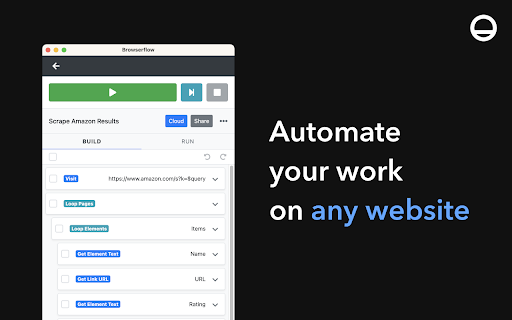


Automate your work on any website. Imagine if you could teach your browser to do your repetitive tasks and save you hours a week. With Browserflow, you can. Browserflow allows you to record and build flows to automate things you'd normally do — fill out forms, write emails, extract data, download files, take screenshots, you name it — all without writing code. Scrape any website and automate any workflow in the browser to save time and avoid mistakes.

Automatio - Web Automation & Scraping
Automatio is most powerful web automation and data extraction tool. Unlock the full potential of the web with the Automatio Chrome Extension. This powerful tool allows you to automate tasks, create bots, and extract data from any website effortlessly—no coding required! Whether you're gathering insights, monitoring changes, or collecting data, Automatio makes it simple and accessible. Enhance your productivity by automating repetitive online tasks and focus on what matters most.

Ui.Vision
Task and UI test automation with Computer Vision/OCR. Ui.Vision combines browser automation and desktop automation. Ui.Vision is an open-source automation RPA software that combines classic browser automation with modern computer vision and OCR: Ui.Vision's computer vision commands make automating tasks inside the web browser easy. Existing Selenium IDE scripts can be imported. Conversion help for iMacros scripts is provided, too. (2) Desktop Automation for Windows, Mac, and Linux Beyond web browser automation, Ui.Vision can interpret images and text on the desktop, executing actions like clicking, moving, dragging and dropping the mouse, and simulating keyboard inputs. This desktop automation requires installing the free Ui.Vision XModules, available for Windows, Mac, and Linux. These modules provide Ui.Vision with the necessary capabilities for desktop interaction. The AI commands allow you to automate complex tasks with a single line of code that would traditionally require hundreds of lines of classic commands. For example, you can teach Ui.Vision to play TicTacToe with just one short "Play this game..." prompt. Ui.Vision can be controlled from the command line. Thus it can be used from, and combined with, any programming or scripting language, such as Windows batch files, Linux/Mac shell scripts, Python or PowerShell. Ui.Vision is Open-Source. The source code is available on Github. The software does not send any data back to us or any other place. Everything, including image recognition and OCR processing, is done locally on your machine. The only exception to the "all data is processed locally" rule is if you select the optional AI commands. But these cloud-features are disabled by default. The default computer vision (image recognition and OCR) runs 100% locally on the machine. For questions and suggestions, please visit the Ui.Vision community forum at https://forum.ui.vision.

Free Web Scraper: Fast, Simple Web Scraping
Blazing fast web scraping. Easily scrape any web page data into a spreadsheet table or CSV, for free. Free Web Scraper is the the ultimate web scraping tool for blazing fast data extraction from web pages! With Free Web Scraper, you can extract data from any website for free in record time, with just a few clicks. Here are some reasons why Free Web Scraper is the go-to tool for web scraping: ★ Lightning-fast data extraction - Free Web Scraper is the fastest way to get structured data from any website quickly and efficiently. No more clunky manual copying and pasting. ★ The friendliest interface - Free Web Scraper has a super simple interface, making it easy to extract data from any site without code. ★ Smart data scraping technology - Free Web Scraper uses smart data scraping technology to extract data from even the most complex websites, without any manual configuration required. ★ Customizable data extraction - With Free Web Scraper, you can customize your data extraction to extract exactly the data you need, without any unnecessary data cluttering up your results. ★ CSV and Spreadsheet Export - You can download your results as a CSV file or import into Data Blaze, the spreadsheet that lets you use your data anywhere. ★ Free to use - Free Web Scraper is completely free to use. Simply install the extension and start scraping! ★ E-commerce sites: Free Web Scraper can be used to scrape product data from e-commerce sites like Amazon, eBay, and Walmart. This data can then be used for price comparison, market research, and more. ★ Social media sites: Free Web Scraper can be used to scrape data from social media sites like Facebook, Twitter, and Instagram. This data can be used for social media monitoring, sentiment analysis, and more. ★ Job boards: Free Web Scraper can be used to scrape job postings from job boards like Indeed, Monster, and Glassdoor. This data can be used for job searching, applicant tracking, and more. ★ News sites: Free Web Scraper can be used to scrape news articles from sites like CNN, BBC, and The New York Times. ★ Real estate sites: Free Web Scraper can be used to scrape real estate data from sites like Zillow and Realtor.com. This data can be used for house hunting, property valuation, and more. ★ Stock trackers: Free Web Scraper can be used to scrape data from stock trackers like Yahoo Finance, Google Finance, and Nasdaq. This data can be used for stock market research, portfolio tracking, and more. Whether you're a seasoned web scraper or just getting started, Free Web Scraper is the ultimate tool for fast and efficient data extraction. Try it out today and see for yourself how easy web scraping can be!

Easy Scraper - One-click web scraper
A free web scraper for instant results. Scrape any website with one click. No coding required. Easy Scraper is the easiest web scraper you’ll ever use. With just a single click, extract data from any website and streamline your data analysis, research, and content aggregation tasks. - Scrape lists: Scrape any list, on any website, with a single click. - Scrape details pages: After extracting a list of URLs, scrape each URL and extract data from each page. - Easy to use: Navigate to your desired webpage, click the extension icon, and watch as data is magically organized and ready for use. - Instant export: Conveniently save your scraped data in CSV or JSON, facilitating easy integration with your projects or databases. - Dynamic content handling: Skillfully manages JavaScript-rendered content, ensuring you capture data from even the most complex sites. - Privacy focused: Operates locally on your browser, ensuring your data remains private and secure without being sent over the network. 1. Install the extension with a single click from the Chrome Web Store. 2. Navigate to any website from which you wish to scrape data. 3. Click the extension icon to activate the scraper. 4. Customize your scrape by changing the list and scraping speed if desired. 5. Export your data in the format of your choice and you're done! - Lead generation: Effortlessly collect contact information and leads for your sales and marketing initiatives. - Market research: Quickly gather product details, prices, and reviews. - Data analysis: Compile data sets from various sources for analysis. - Content creation: Aggregate content for research or inspiration.
