
hfemolalfcjcgompdfddabemkdpbgjki
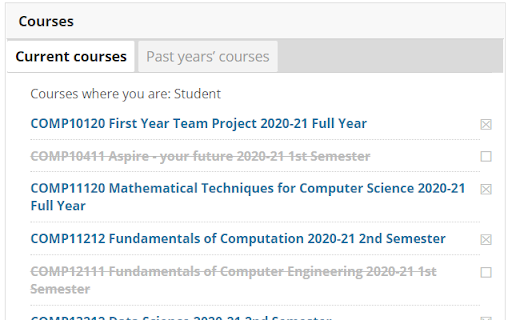
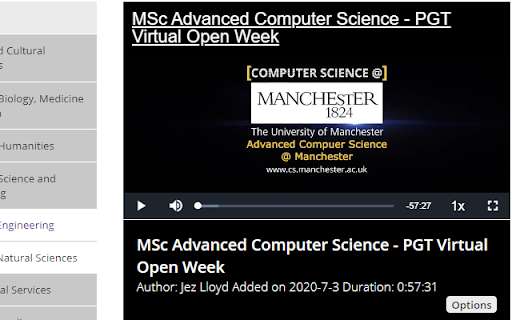
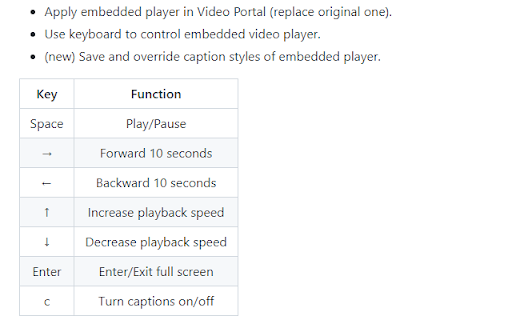
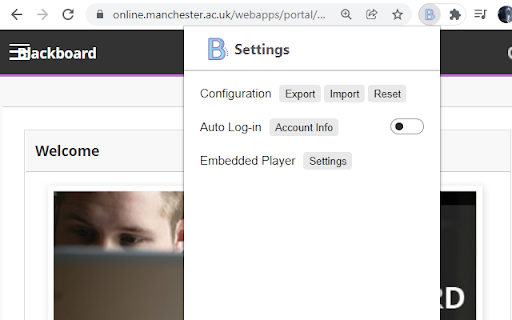
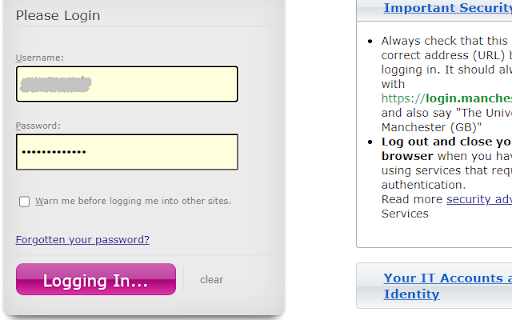
Improve your experience of Blackboard of the University of Manchester. This extension aims to improve user experience of Blackboard of the University of Manchester, help customize your own blackboard and improve productivity. It is quite light-weight and written by native JavaScript to ensure high efficiency and reliability. ----- Main features ----- Customize Home Page - Hide unnecessary course entries. - Display UK time. - Customize live sessions portal. (Provide direct access to zoom meeting) - Collapse any portlet as you wish. Control Embedded Video Player - Apply embedded player in Video Portal (replace original one). - Use keyboard to control embedded video player. - Save and override caption styles of embedded player. - Allow user to reload and restore video progress on network error. Other Utilities - Go to external link in new tab directly. - Open links of file content in new tab. - Open embedded pdf file in browser directly. - Open embedded web page (like piazza) in browser directly. - Jump to in-page hash anchor directly. - Auto log in to UoM Login System. (Your account information is stored locally) - Auto login if token was expired. Settings Page (Popup) - Import/Export your user configuration for migration. - Configure account information for auto login. - Turn on/off switches for various features. Accessibility - Sync layout and configuration with your browser account automatically. - Auto update with long-term support. ----- Support ----- This is an open source project on GitHub. For more information, go to project repo 👉 https://github.com/RyanXinOne/UoMBbEn Developed by RyanXin - a Computer Science student @UoM. ----- Feedback ----- If you like it or have any ideas regarding new features or bugs/improvement, do not hesitate to leave a reply or contact me (xyz@ryanxin.cn) directly!

UoM Blackboard Restyle
A cleaner interface for the University of Manchester Blackboard with custom themes and dark mode. This provides a universal design to Blackboard with consistent fonts, colours and styling. It fixes many of the resizing and positioning issues present in Blackboard. This redirects to the old homepage on loading. The new homepage can be accessed in the top right if needed. Any deadlines on the Blackboard system coming up in the next 30 days are displayed on the left of the home page. Navigation links to the following are displayed below this: Student System, Timetable, Lecture Recordings, Exam Timetable, Exam Results, Library, SPOT, My Learning Essentials and Evaluation Kit. The following themes are available in both light and dark mode: Default (Purple), Blackboard (Grey), Ocean (Light Blue), UoM Purple (Same Purple as UoM Logo), Art Deco (Green and Gold Pattern), Tron (Black and Neon Blue Pattern), Rustic (Reddish Brown), Camo (Brown and Green Pattern). Course units on the home page are filtered by semester. The semester you are currently in will display by default. When first using the extension, it will warn you that it can read and change your data at online.manchester.ac.uk. It needs this access to apply style changes to the loaded page. No personal data is changed or stored. The following URLs are whitelisted by the extension (Blackboard won't warn you that you're leaving the learning environment): https://zoom.us/, https://piazza.com/, https://www.sli.do/ and https://gitlab.cs.man.ac.uk/. Assessment paragraph entry boxes on dark mode by default display white text but will submit black text (clearly visible on standard Blackboard). If you change the text colour, the submitted text will be this colour. Be aware that a submission of white text is not clearly visible on Blackboard. This is an open source project available at: https://github.com/mattmcnee/uom-restyle-extension. Provide feedback at https://uom-blackboard-restyle.web.app/. Updates: 1.23 - Header links now underlined when hovered 1.22 - Fix for blackboard update 1.21 - Course units on the home page are now filtered by semester 1.20 - Improved styling on journal entry pages 1.19 - Fixed errors logging to console and improved styling coverage 1.18 - Embedded videos no longer exceed screen width on smaller screens 1.17 - Fixed Kortext link and improved course slide layout 1.16 - Replaced menu icons with new style

Better Blackboard Learn
Dark mode, Custom Course Images & Names, Custom Themes, and More for Blackboard Learn. Features: -Dark Mode -Custom Course Images -Custom Course Names -Preset Themes -Full Theme Customization (Primary, Secondary, and Sidebar colors) -Custom Fonts All options can be easily adjusted and toggled directly from the extension menu, allowing you to personalize your Blackboard experience in real time.

Snap Environment Switcher
Switch between environments and modes in complex solutions like AEM. The Snap Environment Switcher Extension, also known as Exadel Environment Switcher for AEM, allows you to add projects with their corresponding environments (like DEV, QA, STG, PROD) and modes (like Publish, Edit, Admin). You can also specify relationships between environments and modes so that the environments will change alongside the modes. With Snap Environment Switcher/Exadel Environment Switcher for AEM, you can: - create an unlimited number of projects - configure several modes and environments - easily switch back and forth between your modes and environments - switch between environment domains - create several sub-environments (an environment with the same name that corresponds to another mode) - set up a relationship between your sub-environments and modes, so when you change the mode, the sub-environment and domain will change automatically, too - switch to a new mode or environment in a new tab - share plugin configurations between team members through the Import and Export operations - keep track of your current operating state—you’ll never be confused about which project, environment, and mode you’re in

Silent Solver
Introduction Silent Solver is a Chrome extension built exclusively for Blackboard users, designed to make test-taking smoother,… Introduction Silent Solver is a Chrome extension built exclusively for Blackboard users, designed to make test-taking smoother, smarter, and more efficient. With intelligent automation and AI-powered accuracy, Silent Solver helps you navigate quizzes and assignments effortlessly, allowing you to focus on what truly matters—understanding the material and mastering the subject. What is Silent Solver? Silent Solver is an AI-powered Chrome extension engineered solely for Blackboard. Unlike generic automation tools, it is purpose-built to integrate flawlessly with Blackboard’s system, ensuring optimal functionality. With just a click or a keyboard shortcut, it quickly analyzes and solves any question type—MCQs, short responses, or anything else Blackboard throws at you. Built for Blackboard Silent Solver is designed specifically for Blackboard and works only on Blackboard—nowhere else. This ensures seamless compatibility without unnecessary bloat or bugs from unsupported platforms. AI-Powered Precision Uses advanced natural language processing (NLP) and machine learning to analyze and solve all Blackboard test questions in real time. Fluid Compute: Serverless Optimization Silent Solver runs on cutting-edge serverless infrastructure, dynamically allocating resources in real time for ultra-fast computations. But that’s beside the point—just press a button, and it works. Minimalist interface with a single “Activate” button for instant results. 1. Install the Extension – Get Silent Solver from the Chrome Web Store. 2. Open Blackboard – Navigate to your quiz or assignment. 3. Activate Silent Solver – Click “Activate” or use the shortcut. 4. Get Instant Solutions – Receive accurate answers for MCQs and short responses. Silent Solver is a tool for Efficiency—Not a Shortcut for Learning. Silent Solver is here to help, but true success still comes from understanding the material. Use it wisely to enhance learning, manage your time better, and reduce stress—not to avoid studying. While this extension uses advanced AI to assist with answering questions, it may occasionally provide incorrect or incomplete answers. Always verify the answers before relying on them. This extension does not collect, store, or share any personal data. All questions and answers are processed securely and are not retained. This extension requires an active internet connection to function. It will not work offline. This extension is designed to work on specific platforms (e.g., Blackboard). It may not function correctly on all websites or learning management systems. The functionality of this extension may change over time as we improve the tool. We are not responsible for any disruptions caused by updates. The developers of this extension are not responsible for any consequences resulting from the use or misuse of this tool. Use it at your own risk. For technical support or to report issues, please contact silentsolverx@gmail.com We are not responsible for issues arising from unsupported browsers or platforms.
