
hfdejmgblclcececnfkoeckaghfglelp

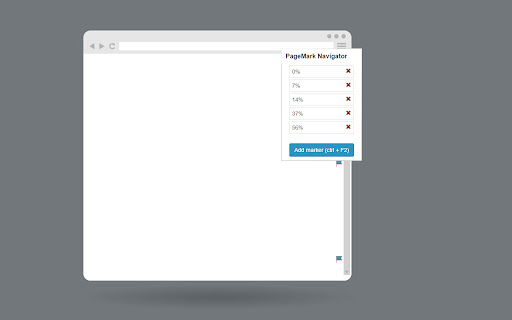
Mark your position on the page and jump between marks using F2 key Say goodbye to repetitive scrolling and welcome effortless navigation within your web pages. You can effortlessly move between important positions, saving time and effort. Mark by pressing ctrl + F2 and then jump between marked positions by pressing F2, you can also add new markers and navigate between them from the extension menu. This extension is designed in a way that you won't have to do any extra step to save and navigate between markers. Saved positions are marked by a little flag icon close to the scrollbar and can be removed at any time from the extension menu. You can see all the markers for a specific page by opening the extension menu on that page. Here are some examples of how you can use the extension: Bookmark Your Position: Mark your current position on a page before scrolling down. This way, you can easily return to the marked position later without forgetting where you were. Compare Multiple Regions: Easily compare different regions on a page by marking their positions. This allows you to jump between the marked points and analyze the content or data efficiently. Test Dynamic Elements: Efficiently test multiple dynamic elements interacting with each other. Mark their positions to quickly navigate and interact with each element during testing and experimentation. Create Shortcuts for Frequently Visited Positions: Set up shortcuts to instantly scroll to specific positions you frequently visit on a particular page. Save time by avoiding manual scrolling to essential sections whenever you open that page. Keyboard Shortcuts: - CTRL + F2: put a marker on the current position - F2: jump to the next marker Upcoming Features: - settings page - ability to jump between tabs - ability to hide/show marker icons - ability to name markers - ability to remove marker using keyboard shortcut - ability to resize markers - ability to change the keyboard shortcuts - separate markers page Don't hesitate to let me know if you have any suggestions.

Reading Position Bookmark
Make reading online articles a breeze with 'Reading Position Bookmark' – the Chrome extension designed to simplify your reading… Make reading online articles a breeze with 'Reading Position Bookmark' – the Chrome extension designed to simplify your reading experience. Bookmark and Save: Easily bookmark your reading position with a click, so you can continue where you left off. Seamless Resume: Never lose your place in long articles or blog posts. Effortless Navigation: Quickly jump between your saved reading positions. No Account Required: No sign-ups, no accounts – just enhanced reading. Whether you're a student, researcher, or avid reader, 'Reading Position Bookmark' is your companion for hassle-free online reading. Say goodbye to endless scrolling and searching for your last read line. Install now and enjoy uninterrupted reading.

Mark Scroll Positions
Mark your scroll locations for later. This extension saves your scroll positions so you can resume reading later with an ease. You can save as many scroll positions as you want, add notes to them, rename them, and see all your saved spots on a separate page.

Open to Scroll
An extension to open a link to the same position on the page as you are currently scrolled to. This extension allows you to navigate pages on websites while maintaining your current position. Useful for browsing within a site that has a constant layout, particularly video streaming sites, it allows you to move from one video to the next without adjusting the page. Update version 1.11 Fixed code to allow using links without opening a new tab --Fix only works for links without redirects, you can open a link an maintain position only if the url on the link matches the url you end on. Will look into fixing this Update version 1.1: Cleaned up visible components Added Icons Sped up the code

Scrroll In
An extension to save scroll position of a webpage ✨ What's new - - You can now save upto 20 scroll positions for any page and manage (get, update and delete) them individually. - Added an opt-in to show toasts when performing actions with a scrroll for better UX (Experimental). You must have been in a situation wherein you are reading a long article but you don't have enough time to finish it so you close the tab, and the next time you open the article again, you have no idea where you left it. Well not anymore, with this extension you can save the scroll position of the page and then revisit the page at any time to continue where you left. I know that there are other extensions similar to this, but most of them either don't work reliably or lack the features mentioned below - 🤹 Color changing icon The icon changes color whenever the extension detects that you have already saved a scroll position for a page. ✨ Sleek UI Ability to add, remove, update or delete the scroll position directly from the popup menu. 💾 Unlimited Storage Under the hood this extension uses chrome's local storage API, so you'll never run out of storage for your articles. 🤳 View all your saved scrrolls An options page to view all your saved pages, with the percentage of the page completed. 📜 Completely free and open source Scrroll In was and will always be free to use and open source. Feel free to open an issue for feature request or bug report on the issues page on Github
