
heikifnngkibnhgdnhbpggbmefnagjgp
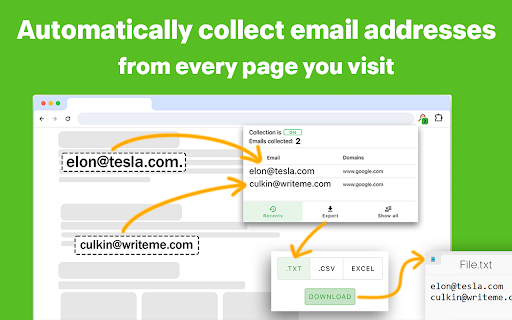


Streamline your data collection with a free Email Extractor online. Email scraper works as free email extractor 1.4 chrome extension Improve Your Leads Collection with Email Extractor 🚀 Email Extractor is the ultimate tool for professionals seeking to streamline their email scraper processes. With a robust framework designed to optimize your workflows, this tool is a must-have for anyone involved in marketing, lead generation, or customer outreach. 1️⃣ Efficiency: Quickly extract email from any online sources. 2️⃣ User-Friendly: A simple interface that is incredibly easy to use. 3️⃣ Versatility: Perfect for marketers, recruiters, sales professionals, and more. 4️⃣ Powerful Extraction: Harness the power of advanced Email Extractor chrome extension. 5️⃣ Email Verification: Ensure the validity of extracted emails with integrated verification tools. ➤ Chrome Integration: As this tool is an extension, it seamlessly integrates into your daily browser use, making it accessible at any moment. ➤ Speed and Reliability: Designed to deliver quick results without sacrificing reliability, Email Extractor online ensures your tasks will be performed swiftly. ➤ Precision: Unlike traditional email scraper tool, our extension ensures high accuracy in extracting valid addresses. ➤ Export Options: Effortlessly export results in various formats, or just copy it to clipboard. This feature makes it easy to integrate the data into your CRM system, marketing software, or any other tools you use for your business communications. To start using this scraper tool, simply: 1. Add the Email Extractor extension to your Chrome browser. 2. Navigate to any website where you want to use the Email Extractor chrome extension. 3. (Optional) Refresh the page if it was open before installing Email Extractor online. And that's it! After that, you can click on the extension icon and check all the collected addresses. - Time-Saving: Reduces the hours spent on manual addresses collection. - Free Access: Utilize the free online email extractor 1.4 version to see the benefits before committing financially. - Efficiency Boost: Automate the mundane task of collecting addresses and save hours daily. - Accuracy in Data: Enjoy precise data collection, minimizing the risk of collecting incorrect or outdated addresses. • Marketing teams can build massive lists for campaign outreach. • HR professionals can find potential candidates for recruitment. • Sales professionals can generate leads directly from competitor websites. 🔐 Security and Privacy We prioritize your privacy and data security, adhering to international standards to ensure that Email Extractor 1.6 collected data is handled responsibly and securely. We are committed to continuously improving and expanding your lead collection capabilities and integrate additional features based on user feedback and technological advancements. Install Email Extractor 1.4 today to begin transforming your address collection practices. Join thousands of satisfied users and elevate your professional toolkit with our extension. Thank you for choosing the Email Extractor extension, your trusted partner in digital data collection. Transform your data collection tasks into a breeze and focus on what truly matters in your business. ❓ How do I install this tool? 💡 Just visit the Chrome Web Store, search for Email Extractor plugin, and click 'Add to Chrome.' The extension will automatically integrate into your browser and it’s ready to use. ❓ Is Email Extractor 1.6 free to use? 💡 Yes, there is a free version of extension that offers basic features. For users requiring more advanced features, there are paid subscription plans will be available soon. ❓ On which websites can I use this tool? 💡 You can use this email scraper almost on any website as long as the site does not have restrictions against data collection practices. It works across corporate websites, professional directories, and more. ❓ How does extension ensure the accuracy of extracted addresses? 💡 We use advanced algorithms to identify and validate addresses, minimizing the risk of collecting invalid or outdated addresses. It ensures that only valid addresses are gathered. ❓ Is my data safe? 💡 Absolutely. We adhere to strict data protection policies to ensure that all data collected through Email Extractor extension is secure and private. No data is shared with third parties without user consent.

Instant Data Scraper
Instant Data Scraper extracts data from web pages and exports it as Excel or CSV files Instant Data Scraper is an automated data extraction tool for any website. It uses AI to predict which data is most relevant on a HTML page and allows saving it to Excel or CSV file (XLS, XLSX, CSV). This tool does not require website specific scripts, instead it uses heuristic AI analysis of HTML structure to detect data for extraction. If the prediction is not satisfactory, it lets the user customize the selections for greater accuracy. This type of scraping technology is much more convenient, because it does not require large user created libraries of scraping scripts, which often become filled with outdated and redundant versions. This means that our scraping method works just as well with small and lesser known websites, as it does with global giants like Amazon. Also, our users do not need to have any coding, json or xml skills! Instant Data Scraper FEATURES: * Detecting data for extraction with AI. * Detecting when dynamic data has loaded. * Delay and maximum wait time customization for desired crawling speed * Support for pagination on websites. * Automatic navigation to next page via buttons or links. * Support for infinite scrolling. * Extracted data preview with copy and paste support. * Data export to Excel spreadsheet or CSV file. * Extracted data column renaming and filtering. This extension is completely FREE. Instant Data Scraper works well in unison with SEO tools, CRM recruiter systems, sales leads management tools or email marketing campaigns. Web scraping and data downloading is made easy with our tool. Furthermore, you have data security and privacy as the scraped data does not leave your browser. Instant Data Scraper USE CASES: * Lead generation for companies and freelancers. * Growth hackers looking for easy ways to collect data. * Recruiters looking for job candidates. * Crawl results from search engines. * Get product pricing data from e-commerce websites. * Amazon sellers, distributors and review analysts. * Get email and addresses and phone numbers from directories. * Get contact info from professional association websites. * Scrape reviews and ratings. * Analyze posts for likes, comments, connection and contacts. * Extract emails and ID from social media profiles. Developer promise: This extension does not contain any malware or spyware beyond standard Google Analytics.

Email Extractor Lite
Powerful solution to automatically extract bulk emails from websites. Unlimited and free extraction service. Free extension to extract bulk email IDs automatically from web pages. Powerful email extractor tool for marketers around the world 🚀 ✔ How to use the extension? 💻 ------------------------------------------- - After installation, the "Email extraction" mode is activated by default. - Press the "Collected emails" button to access the list of all saved emails. - Choose the format of your choice and press the "Export" button. ✔ Who is this extension for? 🔥 ----------------------------------------- 👉 Automatic extraction of emails from visited web pages 👉 Extraction from search engines like Google and Bing 👉 Removal of duplicate email addresses (unique ID) 👉 Save emails, search date and domain in the browser 👉 Export email list in TXT, CSV or JSON format 👉 View extracted emails on a modern user interface 1) Is the Email Extractor Lite free? The extraction service is completely FREE. No subscription is required, no account is needed. Take full advantage of this extension. 2) Where are the collected email addresses stored? This extension uses the data storage functions of your web browser to store emails. No data is stored outside your browser. 3) What about Data Privacy and GDPR? This extension protects and respects your privacy. It does not collect or store your personal data. Let's respect your privacy! You can report bugs and feature requests with this link: Note: Do not post bug reports or support requests in reviews! This is NOT a forum and Google will eventually remove some reviews. ✔ How can I support you? ☕️ --------------------------------------- Email Extractor is, and will always be, free, but you can support this 100% free service by making a donation. Any help would be greatly appreciated! You can participate by donating the amount you want ❤️ ✔ Do you have any questions? 📧 ---------------------------------------------- If you have any suggestions, feature requests, or even a partnership request, please feel free to send me a message at my email address.

Easy Email Extractor
Free email extraction tool. Download any email address from the web with just one click. Effortlessly Capture Email Addresses for your marketing needs. Browse the web as normal, and have emails auto-saved. Key Features: Save Emails as you browse: We will scan the page you are on and make it easy for you to copy and download any emails we find. Fast and Lightweight: The extension is compact and designed for speed. User-Friendly: No intrusive ads or extra junk—just a clean and efficient tool. Cloaked Email Detection: Identify and extract hidden or cloaked email addresses. Local & Offline Support: Extract emails from local HTML documents and text files. Export Options: Export and download extracted emails to a text or CSV file for convenient use. Auto Save Emails: When enabled, we store all your extracted email addresses in the cloud for easy access and management. Subscription Sharing: Share your Premium subscription with friends, family or colleagues. Subscriptions can be shared with friends, family or colleagues. This extension is a cost-effective alternative to email extraction tools and services like Email Hunter, Voila Norbert, Clearbit Connect and more. Usage Note: If you navigate to a new tab or page, the extracted email addresses will be overwritten. To avoid losing data, switch back to the previous tab to export emails or enable the auto-saving feature (a paid feature). The extension only accesses email addresses and stores them locally. Support: For any issues, please contact us via hi@tryemailextractor.com. Informal Disclaimer: This extension is intended for personal use only. Please avoid using it for spamming or unsolicited marketing.

Email Hunter
Email Extractor tool that save time and efforts. Forget copying and pasting. It collects emails as you browse websites. Email Extractor is a time proven email grabber tool which helps collection emails. Email Hunter easily extracts email addresses from pages as you visit them and auto saves them all. This chrome app finds email addresses scraping and searching source code and no matter what you see on the front. The functions: - extract emails from visited pages - auto search - export collected emails to text file and copy to clipboard - safe checker: unsafe pages skipping without extracting emails In addition, subject to your consent through the prominent notice, we will be accessing and collecting your non-personal web browsing data to use the unsafe pages detection feature called 'Safe Checker' for free. The feature can be disabled on the Options page, if not - we will share the collected web browsing data in an aggregated, anonymized format with our affiliated companies and business partners for commercial use. We wish to make it clear, we do not want to know your identity, preferences or any information about you personally, all as detailed in the Privacy Policy. Our extension collects and uses all web browsing activity as it is needed to improve the function of detecting unsafe pages of our Safe Checker feature.
