
hedijgjklbddpidomdhhngflipnibhca
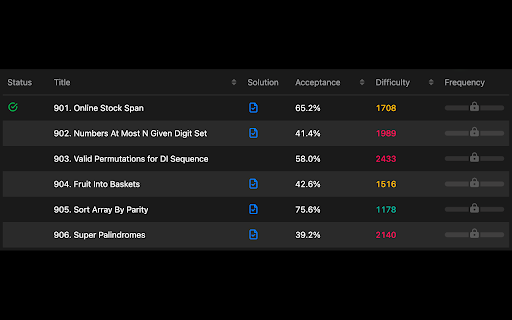
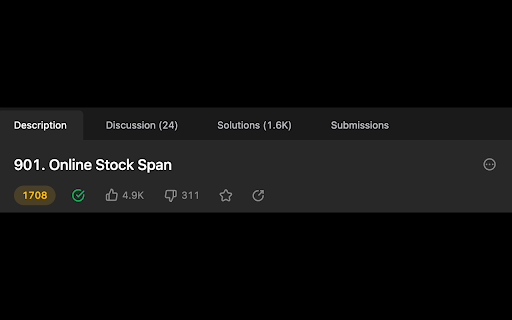
Replace Leetcode problem's difficulty with a more precise contest rating. Support both "leetcode.com" and "leetcode.cn". The green/yellow/red text color is preserved, so you can still tell the official difficulty. *** Problems in 1st-62nd weekly contests and problems that did not come from contests don’t have rating data and "N/A" is shown by default. *** To show the original rating, click the extension icon on the top right of the browser and disable "Show N/A if no rating is available". For more details and source code, please visit: - https://github.com/boenshao/leetcode-difficulty-rating-extension

Competitive Companion
Parses competitive programming problems and sends them to various tools like CP Editor and CPH. Competitive Companion parses competitive programming problems and contests and sends the parsed data to various tools like CP Editor and CPH. At the moment it supports 117 online judges, including most major ones like AtCoder and Codeforces. Using it is very simple. Just install the extension, make sure you got one of the supported tools open, navigate to a problem page and click on the green plus icon in the top-left of your browser. On websites where Competitive Companion is able to parse contests, navigating to the page with all the problems and clicking on the green plus icon will download and parse all problems in the contest at once. You can also use the Ctrl+Shift+U shortcut instead of the green plus icon (configurable on chrome://extensions/shortcuts).

GfG to LeetCode
This extension embeds leetcode links in geeksforgeeks problems page. If you prefer to solve problems on leetcode, this extension provides mapping of geeksforgeeks to leetcode problems, so by just one click this extension will take you to the same problem on leetcode. Feel free to suggest any updates and changes regarding the mappings here https://docs.google.com/spreadsheets/d/1Lw3WEKb-fa4FLSH7Q2E1DD7kU1vd4WAOBXf2QDdqrho/edit#gid=0

Leetcode Analyzer
Add a graph for visualization of number of question per tag and also add a contest history table Features: - simple design - update on every reload - Graph visualization with hover effect of showing tag name - User can check how many question already done on specific tag just by hovering on it - A Table which shows Contest history with rank and score - Faster updation than leetcode real contest time graph Because Leetcode officially doesn't provide any feature by which user get to know how much question already solve by them on specific topic so by this extension we can have that feature on Leetcode account page and this extension doesn't require any username and password.

LeetCode Timer
Leetcode timer and performance tracking This Chrome browser extension is a must-have for coders who want to track their coding time on LeetCode.com and set time limits for themselves. With this extension, you can: - Track your coding time on each LeetCode problem. The extension will automatically start a timer when you start working on a problem and stop it when you submit your solution. You can then view your total coding time at the end for each problem. - Set time limits for yourself based on problem difficulty. The extension allows you to set different time limits for easy, medium, and hard problems. This can help you to focus on and complete problems more efficiently. Release notes for Ver. 4.2: - Revert the timer hiding behavior to its previous version. Release notes for Ver. 4.1: - Fix broken features (Hiding difficulty and acceptance rates) due to UI changes. - The timer has been made robust to handle inactive tabs when practicing outside of the browser tab. Release notes for Ver. 4.0: - Fix timer not showing up due to recent Leetcode layout changes. Release notes for Ver. 3.9: - Minor bug fixes Release notes for Ver. 3.8: - Fix a bug in timer toggling functionality. Release notes for Ver. 3.7: - Fix a bug in timer auto pause functionality when a problem is submitted multiple times. Release notes for Ver. 3.6: - Fix a bug in timer auto pause functionality when a problem is submitted multiple times. Release notes for Ver. 3.5: - Show/Hide Difficulty in recommended problems list - Many more bug fixes and improvements Release notes for Ver. 3.4: - Fix broken Auto pause functionality in Dynamic layout Release notes for Ver. 3.3: - Fix broken timer animation when paused in new layouts - Fix broken Hide Acceptance rate feature in Dynamic layout - Fix timer reset button not working when problem page is loaded Release notes for Ver. 3.2: - Fix timer stuck at loading in Dynamic layout when Hide difficulty setting is turned on. Release notes for Ver. 3.1: - Fix broken styles causing timer text invisible in dark mode - Update feedback/bug report link - Add extension rating link in the popup page. Release notes for Ver. 3.0: - New Timer Design - Timer is now draggable and can be placed where ever you want on the page. - Added support for all Leetcode UI modes(Old, Split View , Dynamic) - Bug fixes Update: 2023-08-16 Fix Broken features in old UI due to the recent release. Update: 2022-09-16 New Features: 1. Improved UI. 2. Timer will now appear for all LeetCode Explore problems. 3. Set time limits for each difficulty. Bug fixes: 1. Fix: Timer showing up in the problem discussion page 2. Fix: Hide time icon not showing up Please rate it if you find this extension useful and provide feedback if you are uninstalling.
