
hdnlkdbboofooabecgohocmglocfgflo
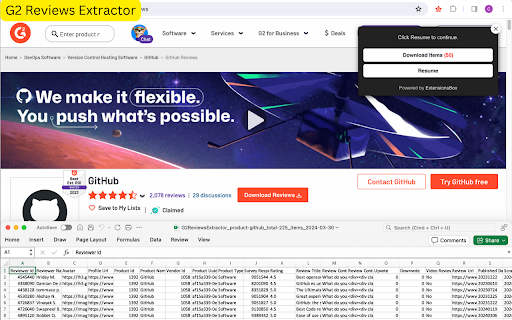
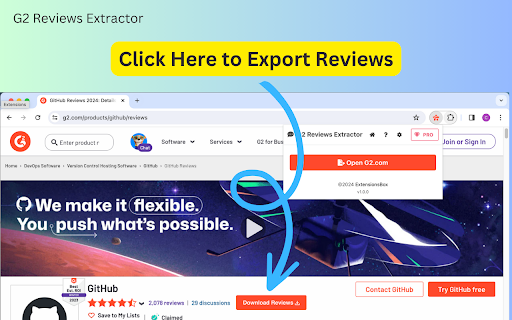
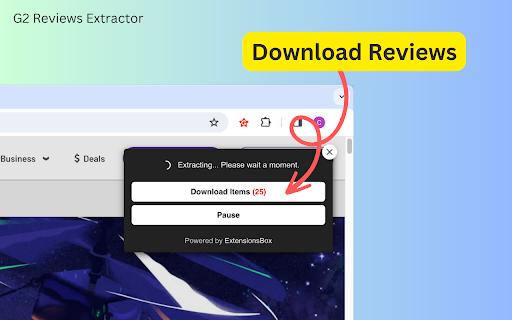
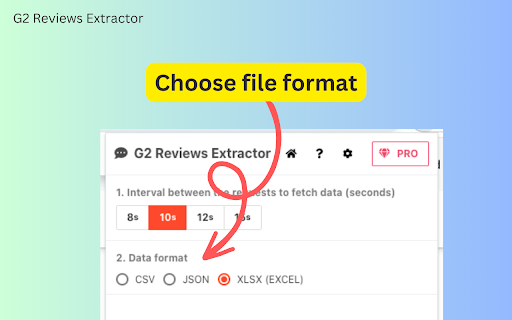
G2 Reviews Extractor Quickly gather user reviews from g2.com Export data in preferred formats for thorough analysis. G2 Reviews Extractor – Your Ultimate Tool for Seamless Extraction of G2 User Reviews! The powerful browser extension is designed to streamline your data analysis and market research efforts. This intuitive tool is your gateway to efficiently gathering and exporting user reviews from G2.com, one of the leading platforms for software and service evaluations. Whether you're a market researcher, a software developer, or a business analyst, G2 Reviews Scraper enhances your decision-making process by providing you with comprehensive insights directly from users. Key Features: - Effortless Extraction: With just a few clicks, extract detailed user reviews from G2, saving you hours of manual data collection. - Versatile Export Options: Catering to your data analysis preferences, Allows you to export the collected data into CSV, JSON, or XLSX (Excel) formats, making it easy to integrate with your existing tools and workflows. - Time-Saving: Streamline your research by quickly gathering valuable user feedback and insights, enabling you to focus on what matters most - making informed decisions. - User-Friendly Interface: Designed with simplicity in mind, our extension requires no technical expertise, allowing anyone to start extracting valuable data in no time. - Secure and Reliable: We prioritize your privacy and data security, ensuring that your data collection process is safe and dependable. How It Works: 1. Navigate to G2.com and open the software or service you're interested in. 2. Click the "Download Reviews" button near the review numbers to start extracting. 3. After the extraction, download your file and dive into the insights. 4. You can choose your desired export format (CSV, JSON, XLSX) on the settings. Ideal for competitive analysis, market research, or simply gaining a deeper understanding of user sentiments, This is an indispensable tool for anyone looking to leverage the wealth of information available on G2. Transform how you gather and analyze user reviews with G2 Reviews Crawler – your efficient, reliable, and easy-to-use solution for extracting actionable insights. Data Privacy policy Your data remains exclusively on your local machine, ensuring privacy and security, as it never passes through our servers. Disclaimer This extension is an independently developed product by ExtensionsBox and has no association with G2 Inc.

T-Reviews Scraper: Export Reviews, Companies, Ratings & More
Extract and monitor review data, company profiles, and trust scores from Trustpilot with this browser extension. Collect reviews, company information, and user review histories directly from your browser. All data processing happens locally on your machine, keeping your information private. Set up monitoring to track new reviews, rating changes, or trust score updates and receive instant alerts. ✓ Monitor pages for changes and receive alerts when conditions are met ✓ All scraping and exports processed locally on your machine ✓ Export to CSV, Excel (XLSX), JSON, HTML Table, and Raw JSON ✓ Automatic pagination for continuous data collection ✓ Batch process multiple URLs in a single session ✓ Customizable fields to tailor extracted data to your needs What Data You Can Extract Reviews in a List: Captures review titles, text, ratings, dates, languages, like counts, verification status, source names, experience dates, updated dates, reviewer names, images, countries, review counts, company replies, and reply dates from Trustpilot company review pages. Company Information: Extracts company names, websites, website titles, logos, descriptions, categories, primary categories, trust scores, star ratings, review counts, addresses, cities, countries, postal codes, emails, phone numbers, verification statuses for business, payment, Google, and identity, claimed status, claimed dates, paid feature usage, reply rates, average reply days, last reply dates, negative review counts, negative reviews with replies, AI response usage, and information sources from individual Trustpilot company pages. Companies in a List: Collects company names, websites, logos, trust scores, star ratings, review counts, categories, addresses, cities, countries, postal codes, emails, phone numbers, and URLs from Trustpilot category and search result pages. User Reviews in a List: Gathers review titles, text, ratings, dates, languages, like counts, verification status, source names, experience dates, updated dates, reviewer names, images, countries, review counts, company names, company IDs, company URLs, company replies, and reply dates from Trustpilot user profile pages. Page Watcher lets you track changes on any Trustpilot page and get notified instantly. Set conditions on specific fields you care about, such as trust scores, review counts, or star ratings, and receive alerts via webhook or ntfy.sh when those conditions are met. Schedule regular checks to stay on top of reputation changes. Batch URL Opener allows you to queue multiple Trustpilot URLs and process them all in one session. Add URLs manually or auto-collect them from a category or search results page, then batch-process and export all results together. This is ideal for collecting review data across many companies efficiently. CSV, Excel (XLSX), JSON, HTML Table, Raw JSON. Choose the format that best fits your workflow, whether you need spreadsheet-compatible files or structured data for further analysis. Perfect For This extension is ideal for reputation analysts, customer experience researchers, and brand managers who need to collect and analyze public Trustpilot data at scale. Use it to benchmark company ratings, analyze review sentiment, or track trust score trends across the Trustpilot platform. This extension supports Trustpilot globally, working across all regional versions of the Trustpilot website including localized domains for various countries. All scraping and exports are processed locally on your machine. No scraped data leaves your browser. Note that general usage metrics are collected to help improve the extension. This extension provides tools for extracting publicly available data. Users are responsible for ensuring their use complies with applicable terms of service and local regulations. The developer provides the tool and is not liable for how it is used. For assistance or questions, contact hello@nifty.codes. Trustpilot is a registered trademark of Trustpilot A/S. This extension is an independent tool and is not affiliated with, endorsed by, authorized, maintained, or sponsored by Trustpilot A/S.

eBay Reviews Extractor
Unlock customer insights with eBay Reviews Extractor. Scrape, export, and AI-powered summaries for quick, data-driven decisions. eBay Reviews Extractor extension allows you to scrape and export complete product or store review data for easy analysis. Its intuitive interface makes it accessible to anyone, regardless of coding experience. How the Tool Works 1. Open any product page on eBay.com. 2. Click "Download Reviews" under the product name or "Download Store Reviews" under the store name. 3. Wait for the process to complete, then click "Download Reviews" in the popup area to download the data in CSV, JSON, or XLSX format. 4. (Optional) Click the "AI Review Summary" button to generate a detailed analysis, including advantages, disadvantages, improvement suggestions, and a recommendation on whether to buy or not. The extracted CSV, JSON, or XLSX file conveniently organizes all key review information, including ID, Username, Rating, Rating Star, Rating Star Text, Comment, Context Rating Score, Context Time, follow-up feedback, Product Name, Product URL, Review URL, and Scraped Time. Unlock Valuable Insights With the eBay Reviews Scraper, e-commerce professionals can quickly conduct competitive research, monitor trends, compare products and stores, identify opportunities, and make data-driven decisions. Say goodbye to the tedious task of manual review analysis and embrace the power of instant insights. AI Review Summary The ChatGPT-Powered AI Review Summary feature takes your analysis to the next level, providing a comprehensive overview of the advantages, disadvantages, improvement suggestions, and a recommendation on whether to buy or not, based on the extracted reviews. The data extraction process begins immediately after you make a request, with the duration varying based on the amount of information needing retrieval. Data Privacy The data you work with remains confined to your local machine and does not traverse our servers at any point. In-App Purchases Our extension is a freemium product with a nominal subscription fee. With a paid subscription, you can export up to 10,000 items simultaneously and receive premium support. The exact cost is displayed in the extension's interface, ensuring transparency and ease of understanding. Disclaimer This extension is an independently developed product by ExtensionsBox and has no association with eBay.

Wayfair Reviews Extractor
Effortlessly extract Wayfair reviews Export data to CSV/JSON/XLSX. AI-powered review summary analyzes for recommendations. Wayfair Reviews Extractor is a powerful browser extension that simplifies the process of extracting customer reviews from Wayfair. With a single click, you can effortlessly export all reviews for any product into an organized CSV, JSON, or XLSX (Excel) file. Key Features - Comprehensive Review Data Extraction: Easily scrape reviewer names, ratings, comments, images, timestamps, and more without any coding required. - AI Review Summary: Gain valuable insights with the ChatGPT-powered Review Summary feature, which analyzes and summarizes reviews, providing advantages, disadvantages, improvement suggestions, and a recommendation on whether to buy. - Intuitive Interface: Our user-friendly interface allows anyone to export data for market research, trend analysis, or maximizing customer insights, saving you significant time and effort. - Efficient Scraping Process: Simply open any Wayfair product page, click the "Download Reviews" button, and wait for the process to complete. Then, download the data in your preferred format (CSV, JSON, or XLSX) for seamless integration with Excel or other tools. How to Use 1. Open any product on Wayfair.com; 2. Click the "Download Reviews" button next to the review numbers to initiate the scraping process. 3. Wait for the process to complete. Click "Download Reviews" in the popup area to download the data in CSV, JSON, or XLSX format. 4. (Optional) Click the "AI Review Summary" button to generate a detailed analysis, including advantages, disadvantages, improvement suggestions, and a recommendation on whether to buy. Streamline your customer insights and make informed business decisions with Wayfair Reviews Extractor. Unlock the power of comprehensive review data and AI-driven analysis with just a few clicks. Data Privacy The data you work with remains confined to your local machine and does not traverse our servers at any point. Disclaimer This extension is an independently developed product by ExtensionsBox and has no association with Wayfair.

Etsy Reviews Extractor - Scrape Data to CSV
Effortlessly extract Etsy product reviews. Export data in CSV/JSON/Excel formats, and gain AI-powered insights. Etsy Reviews Extractor - your ultimate tool for effortlessly extracting and analyzing reviews from Etsy products. This user-friendly browser extension allows you to quickly gather reviews and export them in CSV, JSON, or XLSX (Excel) formats, making data organization and analysis a breeze. With the added AI Review Summary feature, you can gain deeper insights into customer feedback, including "Advantages," "Disadvantages," "Improvement," and "To Buy Or Not To Buy" recommendations. Key Features - Effortless Data Extraction: Extract reviews for any Etsy product with just one click. No more tedious copying and pasting. - Multiple Export Formats: Export your data in CSV, JSON, or XLSX (Excel) formats for easy use in Excel or other data analysis tools. - Comprehensive Data Scraping: Gather detailed information including User Name, User Avatar, User Profile, Rating, Description, Image, Posted Date, Purchased Item, Purchased Item Link, and Scraped Time. - AI Review Summary: Utilize AI to summarize reviews, providing insights into product advantages, disadvantages, areas for improvement, and purchase recommendations. How It Works 1. Open a Product Page: Navigate to any product on the Etsy.com website. 2. Start Scraping: Click the "Download Reviews" button next to the reviews count to begin scraping. 3. Download Data: Once the process is complete, click "Download Reviews" in the popup to save the data in your preferred format (CSV, JSON, or XLSX). 4. AI Analysis (Optional): Click the “AI Review Summary” button for an in-depth analysis of the reviews. Speed and Efficiency The data extraction process begins immediately after your request, with the duration varying based on the volume of information. This ensures you receive your results as quickly as possible. Data Privacy Your data remains secure and confined to your local machine, ensuring complete privacy and control over your information. Disclaimer This extension is an independently developed product by ExtensionsBox and has no association with Etsy.
