
amagdhmieghdldeiagobdhiebncjdjod

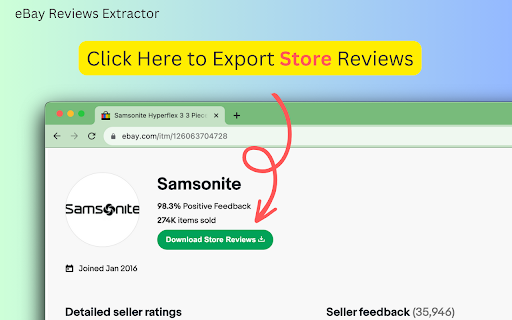
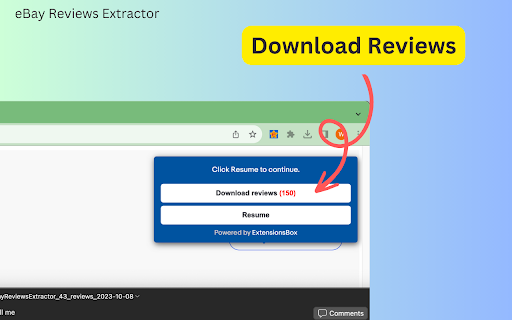
Unlock customer insights with eBay Reviews Extractor. Scrape, export, and AI-powered summaries for quick, data-driven decisions. eBay Reviews Extractor extension allows you to scrape and export complete product or store review data for easy analysis. Its intuitive interface makes it accessible to anyone, regardless of coding experience. How the Tool Works 1. Open any product page on eBay.com. 2. Click "Download Reviews" under the product name or "Download Store Reviews" under the store name. 3. Wait for the process to complete, then click "Download Reviews" in the popup area to download the data in CSV, JSON, or XLSX format. 4. (Optional) Click the "AI Review Summary" button to generate a detailed analysis, including advantages, disadvantages, improvement suggestions, and a recommendation on whether to buy or not. The extracted CSV, JSON, or XLSX file conveniently organizes all key review information, including ID, Username, Rating, Rating Star, Rating Star Text, Comment, Context Rating Score, Context Time, follow-up feedback, Product Name, Product URL, Review URL, and Scraped Time. Unlock Valuable Insights With the eBay Reviews Scraper, e-commerce professionals can quickly conduct competitive research, monitor trends, compare products and stores, identify opportunities, and make data-driven decisions. Say goodbye to the tedious task of manual review analysis and embrace the power of instant insights. AI Review Summary The ChatGPT-Powered AI Review Summary feature takes your analysis to the next level, providing a comprehensive overview of the advantages, disadvantages, improvement suggestions, and a recommendation on whether to buy or not, based on the extracted reviews. The data extraction process begins immediately after you make a request, with the duration varying based on the amount of information needing retrieval. Data Privacy The data you work with remains confined to your local machine and does not traverse our servers at any point. In-App Purchases Our extension is a freemium product with a nominal subscription fee. With a paid subscription, you can export up to 10,000 items simultaneously and receive premium support. The exact cost is displayed in the extension's interface, ensuring transparency and ease of understanding. Disclaimer This extension is an independently developed product by ExtensionsBox and has no association with eBay.

Costco Reviews Extractor
Scrape and download Costco product reviews to CSV/JSON/Excel, inform data-driven strategy based on customer feedback. Unlock Customer Insights Instantly with the Enhanced Costco Reviews Extractor, Now with Customizable Data Export Options. In the fast-paced world of e-commerce, understanding your customers is crucial for success. The manual process of analyzing customer reviews can be extremely time-consuming and tedious. To address this challenge, we've upgraded our extension, a powerful tool designed to simplify the extraction of customer feedback with even more functionality, including customizable data export options. Our user-friendly browser extension is tailored for e-commerce professionals looking to gain valuable insights without the need for coding skills. With just a simple click, you can now scrape and export comprehensive product review data in your preferred format, making it easier than ever to analyze and understand customer opinions. Here's how you can start leveraging the power of the Enhanced Costco Reviews Extractor with the new customizable export feature: 1. Navigate to any Costco.com product page of your choice. 2. Click the "Download Reviews" button located beneath the product title. 3. A popup window will appear, allowing you to export the data into a structured CSV, JSON, or XLSX file, depending on your needs. The files you'll receive are meticulously organized, containing all the essential review details such as reviewer IDs, ratings, comments, and much more. In the settings interface, select your desired content format for export: choose from CSV, JSON, or XLSX file options to best suit your analysis tools. These structured formats are ideal for conducting competitive research, monitoring market trends, comparing products, spotting opportunities, and ultimately making informed data-driven decisions. Say goodbye to the days of laborious manual review analysis. With this enhanced extension, you can obtain the product insights you need promptly and efficiently in the format that best suits your analytical tools and methods. Installation is quick, and you can start scraping smarter in no time. Once you initiate a data extraction request, the process begins immediately, with the duration depending on the volume of information to be retrieved. Install the Enhanced Costco Reviews Extractor now, and transform the way you gather and analyze customer feedback across multiple data formats, with the added convenience of customizable export options. In App Purchase Our Extension is a freemium product with a nominal subscription fee. With a paid subscription, you can export up to 3000 items at a time and receive premium support. The exact cost is displayed in the extension's interface, ensuring transparency and ease of understanding. Disclaimer This extension is an independently developed product by ExtensionsBox and has no association with Costco Inc.

Reviews Extractor for WM
Quickly extract and analyze Walmart reviews with a user-friendly extension; export data in CSV, JSON, or XLSX formats. Walmart Reviews Extractor is a powerful browser extension designed to streamline the process of extracting and analyzing customer reviews from Walmart. With a user-friendly interface, this plugin requires no coding knowledge, making it accessible to everyone. With just a single click, you can effortlessly scrape reviews and export them to a CSV, JSON, or XLSX (Excel) file for easy organization and analysis. Whether you're conducting market research, analyzing trends, or mining customer feedback for insights, this tool is essential for any e-commerce professional. Walmart Reviews Extractor offers a seamless one-click extraction process, allowing you to quickly scrape reviews for any Walmart product. The data can be exported in multiple formats, including CSV, JSON, and XLSX (Excel), ensuring flexibility in how you manage and analyze the information. Additionally, the extension features an AI Review Summary, providing in-depth analysis with sections such as "Advantages," "Disadvantages," "Improvement," and "To Buy Or Not To Buy." What Data Can Be Scraped? The extension allows you to extract comprehensive customer reviews for any product on Walmart. The detailed information includes the product name, review ID, reviewer name, rating, review title, review text, positive and negative feedback, verified purchaser status, review time, images, product link, author ID, reviewer location, and the time the data was scraped. How to Use - Open a Product Page: Navigate to any product page on Walmart.com. - Start Scraping: Click the "Download Reviews" button next to the reviews count to begin scraping. - Download Data: Once the process is complete, click "Download Reviews" - on the popup to download the data in your preferred format (CSV, JSON, or XLSX). - AI Review Summary (Optional): Click the “AI Review Summary” button for an in-depth analysis of the reviews. How Quickly Will You Get the Results? The data extraction process begins immediately after you make a request. The duration of the scrape will vary based on the amount of information needing retrieval. Data Privacy Your data remains secure and confined to your local machine, ensuring that it does not traverse our servers at any point. Walmart™ is registered trademarks of Wal-Mart Stores, Inc. in the United States and other countries. ExtensionBox developed this independent project and has no relationship with Wal-Mart Stores, Inc.

Ebay Reviews Scraper and Exporter | Ecomstal
#1 Easily extract and export the Ebay Reviews Scraper & Exporter. Get ratings, comments, and timestamps in CSV/Excel. eBay Reviews Scraper | EcomStal Effortlessly Extract eBay Product Reviews to Enhance Your Research and Boost Your Sales Maximize your eCommerce insights with the eBay Reviews Scraper Chrome Extension by EcomStal. This powerful tool allows you to collect valuable product reviews directly from eBay product pages, saving you time and effort while providing key data to optimize your product listings, analyze customer feedback, and track competitor performance. Whether you're an eBay seller, dropshipper, or market researcher, this tool is designed to give you a competitive edge. Clean Data Format: Download reviews in CSV or Excel for easy viewing and analysis. Beginner-Friendly Interface: No coding required—just install the extension and start scraping. Free Version Available: Test the basic features at no cost before upgrading. Automated Review Collection: Save time with fast and automatic scraping of reviews. 👥 Who Can Benefit? eBay Store Owners: Gain valuable customer feedback to improve your products and services. Market Researchers: Analyze competitor reviews to spot trends and opportunities. Dropshippers: Collect authentic reviews to enhance credibility and drive sales. Affiliate Marketers: Gather real reviews to enrich your product promotions and increase trust. Agencies and Freelancers: Save time and provide accurate data services to clients. ⚙️ How It Works Install the Extension: Add the eBay Reviews Scraper to your Chrome browser. Visit eBay Product Pages: Open any product page on eBay. Click “Start Scraping": Start collecting reviews instantly with just one click. Download Reviews: Export the scraped data into CSV or Excel for analysis. ❓ Frequently Asked Questions (FAQs) What is eBay Reviews Scraper? A Chrome extension that enables you to scrape product reviews from eBay product pages and download them in CSV or Excel format for efficient analysis. How do I install the extension? Go to the Chrome Web Store, search for eBay Reviews Scraper | EcomStal , and click Add to Chrome. Can I scrape reviews in bulk? Yes! The extension supports bulk review scraping, allowing you to collect hundreds or thousands of reviews simultaneously. What file formats can I download the reviews in? You can download reviews in CSV or Excel format for easy viewing and analysis. Is the tool easy to use? Yes! The interface is designed to be user-friendly, with no coding required. Does it support all eBay stores? Yes, the eBay Reviews Scraper works with most eBay stores worldwide. Is there a free version available? Yes, you can start with the free version and explore its core features before upgrading to the premium version. Is the scraping process fast? Absolutely! The scraper quickly collects reviews, allowing you to analyze customer feedback in real-time. Can I filter reviews before scraping? Yes, the extension offers the ability to filter reviews based on ratings, keywords, and other criteria for more precise data extraction. Is the tool safe to use? Yes, the extension ensures that your data privacy is maintained, and security is guaranteed throughout the scraping process. Start Scraping Reviews Today! With eBay Reviews Scraper by EcomStal, you can unlock valuable insights that drive your eCommerce success. Whether you want to improve your product listings, track competitor activity, or analyze customer feedback, our tool helps you make data-driven decisions that lead to better products and increased sales. Get started today with eBay Reviews Scraper and optimize your eCommerce strategies.

E-Auctions Scraper: Export Listings, Sellers, Feedback & More
Scrape and export product listings, seller profiles, and buyer feedback from eBay with this powerful browser extension. The tool operates entirely within your browser, processing all data locally on your machine. Set up monitoring to track price changes, new listings, or seller updates and receive instant alerts when conditions are met. ✓ Monitor pages for changes and receive alerts via webhook or ntfy.sh ✓ All data processing happens locally in your browser ✓ Export to CSV, Excel (XLSX), JSON, HTML Table, and Raw JSON ✓ Automatic pagination for multi-page search results ✓ Batch process multiple URLs in a single session ✓ Customizable field selection and conditional formatting What Data You Can Extract Listings: Titles, prices, shipping costs, bid counts, auction expiry times, seller usernames, discounts, and images from eBay search results and category pages. Listing Details: Item specifications, full descriptions, item conditions, watch counts, sold counts, recent sales, brand, model, color, condition descriptions, and all product images from individual eBay listing pages. Seller Details: Seller usernames, display names, feedback percentages, total feedback counts, items sold, follower counts, seller type, location, and membership history from eBay seller profiles. Feedback: User IDs, usernames, feedback scores, ratings, comments, time periods, verified purchase status, and image counts from eBay seller feedback pages. Use the Page Watcher to track changes on any eBay page over time. Set conditions on specific fields, such as price drops below a threshold or new listings matching certain criteria. Receive instant notifications via webhook or ntfy.sh when your conditions are met, so you never miss an important update. The Batch URL Opener lets you queue multiple eBay URLs for processing in one session. Add URLs manually or auto-collect them from search result pages. The extension opens each URL, extracts the data, and compiles everything into a single export file. Perfect For Ideal for resellers, market researchers, and deal hunters who need to compile product and pricing data from eBay at scale. Simplifies the process of gathering large sets of listing, seller, and feedback data from eBay without manual copying. This extension supports eBay domains across multiple regions, including the United States, United Kingdom, Germany, Canada, Australia, France, Italy, Spain, and other international eBay marketplaces. All scraping and data exports are performed locally on your machine. The extension collects general usage metrics to improve performance and reliability, but your scraped data is never sent to external servers. This extension provides tools for extracting publicly available data. Users are responsible for ensuring their use complies with applicable terms of service and local regulations. The developer provides the tool and is not liable for how it is used. For assistance or questions, contact hello@nifty.codes. eBay is a registered trademark of eBay Inc. This extension is an independent tool and is not affiliated with, endorsed by, authorized, maintained, or sponsored by eBay Inc.
