
hdignmanbcnlpmbpclikejilbphndgja
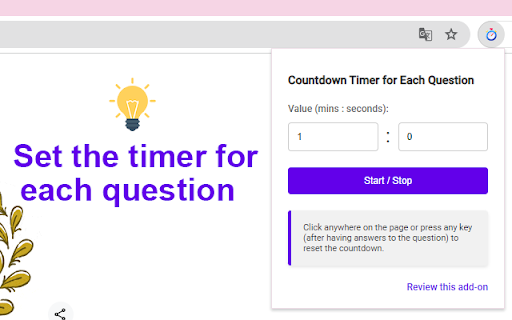


A countdown timer designed to help you stay focused and manage time for each question. Perfect for quizzes and timed tasks. Have you ever run out of time during an exam? This extension helps you stay focused and manage your time effectively while studying, ensuring you stay on track and finish each question on time. Setting the Timer (one time): - Click the extension icon to open the popup. - Enter your desired countdown value in the input field. Starting and Stopping: - Click on the extension icon, then click the "Start / Stop" button to start or stop the countdown. (Pages opened before installing this extension may not work properly, please reload them.) Resetting the Timer (by clicking anywhere, pressing any key): - Click anywhere on the page or press any key (after having answers to the question) to reset the countdown. If you find this extension helpful, please rate it 5 stars.

Test Timer
Pacing Practice timer for standardized tests Test Timer - Pacing Practice for Standardized Tests Master your test pacing with precision timing and instant feedback. Section Timer is the essential Chrome extension for students preparing for standardized tests like the LSAT, GMAT, GRE, SAT, and more. Increase your speed by upgrading your pacing skills with a professional-grade timer designed specifically for timed standardized test sections. 📊 Smart Question Pacing - Automatically calculates optimal time per question based on your test parameters - Real-time question timer shows if you're on track, behind, or ahead - Visual progress bar with distinct question and review phases ⚠️ Intelligent Warnings - Screen turns yellow at 10 seconds remaining per question - Critical red flash at 3 seconds remaining per question - Optional audio beeps for auditory alerts (can be toggled on/off) 🎯 Realistic Test Simulation - Specify how much time to reserve to review the test section - Question log tracks your pacing performance - Average time calculation helps identify pacing patterns ⚙️ Flexible Configuration - Set custom total time (1-180 minutes) - Configure number of questions (1-100) - Adjust review time (0-30 minutes) - LSAT preset for instant 35-minute, 25-question setup 🎨 Clean, Distraction-Free Interface - Hide timer feature for pressure-free practice - Works in Chrome's side panel to let you focus on the test without switching windows 🔄 Complete Control - Pause/resume functionality - Manual question advancement - Reset and restart options - Audio warnings toggle Perfect For: 1. Open the extension in Chrome's side panel 2. Set your test parameters (time, questions, review period) 3. Start practicing with real-time pacing feedback 4. Review your question log to improve timing strategy Developed for test prep students who demand precision in their practice. No data collection, no distractions - just pure focus on mastering your timing.

Google Form Timer
Adds a floating timer and auto-submits Google Forms. Pinokio - Google Forms Timer – Simple Countdown for Online Assessments This extension adds a countdown timer to Google Forms, helping educators, HR teams, and trainers enforce time limits on online tests and forms. The current version only works for specific Google Form links currently used by Samator Group.

Timer Countdown
An easy-to-use interface for the Countdown clock Timer—to manage time! After all, you'll be redirected to the last active tab. Online Timer Countdown Clock—This is a Chrome extension timer that simplifies time management and boosts productivity. Our online timer is designed to be easy to use, eliminating the need for a keyboard and providing an intuitive interface that anyone can navigate. Its versatile features make this timer good for personal use, whether managing work projects, timing meetings, or tracking other essential tasks. Why Choose Our Extension? ✅ Efficiency growth ✅ Popular sounds collection. If you need more - write in the comments ✅ Nice to view ✅ Simplicity ✓ Ease of Use: Set up your countdown in just a few clicks. ✓ No Keyboard Needed: Navigate with your mouse, making it perfect for quick setups. ✓ Anchors: 10s, 30s, 5m, 10m, 15m, 30m, 45m, and 1h to set an alarm clock in a single click. ✓ Visual Clarity: The countdown is prominently displayed, ensuring you always know how much time is left. ✓ Productivity Boost: Helps maintain focus and manage time effectively during work or study sessions. Because the clock is ticking! The countdown clock is prominently displayed on your screen, clearly indicating the time left. This is particularly useful during meetings or timed work sessions, where keeping an eye on the clock is crucial. The alarm timer feature allows you to select predefined alarm sounds, ensuring you never miss a deadline or forget an important task. The countdown app is designed with versatility in mind. You can use it for various activities, from tracking the time spent on work projects to setting timers for breaks and personal tasks. The online countdown function means you can access your timer from any device with a Chrome browser, giving you flexibility and convenience no matter where you are. Use Cases and Benefits: ☑️ For Professionals: Manage project deadlines, time meetings, and improve productivity by completing tasks within the set time. ☑️ For Students: Perfect for timing study sessions, exams, and breaks, helping to create an effective study routine. ☑️ For Fitness Enthusiasts: Track workout sessions and rest intervals, and ensure you follow your fitness regimen accurately. ☑️ For Home Use: Set timers for cooking, household chores, and other daily activities to stay organized. 🔸 Increased Productivity: Users report a 30% increase in productivity when using our timer for managing work tasks. 🔸 Enhanced Focus: 75% of users feel more focused and less distracted when they use the timer to segment their work into manageable intervals. 🔸 Better Time Management: Over 80% of users find it easier to manage their time effectively and meet deadlines consistently. - Style: Set and manage multiple timers simultaneously for different tasks. - Predefined Alarms: Choose from various alarm sounds and customize them to your liking. - Timer Presets: Save frequently used countdowns for quick and easy setup. - Tab safe: The alarm sound opens in a new tab. When it closes, you will automatically go to the tab where you worked. 👉🏻 "The online timer has completely changed how I manage my workday. It's incredibly easy to use, and the countdown clock keeps me on track during meetings and projects." – Sarah T., Marketing Manager. 👉🏻 "I use the countdown app for all my study sessions. It helps me stay focused and ensures I take regular breaks. Highly recommend it!" – John D., University Student. 👉🏻 "As a coach, the digital timer is perfect for timing brainstorms and rest periods. The customizable alarms are a great feature." – Emily R., The Personal Productivity Coach. Our Chrome extension timer is more than just a simple countdown tool: it's a comprehensive time management solution designed to enhance productivity and organization. With features like the timer countdown, digits display, and sound countdown clock alarm, it offers everything you need to stay on top of your tasks. Whether working on a critical project, studying for exams, or managing daily activities, this timer is the perfect tool to help you achieve your goals. Don't wait to take control of your time. Set up our Chrome extension timer today and experience the benefits of efficient time management. Join thousands of users who have transformed their productivity with our easy-to-use and versatile timer. With our feature-rich Chrome extension timer, enhance your workflow, stay organized, and never miss a deadline again.

Quick Prompt Search: ChatGPT, Google, and More
Effortlessly search selected text with customizable prompts across ChatGPT, Google, and other services. Configure and manage your search prompts via the Settings page. (Pages opened before installing this extension may not function correctly, please reload them.) 1. Search with Prompts via Context Menu and Hotkey: - Select text on any webpage. - Right-click to open the context menu. - Press Q to open the prompt menu. - Choose a prompt by pressing the first character of its name. 2. Search with Prompts via Extension Icon: - Select text on any webpage. - Click the extension icon. - Choose a prompt from the menu. 3. Manage Prompts: - On the Settings page, you can add, edit, or delete prompts. - Click "Add Prompt" to create a new one. - Customize each prompt with a unique name and URL format. If you find this extension helpful, please rate it 5 stars.
