
nmohlhnphbfffmokacjcbefnnjjfboek
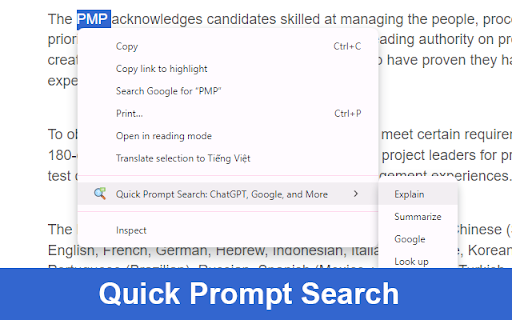


Effortlessly search selected text with customizable prompts across ChatGPT, Google, and other services. Configure and manage your search prompts via the Settings page. (Pages opened before installing this extension may not function correctly, please reload them.) 1. Search with Prompts via Context Menu and Hotkey: - Select text on any webpage. - Right-click to open the context menu. - Press Q to open the prompt menu. - Choose a prompt by pressing the first character of its name. 2. Search with Prompts via Extension Icon: - Select text on any webpage. - Click the extension icon. - Choose a prompt from the menu. 3. Manage Prompts: - On the Settings page, you can add, edit, or delete prompts. - Click "Add Prompt" to create a new one. - Customize each prompt with a unique name and URL format. If you find this extension helpful, please rate it 5 stars.

ChatGPT Exporter - ChatGPT to PDF, MD, and more
Transform your ChatGPT conversations into beautifully formatted, shareable files effortlessly! Whether for work, study, or personal reference, ChatGPT Exporter is the ultimate tool to download ChatGPT results as PDF, Markdown, Text, CSV, or JSON formats. ChatGPT is an advanced language model developed by OpenAI that can converse with humans like a human. ChatGPT conversations can be used for various purposes, such as research, training, or entertainment. However, extracting these conversations from ChatGPT can be a challenging task, especially if you have a large number of conversations or need to extract specific conversations only. 🖨️ Beautiful, Professional PDFs - No Unnecessary Clutter: Generated PDFs are free of distracting browser UI elements. - Customizable PDF Settings: a. Set your preferred filename—no need to rename files post-download. b. Define the content title, even if it's different from the conversation name. c. Adjust the PDF format (size and orientation). d. Choose between dark or light mode without altering the ChatGPT interface. e. Includes page numbers for easier navigation in long PDFs. f. Set page margins (Normal, Narrow, Wide) to match your formatting needs. g. Fine-tune font size with percentage-based scaling for better readability or space-saving. h. Choose your preferred font family for improved aesthetics or accessibility. i. Optionally include a table of contents for better structure and navigation. j. Add user info (name and/or email) for documentation or attribution. k. Control the visibility of date and time—choose to hide or display with custom formatting. l. Show per-message timestamps so you know exactly when each message was sent. m. Remove page numbers or interface icons for a cleaner, presentation-ready output. n. Page break per prompt option for better document structure and readability. o. Automatic CJK font rendering for Chinese, Japanese, and Korean content. p. Include or exclude Deep Research references to keep exports focused. q. Show or hide Web Search sources depending on your needs. r. Optionally include Thought Process / reasoning steps for full transparency. ✅ Selective Content Download Export only the parts of the conversation you need. Unlike other extensions, you're not forced to download the entire chat—just select the specific responses you want! Shift+click to quickly select a range of messages. 📂 Versatile File Format Support Export your ChatGPT conversations in multiple formats, including: - PDF - Markdown - Text (TXT) - CSV - JSON 📋 Copy to Clipboard Skip the download step entirely! Copy your exported content directly to your clipboard for instant use in other applications. 🔬 Preserves Advanced Content & Features Retains essential ChatGPT formatting and automatically extracts advanced features: - Canvas, mathematical formulas (block and inline) - Code blocks with syntax highlighting - Tables and structured content - Deep Research reports with full source citations (converted to footnotes in Markdown) - Web Search source links and references - Thought Process / reasoning steps from O1 and other reasoning models 👥 Group Conversation Support Export both regular chats and group conversations. The extension automatically detects group chats and identifies messages from different users and AI assistants. 🔓 Anonymous GPT Conversations No login? No problem! Download your GPT chats before logging in to ensure your data is captured seamlessly. 🌟 Modern, Polished Interface A clean, modern UI design that blends seamlessly with ChatGPT's look and feel. Smooth interactions and intuitive controls for beginners and advanced users alike. 🌍 Available in 34 Languages The extension interface supports 34 languages, and exported files maintain text in your chosen language, making it ideal for international users. ⚡ Performance You Can Count On - Lightweight extension that won't slow down your browser. - Optimized PDF export for long conversations. - Fast and smooth export across all formats. 💰 Free to Use with Optional Premium - Most features are completely free to use. - Markdown, Text, JSON, and CSV exports are always free. - PDF export: 3 free exports per day. Additional exports require a small fee to help cover tool maintenance costs. - For more details, visit our pricing page. 🎯 Use Cases and Benefits 📊 Ideal for Professionals Save customer interaction logs, brainstorming sessions, or project ideas. Share polished PDFs or Markdown files with colleagues or clients. 📚 Perfect for Students & Educators Archive study notes or Q&A sessions for later review. Save Deep Research reports with cited sources for academic reference. Export code snippets, formulas, or tables for assignments. 💻 For Developers Export JSON or CSV for data manipulation or analysis. Preserve code snippets with syntax highlighting in Markdown or PDFs. Save Thought Process reasoning steps to understand AI decision paths. ✍️ Content Creators' Companion Effortlessly save ideas or scripts. Use Markdown files directly in content management systems (CMS). Copy content directly to clipboard for quick pasting into blogs, social media, or writing apps. 1️⃣ Can I export only part of the conversation? Absolutely! Use the checkbox feature to select specific responses for export. Shift+click to select a range of messages at once. 2️⃣ Can I export Deep Research reports and Web Search sources? Yes! The extension automatically extracts Deep Research reports with full citations, Web Search source links, and Thought Process reasoning steps from ChatGPT's API. 3️⃣ Does it support group conversations? Yes! The extension automatically detects group chats and exports them with proper role identification for each participant. 4️⃣ Are canvas, formulas, code, and tables retained? Yes! All rich content—canvas, formulas, code blocks, and tables—is preserved in the export. 5️⃣ What browsers does ChatGPT Exporter support? We officially support Chrome. It also works on Edge, Brave, and other Chromium-based browsers via the Chrome Web Store. 6️⃣ How do you handle my conversation data? I have privacy concerns. We never store your data. PDF exports are processed temporarily on our server and deleted immediately. All other formats are handled entirely in your browser. 7️⃣ Do I need to log in to use the extension? Most features work without logging in. Only PDF export requires signing into the extension. Other formats like Markdown, Text, CSV, and JSON don't require login. 8️⃣ Can I use ChatGPT Exporter for free? Yes, most features are free. PDF export provides 3 free exports per day. Additional exports require a small fee to help cover tool maintenance costs. For more details, visit our pricing page. ✨ Why Choose ChatGPT Exporter? With unmatched versatility, advanced features, and a focus on user experience, ChatGPT Exporter is the only extension you'll ever need to save and share your ChatGPT results. 🔗 Install now and experience the difference! v5.0 1. Completely redesigned UI — modern, polished look that blends naturally with ChatGPT 2. Improved dark mode support across all UI components 3. Smoother interactions and faster response v4.0 1. Added Deep Research report export with full source citations 2. Added Web Search source link export 3. Added Thought Process / reasoning steps export 4. Added toggle settings to include or exclude each feature in exports 5. Improved PDF download speed and reliability v3.0 1. Added group conversation export support 2. Added Shift+click to select a range of messages 3. Improved PDF stability for long conversations 4. Improved CJK (Chinese, Japanese, Korean) font rendering in PDFs 5. Fixed PDF rendering issues with special characters and Unicode 6. Fixed filename encoding for Japanese and other non-Latin characters v2.27.0 1. Enabled several PDF options by default for a better out-of-box experience v2.26.1 1. Fixed date formatting for non-PDF exports v2.26.0 1. Improved PDF date and time formatting with timezone support v2.25.0 1. Added page break per prompt setting for PDF exports 2. Improved PDF layout with better margins and page breaks 3. Enhanced deep research report formatting in PDFs v2.24.0 1. Fixed image rendering for PDF v2.23.0 1. Fixed message selector compatibility issues 2. Enhanced PDF styling for thinking processes and user messages v2.20.0 1. Added download location setting 2. Added auto-open thought process option 3. Reorganized settings into common and PDF-specific sections 4. Improved markdown formatting by removing duplicate line breaks 5. Enhanced PDF styling for thinking processes and typography v2.19.0 1. Added support for exporting conversation links 2. Added font family selection for PDF exports v2.18.0 1. Users can now input name and email for all export formats 2. Added a toggle to show/hide export buttons v2.17.1 1. Added "None" option for the select button 2. Selecting now automatically expands all "Thought Process" sections v2.15.0 1. Added keyboard shortcut for the PDF export button 2. Fixed several bugs v2.13.0 1. Added support for setting a filename prefix v2.12.0 1. Users can now input name and email for PDF generation v2.8.0 1. Added common settings section in the extension options and popup window v2.7.0 1. Users can now input any font size 2. Improved performance and reduced export wait time v2.6.0 1. Added option to remove page numbers from PDF footers 2. Added option to remove conversation role icons in PDFs v2.5.0 1. Added export options for user info (name and email) 2. Added export options for date info: creation, modification, or export time v2.4.0 1. Now remembers user selections and export options for quicker future use v2.2.0 1. Added table of contents to PDF exports 2. Improved code block styling with syntax highlighting and line wrapping v2.1.0 1. Added localization for multiple languages 2. Tutorial page now opens on first install

Prompter AI: Generate personalized AI prompts everywhere you chat
Generate personalized prompts in ChatGPT, Claude, Gemini, Perplexity, Grok, and more. AI works best when it understands your work. Prompter makes sure it does. 🧠 Prompter is a lightweight Chrome extension that helps professionals get better results from ChatGPT, Claude, Perplexity, Lovable and more by transforming messy inputs into clear, effective prompts—with built-in workspace context. Your AI prompts automatically carry the context of your projects, so AI responses stay relevant, personalized, and on-point without extra explaining. It's not just an AI prompt generator - it's your personal prompt assistant. Why Prompter? 🎯 Most AI tools start every conversation from scratch. Prompter doesn’t. It keeps your work in mind so you can move faster and think less about how to phrase things. With Prompter, you can: Ask better questions that reflect your current project or workflow Get more accurate, useful AI responses with less back-and-forth Eliminate repetitive context-setting in every prompt Key Features 🗂️ Workspace-aware prompting: Attach project context once and let Prompter automatically apply it across all AI interactions. ⚡Real-time prompt transformation: Convert rough notes and partial thoughts into clear, structured prompts instantly. 🧩 Lightweight in-extension UI: Works directly inside ChatGPT and Claude—no switching tabs or learning new tools. 🧠 Context-driven outputs: Prompts adapt to what you’re working on, helping AI respond with greater relevance and clarity. Built for Busy Professionals Prompter is designed for people who use AI every day and want consistent, high-quality outputs—without prompt engineering, templates, or complexity. Stop re-explaining your work. Start getting better AI results. 🚀 👉 Install Prompter and turn context-aware prompting into your daily advantage.

ChatGPT Toolkit
Enhances your ChatGPT experience with useful features like a Auto-Fill prompt text from URL, common prompts after response, and… The ChatGPT Toolbox provides some useful additional features for the ChatGPT website, which can enhance the user experience. Currently, two features are available: 1. Automatic prompt filling from URL: This allows you to save commonly used prompts as bookmarks and quickly fill them in when needed. 2. Automatic prompt button in the ChatGPT response field: These commonly used prompts can be automatically entered through a button. 3. You can directly edit the prompt by double-clicking on the user icon or prompt text. 📢 This extension adds support for AutoFill and AutoSubmit functions for Gemini, Claude, phind and Groq on 2024-03-11. Please make use of the ChatGPT Prompt Link Generator: https://blog.miniasp.com/ChatGPTToolkitExtensionUrlGen.html to automatically generate links. More useful features will be launched in the future, and everyone is welcome to provide ideas and suggestions. 1. Add `#autoSubmit=1&prompt=your_prompt_text` to the URL bar, for example: Open the ChatGPT website and fill in "hello" without automatically submitting (`autoSubmit=0`): Open the ChatGPT website and fill in "hello" with automatic submission (`autoSubmit=1`): 2. Set it as the default search engine in Chrome / Edge, for example: Refer to the [Set your default search engine & site search shortcuts](https://support.google.com/chrome/answer/95426?hl=en) document for instructions! ```txt Search engine: ChatGPT Shortcut: g URL with %s in place of query: https://chat.openai.com/chat#autoSubmit=1&prompt=%s ``` Just type `g` in the URL bar and press the Tab key, and ChatGPT will automatically open and fill in the prompt text.

Multi Search & Multi AI
Search or Chat with ChatGPT, Claude, Google, Reddit and many more — all at once, without switching tabs! 10x Producivity speed boost Search multiple search engines, use multiple AI chat models, and compare websites side by side at the same time. Multi Search & Multi AI is a powerful Chrome extension that lets you compare results side by side, get faster answers, and boost productivity without opening dozens of tabs. If you are looking for a multi search Chrome extension, an AI chat extension, or a way to compare search engines and AI tools instantly, this is built for you. 🔍 Real-Time Search Suggestions Google-powered suggestions now appear as you type. Toggle instantly from the search bar, or disable it in settings. 🤖 Kimi AI Support Seamless integration with Kimi is now fully supported. 🛡️ Browsing Improvements Fixed loading issues on certain sites and improved compatibility. 🛠️ AI Integration Fixes Resolved connection issues affecting major AI platforms for a smoother experience. 🧹 Platform Cleanup Removed inactive integrations and refined performance across supported tools. Run the same query across Google, Bing, Reddit, DuckDuckGo, Brave, and dozens more in parallel. See all results side by side. Spot patterns. Catch differences. Decide faster. Ask one question and get answers from ChatGPT, Claude, Gemini, DeepSeek and more at the same time. Compare reasoning, tone, and accuracy instantly. Create powerful workspace presets like Shopping, Coding, Research, or AI. Each workspace loads your chosen engines and AI tools in one click. Zero setup every time. Highlight text anywhere on the web, right-click, and launch a full multi-engine or multi-AI search instantly. Your custom workspaces appear directly in the context menu. Scroll all panels together to compare results effortlessly. Choose pixel-perfect sync or percentage-based sync for deep analysis. Open as many panels as your screen can handle. Mix search engines and AI tools freely. Resize, reorder, and customize everything. - Google Search - Bing - Reddit - DuckDuckGo - Brave Search & Many more... -> You can also add your own custom search sites from settings. 🧠 Built for Serious Productivity Use ready-made prompt templates with smart placeholders like {{topic}}. Run advanced prompts in seconds without rewriting anything. 🎯 Focus Mode and Full-Screen Writing Hide all distractions when reviewing results or go full screen for long prompts and deep thinking. Instantly find engines using search and category tabs like Shopping, Dev, and AI. Modern UI, smoother animations, a draggable side widget, and a responsive input bar that adapts as you type. 🧭 Open Multi Search Your Way - Floating side widget - Default search engine in the address bar - New tab page - Type ms + query in the address bar - Right-click selected text on any website 🎨 Extra Features You Will Appreciate - Light mode and dark mode - Saved engines, AI tools, and layouts - Open results in new tabs - Layouts that remember your workflow 1. Install from the Chrome Web Store 2. Open Multi Search from the side widget or extension icon 3. Build your workspaces and never tab-hop again 💬 We’d love your feedback. Share feature ideas or request new engines directly from the feedback option in the menu. Built with ❤️ by Krishna & Cebe
