
hdhngoamekjhmnpenphenpaiindoinpo
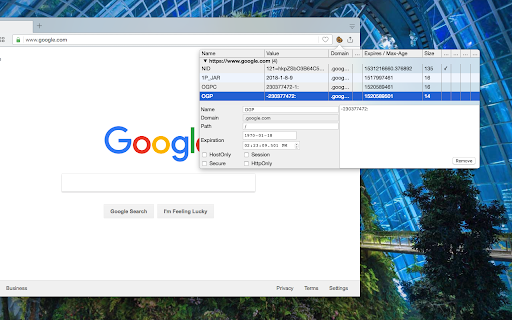
Edit cookies related to the current page and all its CORS frames right from the popup interface This open-source extension presents a toolbar interface allowing users to observe and modify all cookies associated with the current page. Additionally, it conveniently displays cookies accessed by cross-origin (CORS) subframes on the same page, categorizing them based on their origins. Users can directly edit various cookie properties from the interface and delete selected cookies. Features: 1. Import and export cookies to and from JSON and TXT file 2. View all cookies related to the current tab, including sub-frames 3. Access the cookie editor in a separate tab for enhanced visibility 4. Use the "Search Cookies by Domain" context menu option via the action button 5. Use the "Open Cookie Editor in new Tab" context menu option via the action button 6. Export cookies in TXT format, compatible with Wget and Curl command-line tools For bug reports, please visit: https://github.com/joue-quroi/cookie-editor/

EditThisCookie (V3)
EditThisCookie is a cookie manager. You can add, delete, edit, search, protect and block cookies! EditThisCookie is a cookie manager. You can add, delete, edit, search, protect, and block cookies! Inspired by the lack of good cookie managers in Google Chrome, I developed this small, simple, and extremely useful extension that allows you to do anything you'll ever need to do to cookies! Delete any cookie Edit any cookie Add a new cookie Search a cookie Protect a cookie (read-only) Block cookies (cookie filter) Export cookies in JSON, Netscape cookie file (perfect for wget and curl), Perl::LPW Import cookies in JSON Limit the maximum expiration date of any cookie

J2TEAM Cookies
Simple tool to export/import cookies. Share online accounts without revealing your password. A simple extension to export/import cookies. Share online accounts without revealing your password. + Export cookies + Import cookies + Set password to encrypt your cookies + Auto-refresh website when import cookies. Website: https://www.junookyo.com/2017/07/j2team-cookies-chrome-extension.html

Global Cookie Manager
Cookie Manager with advanced global search, editing and import/export functionality that acts on all browser cookies. Global Cookie Manager is a cookie manager extension for Google Chrome with advanced global search, editing and import/export features that act on all browser cookies. Feature list: ★ Advanced list of cookies of the Current URL, Domain or Global (browser-wide). ★ Cross-search by Name, Domain and Value. ★ Remember your last search feature. ★ Full detail view. ★ Create, modify and delete cookies. ★ JSON or CSV import and export of a single cookie or the entire list. ★ Custom settings. ★ ...and other features in development. Designed by developers for developers: ★ Focused on productivity and speed of use. ★ Facilitates website development and testing. ★ Allows to quickly check the privacy and cookie consent settings of websites. ★ Offers support to the SEO experts work. ★ It can also be used just to manually manage cookies.

Cookie Editor - Cookie Manager
Simple tool to manage cookies! You can delete, import, export and edit cookies. A powerful and user-friendly cookie editor and manager tool designed to effortlessly manage browser cookies on any website. Download it free and experience seamless usability and enhanced security. Key Features: - View cookie: Easily view all cookies related to the current tab. - Clear cookies easily: Quickly delete cookies from the current tab and other domains with ease. - Selectively delete cookies: Delete any specific cookie you wish to remove. - Import and export cookies: Import and export cookies in both text and JSON file formats for convenience. - Edit and save cookie properties: Edit the properties of browser cookies to suit your needs and save changes instantly. Applicable Scenarios: - Web development and testing: Perfect for developers to quickly modify and test cookies during web development. - Privacy management: Take full control of your privacy by manually managing and deleting cookies. - Daily browsing: Optimize your browsing experience and enhance security by managing cookies effectively. For more related product information, please visit: https://dicloak.com If you need to report vulnerabilities, please use: https://dicloak.com/contact-us
