
hdgjlfchbpojdocjlldfikeddamdcbhn
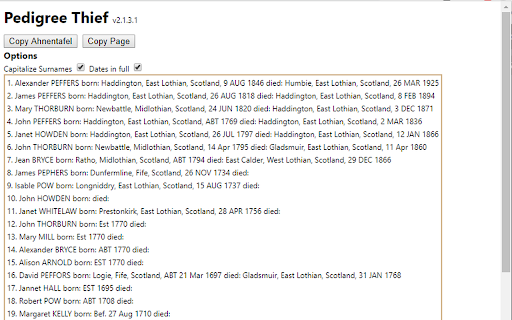
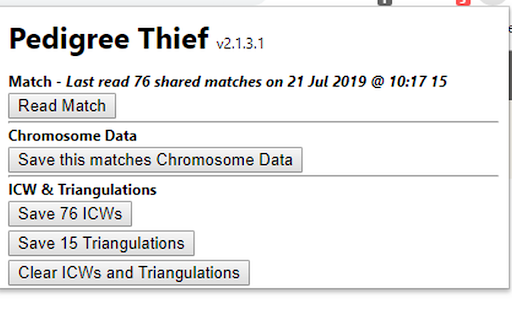

Creates ahnentafels from Pedigree Trees (plus other tools to assist with data input to Genealogical DNA Analysis Tool). Pedigree Thief is a genealogy data gathering tool. The information gathered is intended to be imported into Genealogical DNA Analysis Tool, a program that allows you to manage your DNA matches. Please note that only English language pages are supported although the extension may function in other language sites. The extension's primary function is to read pedigree trees ( Geni and MyHeritage) and convert them to Ahnentafel. See also the included Pedigree to GedCom application that can read pedigrees from other sources. Before using for the first time, right-click the icon and select 'Help' from the menu. This will give guidance to setting up and using the extension. For further help join the Pedigree Thief Facebook group. --------------------------------- Pedigree Thief Change Log Version 3.0.25 updated 15 April 2026 - Fixed issue where Chromosome data was not collected on a MyHeritage match page. Version 3.0.24 updated 11 July 2025 - Fixed change in MyHeritage match page URL Version 3.0.21 updated 2 December 2024 - Fixed recent change in MyHeritage matches page. Version 3.0.20 updated 14 October 2024 - Added options to reading MyHeritage matches the does not involve opening the chromosome browser. Version 3.0.19 updated 9 October 2024 - Fixed GedMatch Pedigree page - P2G button now appearing. Version 3.0.17 updated 17 April 2024 - Fixed bug where sometimes PT would not read MyHeritage cM value if a whole number. - The date/time in PT's MyHeritage Matches menu will be removed once file created. - Oldest date/time will be pre-selected in dropdown. - MyHeritage Match is slow to 'fully' load, PT adjusted to allow for this as it can take several seconds. Version 3.0.16 updated 8 April 2024 - If MyHeritage data limit is reach, the browser tab no longer closes. Refreshing this tab will re-start the read (after waiting for the data limit to be restored). Version 3.0.15 updated 7 April 2024 - No longer includes masked email addresses in GedMatch downloads. - 'Save Matches' button on GedMatch, People who match both kits on both kits tab now includes the total and shared cMs for the FIRST kit. Version 3.0.13 updated 5 April 2024 - Fixed to allow for change in layout of GedMatch One-to-Many Free Limited. Version 3.0.11 updated 27 March 2024 - Fixed bug where Pedigree Thief failed to continue with MyHeritage Triangulations after pressing 'Read' button. Version 3.0.10 updated 25 March 2024 - Adjusted code to allow for slow down in receipt of Chromosome data from MyHeritage. - When reading a match on MyHeritage, PT will try automatically reading Chromosome data of shared matches before any Triangulations data. - Removed … from end of place names in P2G. Version 3.0.8 - updated 5 December 2023 - Added check to ensure info for test person is available on the MyHeritage matches page. - Fixed issue where reading Chromosome page would generate incorrect shared cMs value .(No impact on GDAT). Version 3.0.7 - updated 28 November 2023 - Minor bug fix - activity log - Fixed issue with removal of stored triangulations when read - Further fixes for MyHeritage sites where numbers use comma decimal point Version 3.0.6 - updated 27 November 2023 - Fixed ICW button in GedMatch Both or 1 of 2 page. Version 3.0.5 - updated 25 November 2023 - Updates DNA data if different from that currently stored. - Fixed issue if in comma decimal locale when reading chromosome date from a match page. Version 3.0.2 - updated 21 November 2023 - Fixed format of Matches file from GedMatch 'Matches Both or 1 of 2' from the 'Both' tab and renamed template (was GedMatch Matches with email.txt) - Fixed issue when reading chromosome browser when the data appears to be in a 'comma' decimal point format. Version 3.0.1 - updated 19 Nov 2023 Bug fixes : - Removed duplicates of Date/Times in downloads dropdowns in MyHeritage. - Fixed so only one tab of P2G created. - Fixed ICW & Triangulation output files so that they are limited by the date selected. - Fixed bug preventing GedMatch ICW from downloading file.

Genealogy Assistant
Adds custom features to popular genealogy websites like Ancestry, MyHeritage, 23andMe and more! **Get ready to supercharge your family history research!** Genealogy Assistant adds 100+ custom features to popular genealogy websites like Ancestry, MyHeritage, 23andMe, FamilySearch, FamilyTreeDNA and more. This extension helps you save time and research more efficiently by connecting these individual websites into one powerful, unified platform. Designed with both traditional and genetic genealogy in mind, we provide you with the tools to break down brick walls in record time. Genealogy Assistant helps you focus on what matters most: uncovering the connections that reveal our fascinating family histories. **Transform your genealogy workflow with powerful tools designed for serious researchers:** • Download DNA matches to CSV files for advanced analysis • Highlight high-value DNA connections with customizable thresholds • Research faster using handy custom keyboard shortcuts • Run cross-platform searches and open record collections directly from any page • Skip through hundreds of record images in seconds with advanced paging tools • Easily organize matches into groups using bulk selection tools • Add groups to your 23andMe DNA matches and shared matches …and much more. View the full list of features at https://www.genea.ca/genealogy-assistant/ Enjoy a free 30-day trial of Genealogy Assistant, then unlock the full version for just $2.95 per month or a one-time payment of $34.95. Get access to all of our tools with an easy to use, one-click install. Features are automatically updated and new tools are added regularly. Join thousands of genealogists who have already discovered Genealogy Assistant and start saving time today! Use the "Report a bug" link at the top of the Genealogy Assistant window to report any issues you encounter. Latest update: Thursday June 4th, 2026 v3.5.5: Continuing updates for AncestryDNA match list pages.

RootsFinder Web Clipper
Copy records from genealogy websites and save them to your RootsFinder tree. When you install this extension, you will be able to easily copy records from major genealogy websites into your RootsFinder tree.

WikiTree AGC
The WikiTree AGC (Automatic GEDCOM Cleanup) extension allows users of wikitree.com to automatically reformat biographies created by GEDCOMpare. It adds a button to the wikitree profile edit page when the profile looks like one created by GEDCOMpare. Pressing the button will reformat the biography into a chronological narrative that provides a good starting point for a typical WikiTree biography.

OpenTranscribe
Transcribe historical handwritten documents using local and open public AI models! **Transform handwritten documents into searchable text transcriptions using local and open public AI models** OpenTranscribe is a free browser extension that helps genealogists, historians, and researchers transcribe large collections of historical documents using local and open public AI models. Simply drag and drop a folder of images, select your AI model, and let OpenTranscribe get to work. **Here's why OpenTranscribe is a great choice for handwriting transcription:** • Choose from 100+ ranked AI models via OpenRouter, Google Gemini, OpenAI, or Anthropic with rankings to help pick the best one. • Use any model running locally on your computer with one-click support for Ollama, LM Studio, llama.cpp and vLLM. • Enable Smart Adjust with one click to automatically optimize your images, so AI models can read them more accurately. • Search your entire transcription library by keyword at lightning speed, with live highlighting and keyboard navigation. • Use the handy built-in editor to correct or reprocess your transcriptions in a side by side view with the original image. • Drag and drop entire folders into OpenTranscribe, enabling you to process thousands of images within a single batch. • Process multiple transcriptions simultaneously with our configurable agents, helping to maximize efficiency and save time. • Export as PDFs with or without the source images, plain text, CSV, or XML files for seamless integration with your workflow. Researchers love OpenTranscribe because it's open, affordable and customizable. Transcribe hundreds of pages for less than one dollar (USD) using accurate, budget-friendly models like Gemini 2.5 Flash, with prompts and parameters that can be easily modified. **OpenTranscribe is designed for:** • Genealogists transcribing historical documents. • Historians working with archival collections. • Researchers processing large document sets. • Anyone with handwritten documents they need to read. **Using this extension is easy!** 1. Select a folder of images to transcribe and choose a model. 2. Optionally preprocess your images for clarity with Smart Adjust. 2. Click "Start Transcription" and your results will appear. 3. Search, edit, and export your results in multiple formats. Transcribe: JPG, PNG, and PDF files. Multi-page PDFs will be split into individual files. Export: PDFs (with or without images), merged or individual TXT files, CSV, and XML. OpenTranscribe supports free models running locally on your computer. Some built-in model options, like Google's Gemini 2.5 Flash, can transcribe 100 images with a high degree of accuracy for less than 25 cents (USD). OpenTranscribe requires an API key from your chosen AI provider and costs are paid directly to them based on the model you select. View our AI model recommendations and benchmark rankings online at https://genea.ca/rankings Yes! OpenTranscribe runs entirely on your computer. Your documents and API keys never leave your machine except when they are sent directly to the AI provider of your choice. All transcription batches are saved as local files in your working directory. You control where this data lives and can back it up, move it or delete it at any time. OpenTranscribe does not collect, store, or have access to your documents, transcriptions or API keys. • Click the "Help" button at the top of any page for support and frequently asked questions. • If you are experiencing a bug in OpenTranscribe, click "Report a bug" on the Help page. • Send support or feedback emails to hello@genea.ca Latest update: Saturday April 4th, 2026 v0.2.3: Improvements for model list updates.
