
hcgpjaopokimlhhkmjpbimmcjdkdoini
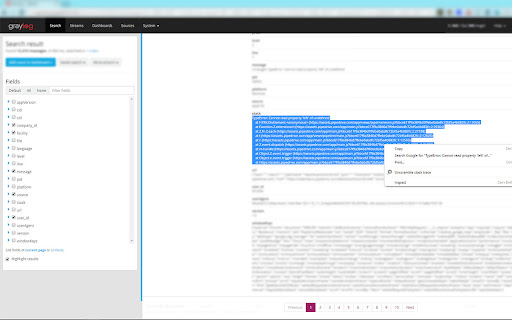
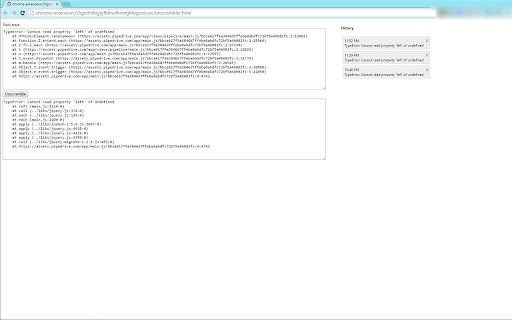
This extension shows unscrambled stack traces in case map files available for JS files on the page Extension allows to unscramble (un-uglify) javascript stack traces. Useful if you're developing web applications and need to see what went wrong in live environment. Options: 1. Select stack trace and click Unscramble context menu. 2. Click on the icon and paste stack trace to the first field and click "unscramble" Unscrambling is possible only if .map files exist for files in stack trace. Otherwise unsrambling won't lead to more readable results. v1.1 changes -- fixed issue when one line with unreachable URL (404/401/500 etc) was breaking the whole unscramble v2.3 changes -- small fixes for handling edge cases

GitHub Release Downloads
This extension displays the number of downloads GitHub releases have on the releases page. This extension displays the number of downloads GitHub releases have on the releases page. Adds current download counts to the releases page on Github for custom release artifacts using the GitHub API. GitHub tracks the number of downloads for all assets (files) that are attached to a release, but GitHub currently makes it very hard for users to get at this information. Initial release blog post: https://addshore.com/2015/04/github-release-download-count-chrome-extension

!Bang Quick Search
This extension adds DuckDuckGo !bang search to chrome. You can use it from the URL bar as long as your default search engine is either google or bing (for now). You can also use it directly on google's and bing's websites. UPDATED FOR V3 - although the extension has been crippled due V3 changes, it still redirects, just not as seamless. Note: This extension is basically in beta. I would very much appreciate any feedback in regards to any issues, compliments, new features, or suggestions. I am maintaining this on my own and will get any features or fixes as soon as possible. Thank you for trying out this extension! 1) Your default chrome search engine must be set to Google or Bing (for now) - The reason being is because chrome only allows me to redirect from certain websites, so I would have to add every site to the permissions in order for it to work. I will gladly add any requests sent in. 2) Enter your !bang followed by your search term (or search term followed by the bang), hit enter and you'll be automatically redirected to that site with your search term! Ex: !a tablet or tablet !a will automatically bring you to amazon with tablet as your search! 3) You can even just enter the !bang and it'll bring you to the website's homepage! UPDATE: This extension now supports ANY and ALL !bang searches that are supported by DuckDuckGo!! Updates: v1.1 - Fix Amazon multiple word search v1.2 - Add Google Scholar and JS optimization v1.3 - Add search request through DuckDuckGo to support all !bang searches v1.4 - Will no longer do a bang search when there is not a letter following ! (Any search with a ! would cause a bang search) v1.5 - Fix an issue where any prediction/ autofilled text was not being caught for a !bang search v1.6 - Remove unneeded chrome extension permission v2.0 - Added V3 support

Perseo
The best tool for SEO professionals that helps you analyze the most relevant on-page SEO information in one click. Perseo is the most complete SEO extension for Google Chrome. It allows you to consult all the relevant SEO information of a page in a single click. The best companion for professional SEO consultants. Perseo allows you to consult the most important SEO information of the page you visit and identify any existing problems or anomalies super-fast. This way you can spend more time on strategy and less time gathering information to diagnose problems. The Chrome extension Perseo has been created with the aim of being an essential tool, incorporating all the features that an SEO may need to audit a website in the first instance and saving time in that task. To do this, nothing better than to be inspired by the best. Therefore, we have taken the most useful features from the most prominent extensions in the industry to create the ultimate SEO extension. SEO: Displays all SEO-relevant on-page elements. In one click you will have all the information you need at a glance. Network: Allows you to view the details and HTTP headers of all requests to reach the current page. Headings: Lists all H1-H6 headings included on the page in a hierarchical and attractive format. Schema: Displays the structured data included in the page in a user-friendly format. You will no longer have to navigate through the source code to detect what types it contains. Assets: Presents the links, images, scripts and stylesheets of the page in an easy to consult way. Docs: Provides multiple links to official documentation categorized by area of interest to facilitate the consultation of recurring topics. Supported on-page SEO elements: 0.5.1: - (improved) Until now, when opening the popup, if the page failed to load (it did not even return a status code), the message "loading, or no data available for this page, try reload the tab" was displayed. Now, when this situation occurs, a message "error page, no data available for this page" is displayed to differentiate both cases. - (fixed) The copy headings option in the Headings tab did not generate the text string properly when there was an empty heading (i.e.: ) on the page. - (fixed) Fixed bug that caused, in some cases, a page canonicalized to another page using a canonical tag with a URL without a domain to be mistakenly identified as INDEXABLE when it should be classified as CANONICALISED. - (fixed) Fixed bug in Schema tab where tags with an itemscope attribute without itemtype attribute were shown in the structured data list as "null". Now they are displayed with a more descriptive message: "(No itemtype)".

ChatGPT Soliloquy
ChatGPT-Soliloquy is a Chrome extension that allows ChatGPT to engage in a conversation with itself. ChatGPT-Soliloquy is a Chrome extension that allows ChatGPT to engage in a conversation with itself.
