
hcgmjpjodnakphfpegldpbcajlmpfipa

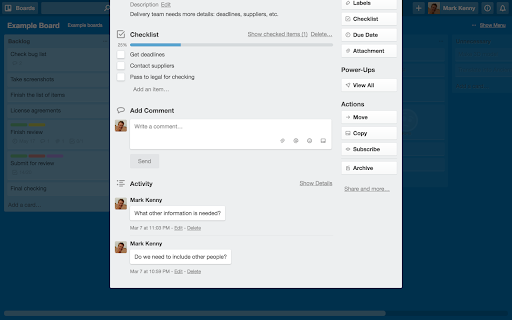
When viewing a card, everything that was ever done to that card is displayed at the bottom. This is far more much information than most people care about, and it cluttered it so that comments were swamped. You can hide this by clicking “Hide Details”, but Trello doesn’t always remember your choice. You can set this extension to click that link for you every time you open a card. Activity details are always there, if you need them. Just click “Show Details”. Please note: this extension does not stop Trello tracking activity. I use checklists all the time, and only want to see the items I have left to do. You can hide completed items by clicking “Hide completed items” above the checklist, but Trello doesn’t hide them by default. You can set this extension to click that link for you every time you open a card. Your completed items don’t go anywhere, just click “Show checked items” to see them again. They’ll be hidden the next time you open the card. In list view, card labels are shown as a strip of colour. If you have given the label a name, this can also be displayed. This was always a hidden feature in Trello, and lately it appears Trello has removed this functionality. This option brings it back — switch it on display card label text, switch it off to hide it. If you have two factor authentication enabled, this option will place the cursor in the field when it appears. This extension is only tested in the the most recent version of Chrome. If reporting a problem, please try to be as specific as possible (e.g. what is not working and where, in which circumstances, etc).

TrelloExport
TrelloExport (Trello Export) allows to export Trello boards to Excel spreadsheets, HTML with Twig templates, Markdown, OPML and CSV. TrelloExport (Trello Export) is a Chrome extension to export data from Trello to Excel, Markdown, HTML (with Twig templates, OPML and CSV. How to use: open a Trello Board, click Show Menu, More, Print and Export, TrelloExport. Version 1.9.82 - fix error 403 in loading many cards: added automatic retry with exponential backoff for 403 errors - optimize API requests: only request checklists/attachments/comments when needed based on selected columns - removed unnecessary API parameters (organization_fields, membersInvited) that could trigger 403 - reduced member_fields from 'all' to 'fullName,username' Version 1.9.78 - Injection of TrelloExport button for Chinese (Traditional) language Version 1.9.77 - Improved injection of TrelloExport button in menu for more languages Version 1.9.76 - Improved injection of TrelloExport button in menu - Added error monitoring for 429 (rate limit) and 504 (timeout) errors - Added small delays between API requests to reduce rate limit issues Version 1.9.73: - update jquery - fix OPML export of comments due date, issue #91 - improvements for issue #29 Version 1.9.72: - finally restored the capability to load templates from external URLs, issues #86 and #87 Version 1.9.71: - Manifest v3 - checklist items' due date, assignee and status added to checklists' mode excel export Version 1.9.68: - avoid duplicate header row before archived cards in CSV export (issue #76) - export the cards "start" field (issue #84) Version 1.9.67 - Added the HTTP header "x-trello-user-agent-extension" to all AJAX calls to Trello, trying to find a solution for https://github.com/trapias/TrelloExport/issues/81 Version 1.9.66 - Added the dueComplete (bool) field to exported columns Version 1.9.65 - fix exporting of Archived items to Excel and CSV Version 1.9.64 - fix some UI defects for the "export columns" dropdown - new CSV export type - please test this! - fix issue #55, Export Done and Done By is missing for archived cards - sort labels alphabetically - HTML Twig: added "linkdoi" function to automatically link Digital Object Identifier (DOI) numbers to their URL, see [http://www.doi.org/](http://www.doi.org/), used in Bibliography template - Apply filters with AND (all must match) or OR (match any) condition, [Issue #38](https://github.com/trapias/TrelloExport/issues/38) - enable export of custom fields for the 'Multiple Boards' type of export (please see the [Wiki](https://github.com/trapias/TrelloExport/wiki) for limits) - bugfix: export checklists with no items when selecting "one row per each checklist item" - new feature: save selected columns to localStorage ([issue #48](https://github.com/trapias/TrelloExport/issues/48)) - new look: the options dialog is now built with [Tingle](https://robinparisi.github.io/tingle/) - new sponsor: support open source development! [read the blog post](https://trapias.github.io/blog/2018/06/19/TrelloExport-1.9.53) - avoid saving local CSS to localstorage - fix filters (reopened issue [issue #45](https://github.com/trapias/TrelloExport/issues/45) - paginate loading of cards in bunchs of 300 (fix [issue #47](https://github.com/trapias/TrelloExport/issues/47) due to recent API changes, see https://trello.com/c/8MJOLSCs/10-limit-actions-for-cards-requests) - bugfix export of checklists, comments and attachments to Excel - change "prefix" filters description to "string": all filters act as "string contains", no more "string starts with" since version 1.9.40 - bugfix due date exported as "invalid date" in excel and markdown - filters back working, [issue #45](https://github.com/trapias/TrelloExport/issues/45) - bugfix HTML encoding for multiple properties - small fixes in templates - two slightly different Newsletter templates - Added a button to clear all settings saved to localStorage - new jsonLabels array for labels in data - updated HTML default template with labels New SPONSORED feature: Twig templates for HTML export. See the [BLOG POST](http://trapias.github.io/blog/2018/04/27/TrelloExport-1.9.43) for more info! - new organization name column in Excel exports ([issue #30](https://github.com/trapias/TrelloExport/issues30)) - custom fields working again following Trello API changes ([issue #31](https://github.com/trapias/TrelloExport/issues30)), but not for 'multiple boards' export option. - persist TrelloExport options to localStorage: CSS, selected export mode, selected export type, name of 'Done' list (([issue #24](https://github.com/trapias/TrelloExport/issues/24))) - fix due date locale - expand flag to export archived cards to all kind of items, and filter consequently - list boards from all available organizations with the "multiple boards" export type - https://github.com/trapias/TrelloExport/issues/28 ok with Done prefix - contains vs startsWith filters for the "done" function - css cleanup - re-enabled tooltips - export custom fields (pluginData handled with the "Custom Fields" Power-Up) to Excel, (issue #22 https://github.com/trapias/TrelloExport/issues/22) Bugfix multiple css issues and a bad bug avoiding the "add member" function to work properly, all due to the introduction of bootstrap css and javascript to use the bootstrap-multiselect plugin; now removed bootstrap and manually handled multiselect missing functionalities. Temporary disabled tooltips, based on bootstrap. - only show columns chooser for Excel exports - can now set a custom css for HTML export - can now check/uncheck all columns to export

Trello plugin all-in-one - Truello
Tired of having too many extensions for Trello? Add missing features in ONE Chrome extension: Card age, number, count and lable name Thanks for using Truello, an all-in-one Trello plugin. ***NEW:*** [20231104] Well, I didn't realize this extension is used by so many people. This release is for you folks! There was a release of Trello website on 20 Oct 2023, which removed hidden card number and the total number of each list/column. I had to re-implement these features. It took me some time because Chrome Web Store no longer accepts Manifest V2 extensions. I had to migrate it to Manifest V3. So there yougo: version 2.0.0 is here. [20170815] Show full label name - fix it to revert the changes Trello did on 7th Aug [20170630] Now adding options to disable features excluding aging 1. True age for the Trello card Trello has a card aging feature, but it does not show the true age of the card in a list. When you add a comment or update the card name, the card will be treated as new. The feature can tell you how long the card has been in the list. No excuse any more! Display the missing Trello card number. 3. Card count for each column Display the card count at top of the columns. Display the label names and still keep the color of them.

Trello Card Counter
Card counters and card identifiers for easy collaboration and project management Trello Card Counter Plus tells you how many cards you have in your lists and board and gives the cards identifiers for easier collaboration and project management.

Official Card Counter Trello with Totalizer
Official Card counter for Trello. Show card counters and the total cards in your board! Show the number of cards, the total cards in every list in Trello and you can click in total cards label and view the details with the percent and the statistic of your cards.
