
hcdkgfcfhkekmjamnchehepgebgkdila

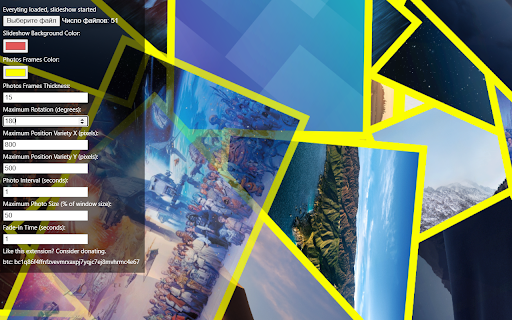
Displays a randomized slideshow of photos from a selected folder as if physical photos thrown on the table. A simple gallery which shuffle shows images from local folder imitating a cool slideshow feature Picasa used to have years ago: displaying your images as if they are thrown on the table one after another. Hower mouse to upper left of the window and you will see interface. Just point extension to a folder and it will load all images from this folder and its subfolders and will start showing slidehshow. You can modify self explaining parameters. My usecase: Run it in chrome tab, F11 for fullscreen, chromecast tab to a TV - have a cool digital photoframe from your tv. Ctrl+tab to leave the fullscreen slideshow tab, F11 to get your tabs normal again. (inactive slideshow tab stays fullscreen and is chromcasted normally)

Photo SlideShow
Turn your Chromebook, PC or Tablet into a Digital Photo Frame! Now with enhanced storage and network compatibility! - Shrinks/Expands photos without displaying black bars! - Allows user to set custom delay between each new photo. - Able to run full screen or without changing your browser's view. - Photos shown sequentially or randomly, while never missing a photo. - Re-scan selected folder for photos on browser start or before the show. - Set optional night mode (dim) during hours when nobody is watching. - Swipe gestures during a slideshow, in order to rewind, stop, and more. Security permissions that should be enabled for all the features: "Allow access to file URLs" is required in order to display your photos. Allows: file:///home/chronos, file://pc/share, file://C:/path, http://localhost We've also added compatibility with our Qwick Serve applicatiion & others: https://apps.microsoft.com/detail/9n1mm0bsm6pb Supports ChromeOS, Chrome, Opera, Vivaldi, and Edge (Chromium).

Google Photos album to Slideshow Video
Create stunning video slideshows from Google Photos albums with audio, effects and transitions 🎬 Create Beautiful Video Slideshows from Google Photos Turn your Google Photos albums into professional-looking video slideshows in just a few clicks! Album to Video Slideshow extracts photos from any Google Photos album and transforms them into dynamic videos with cinematic effects, smooth transitions, and background music. ✨ Key Features 📸 Easy Photo Extraction Automatically scrolls through your Google Photos album Extracts photos in high resolution for crisp, clear videos Choose to include all photos or only selected ones Preview thumbnails before creating your video 🎥 Cinematic Ken Burns Effects Make your slideshow dynamic with professional motion effects: Zoom In / Zoom Out Pan Left / Right / Up / Down Combined effects (Zoom + Pan) Alternate or Random modes for variety 🔄 Smooth Transitions Beautiful transitions between photos: Fade Dissolve Slide (Left, Right, Up, Down) Zoom Random mode for dynamic variety 🎵 Background Music Add built-in music tracks from the extension Upload your own MP3, WAV, OGG, or M4A files Adjustable volume control Loop option for longer slideshows Automatic fade-out at video end 📝 Custom Cover Slide Create a professional title slide: Custom title and subtitle text Adjustable font size Multiple color options Various background colors 🎬 Professional Finishing Smooth 2.5-second fade-out ending Synchronized audio and video fade High-quality WebM output (VP9 + Opus codec) 🚀 How It Works Open any Google Photos album in your browser Click the extension icon to open the panel Extract photos with one click (auto-scrolls the album) Customize effects, transitions, music, and settings Create your video and download it instantly 💡 Perfect For Family photo albums and memories Travel and vacation slideshows Birthday and anniversary celebrations Wedding photo compilations School and graduation memories Social media content creation Business presentations Memorial tributes 🎯 Output Format Videos are exported in WebM format with VP9 video codec and Opus audio codec, ensuring: Excellent quality Efficient file size Wide compatibility (YouTube, Vimeo, social media) Easy conversion to MP4 if needed 🔒 Privacy & Security Works entirely in your browser No photos are uploaded to external servers No account required Your photos stay private 📋 Requirements Google Chrome browser Access to Google Photos (photos.google.com) Logged into your Google account

Image Collective: Webpage to Gallery
Webpage to image gallery: Filter and view images from any webpage in a sleek gallery, enhancing your productivity ### **Enhance Your Image Viewing Experience!** **v2** - Now you can filter images with dimensions and it can fetch/preload all the images by itself, you do not have to wait for all the images to load first. **Description:** This Chrome extension provides a simple and efficient way to view all the images on the current webpage in a gallery-style format. **Key Features:** - **Filter images**: It can exclude icons or thumbnails and it remembers the filter setting, and the filter is customisable for different sites. - **Arrow Key Navigation**: Easily navigate through images using your keyboard's arrow keys. - **Zoom In/Out**: Get a closer look at images or zoom out for a broader view. - **Gallery and Thumbnail Views**: Choose between different viewing styles to suit your preference. - **Full-Screen Mode**: Enjoy a distraction-free experience by viewing images in full-screen mode. This extension is perfect for anyone who wants to quickly access and enjoy images on a webpage, whether you're reading manga, browsing art, or just looking for inspiration. It's lightweight, fast, and easy to install—no additional setup required. If you're looking for a better way to view images online, give this extension a try!

Tiniest Gallery
Save and organize images, videos, and text snippets. Features: categorization, slideshow, color extraction, and zip download. 🌟🎉✨ Embark on an extraordinary creative journey with the Tiniest Gallery extension! Create your own gallery of stunning images, videos, and text snippets! - Save images, videos, and text snippets from any webpage. 💾 🖼️ 🎥 💬 - Organize your content into different categories. 📁 🗂️ - View your saved gallery in a beautiful, responsive layout. 👀 📸 - Enjoy a fullscreen slideshow of your saved items. 🖥️ 🎠 ✨ - Extract and copy dominant colors from images and videos. 🎨 🌈 - Save HEX codes of palette colors with a simple click. 🎨 💾 - Download your saved content as a zip file. ⬇️ 📦 - Filter your content by type: images, videos, or text snippets. 🔍 🏷️ - Control slideshow duration with an intuitive slider. ⏱️ 🎚️ - Quickly access your gallery through a toolbar icon. 🚀 🔧 🔒 Privacy-focused: No sign-up required, no login needed, and your data is saved only on your computer - never on any external servers! 🖥️ 🔐 The Tiniest Gallery extension is a powerful tool for artists, designers, researchers, and anyone seeking visual inspiration or an organized personal collection. 🎨✨🖌️ Unleash your creativity, organize your inspirations, and discover a world of captivating colors and images - all while maintaining complete control over your data. 🌈✨🎨 Install Tiniest Gallery now and let the magic unfold in fullscreen glory, right on your own device! 🌟🌈🎉💻
