
hbmfjllcldcpjcodapkfoijafefafnff
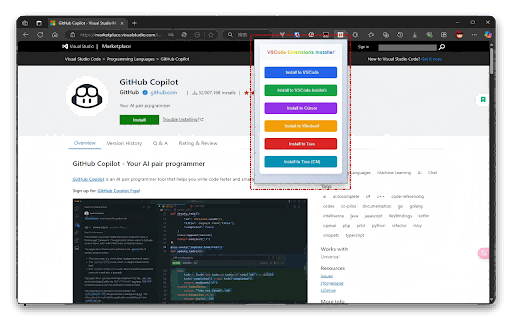

A browser extension to install VSCode extensions directly from the marketplace. - **Popup Interface**: - Provides a user-friendly interface for managing installations.

GitHub Recommender
Get similar repositories on GitHub page

Open in VSCode
The basic idea of this extension is to provide a way for you to open your GitHub files directly in Visual Studio Code. This can be pretty convenient if you want to have more control of your code exploration. The extension works by leveraging a Visual Studio Code extension called vscode-open. You won't have to configure global paths in the Chrome extension or anything like that! If you don't have it installed, don't worry, Visual Studio Code will install it for you once you click over any of the links provided by this extension. You can learn more about how this works here: https://github.com/robertohuertasm/vscode-open

Github to vscode
Quickly open github repos with vscode.dev or clone a repo directly to vscode. This extensions adds some extra functionalities to github.com. It provides a fast and simple way of cloning a repository directly to vscode with the click of a button and also allows opening a repository or file of a repository with vscode.dev, by right clicking anywhere on the web page and selecting "Open with vscode.dev".

VSIX Downloader
Download VS Code extension VSIX files and history versions easily This extension adds convenient VSIX download functionality to the Visual Studio Code Marketplace. When browsing VS Code extension pages, it automatically adds download buttons that allow you to: 1. Download VS Code extension VSIX files of the current version directly 2. Download specific versions from the version history list. Supports multiple languages (English, Simplified Chinese, Traditional Chinese, Spanish, Russian, French, Hindi, Arabic, Japanese, German, Portuguese) and automatically switches based on your browser language, and you can also switch language by clicking the extension icon.
