
lcajicegcfldjbnodelkdmgajajdcgjd

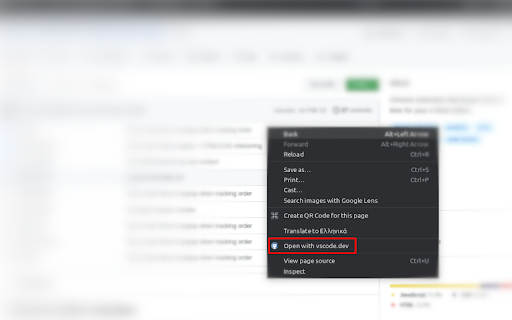
Quickly open github repos with vscode.dev or clone a repo directly to vscode. This extensions adds some extra functionalities to github.com. It provides a fast and simple way of cloning a repository directly to vscode with the click of a button and also allows opening a repository or file of a repository with vscode.dev, by right clicking anywhere on the web page and selecting "Open with vscode.dev".

Clone in VS Code
A browser extension to clone any GitHub, GitLab or Bitbucket repository in Visual Studio Code with just one click. All you need is Visual Studio Code installed on your system for this extension to work. Then just click the extension on any GitHub, GitLab or Bitbucket repo and it will open VS Code where it will take you through the rest of the cloning process. The extension also supports other variations of VS Code such as VSCodium and Cursor. You can change which application the extension opens via the options page.

GL Git Clone
Adds 'git clone' to the ssh/https clone url, so you simply can copy and paste it into your terminal. This is extension is NOT officially from the gitlab team.

GitHub Clone Helper
Adds 'git clone' before HTTPS and SSH clone URLs on GitHub. Are you a developer, engineer, or tech enthusiast who frequently clones repositories from GitHub? If so, you know the drill. You need to prepend 'git clone' before every clone URL manually. But what if we told you there's a way to make it all easier? Well, that's exactly what GitHub Clone Helper is here for! With GitHub Clone Helper, you don't need to type 'git clone' before your URLs anymore. Our extension automatically adds 'git clone' before the clone URLs on GitHub. Now, when you copy the clone URL, you're actually copying the entire 'git clone' command! It's as simple as click, copy, and paste! 🔒 Respecting Your Privacy We value your privacy. GitHub Clone Helper does not collect, store, or share any personal data. The operations are performed locally on your machine, and the extension does not communicate with any servers or third-party services. The extension is designed to work seamlessly with GitHub pages. Whether you're browsing on a public or private repository, GitHub Clone Helper is here to streamline your cloning process. So, why wait? Install GitHub Clone Helper today and experience a smoother, more efficient GitHub journey. Happy cloning! 🎉 Please note that you may want to further customize this based on any unique features your extension may have or any specific tone you want to set.

Quick Open in VSCode
Quickly and easily open file links in VSCode When participating in code reviews, scrolling through comments and then switching to VSCode to open each comment in the editor can become a cumbersome and repetitive task. Features --- - Right click file path links in GitHub and open them in VSCode - Highlight file path links anywhere and open them in VSCode - Open all failing ruby tests at once from BuildKite CI by right clicking the test_data.json file located under the artifacts tab of a ruby test suite in BuildKite Setup --- 1. Download and pin the Open in VSCode chrome extension. Right click the chrome extension and open the "Options" page. 2. For the base path, enter the path to where all your local repositories are located. This should generally be in the format of /Users/{local_user_name}/src/github.com/Shopify. For example, my base path was /Users/sayyant/src/github.com/Shopify 3.Save settings and exit the "Options" page. You should be good to go!
