
hbjpkligkpghgjacpmfoccjjijkmngkg
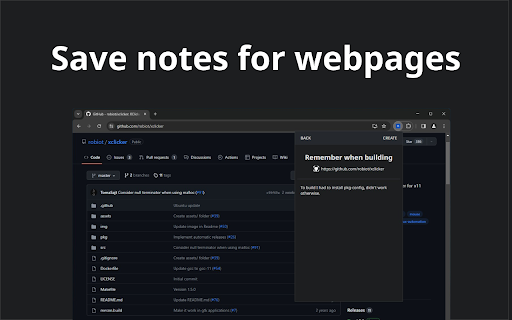
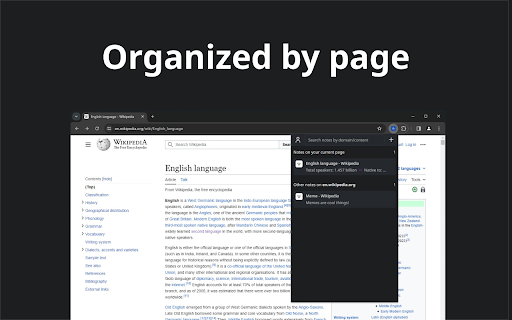
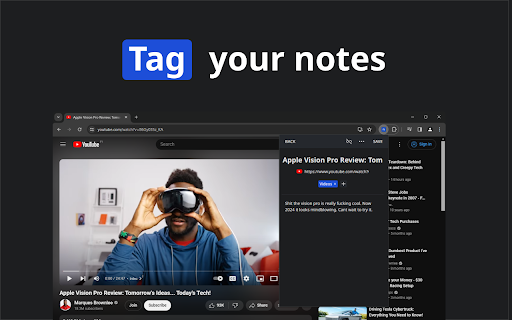
The browser extension for seamless, page-specific note-taking. Notan is the simplest chrome extension for enhancing your browsing experience through efficient note-taking. You'll never have to worry where you saved a note again with Notan. The extension allows you to write down notes, add tags to them, and search them up blazingly fast. Now you don't have to spend countless hours organizing and managing where to save your notes. FEATURES 💾Connect notes to webpages 🔍Search notes with our advanced search field 🕧Organizes them for you 📕Tags to identify and filter notes

Notion Sidebar Tamer
Disable the hover sidebar in Notion. The sidebar in Notion is a great way to navigate between pages, but it can be distracting when you're working between windows. This Chrome extension prevents the sidebar from appearing on hover.

Faro
Save pages with highlighted taglines - Bookmark manager ⨯ web highlighter Chaos in your bookmarks? Can't find what you want? They end up gathering dust? Or you don't even try and end up with 100s of open tabs? Faro is made to fix that! It's the simplest way to save & keep track of pages. With it, even thousands of saves don't get overwhelming. When saving, you highlight a sentence to act as a tagline. It helps you remember what the page is about and why you saved it. If unsure - just save whatever sentence you're reading. All saves appear on your dashboard. They come most-recent-first by default, so you don't forget what you recently saved. You can pick up your reading where you left off - no need for a separate reading list. You can also pin & archive to further arrange it. Organize them with tags. Since you're reminded what you saved and why, you can do it later. It makes your saves much easier to manage than bookmarks. Faro supports nested tags (eg: recipes/vegan), so combines the best of tags and folders. Clicking a save takes you right back to your highlight - especially useful for longer articles. Also: ➣ export to bookmarks to keep them if you uninstall Faro ➣ copy links to highlights and share them or paste into Notion, Obsidian, etc. ℹ️ About your data: When installing you can read: "it can read and change all your data on all websites" The only information that ever gets uploaded (when signed in) when you use it to save: ➣ Open page address ➣ Saved highlight/quote - what's visible in the sidebar ➣ Timestamp ➣ Debug info e.g. errors The extension also keeps track the currently open tab for each window - to update the sidebar as you navigate - but doesn't save or upload that data.

Notion Power
Numerous customization features, enhancing UX/UI for Notion page. Fixed TOC, change theme and font, scroll-to-top button, more... --------------------------------------------------------------------------- Tired of Notion's ugly, boring and inconvenient UI/UX? Notion is: 1. Lack of Fixed Table of Contents 2. Endlessly scrolling through pages to find what you need 3. Only the default theme and font 4. Distracting horizontal scrollbar in board view 5. No Scroll to Top Button 6. Uninspiring UI: The default Notion interface fails to inspire creativity and motivation. --------------------------------------------------------------------------- Why NotionPower? Why use this extension with Notion.so? This extension can help you: - Empower your notion experience with more than 20+ UX/UI features. - Supercharge productivity. - Make notion more attriactive and less boring. - Visualize Your Progress! Track your activity with NotionPower's insightful graphs. - Your data stays safe in your browser. - Increase Line Spacing - Hide Page Properties - Hide Breadcrumb And more...

Outline: quick notes
An extension that let you save you quick notes while browsing Outline help you to save quick notes while browsing on the internet. The process for taking notes with outline is simple. You simply need to install the extension. And start adding whatever you like on the internet. This project I created for my personal use but later I realise it can be used by anyone. So here it is available for everyone. Why Outline? 1. Privacy focused. The data can only read by you only. Its between you and your browser. Code is open sourced. So you can always look whats going. No one can recover your info. If it's gone, it's gone 2. Rich text formatting allowed. You can highlight according to your convenience. 3. Less clutter info: Not everything you read should be in your notes. Sometimes you just need some pointer which you can review later. You can think outline as quick draft which you can save all your info anywhere you want 4. Easy to find whatever you type Note: This extension rely chrome storage api. So it has its own limitation. If you do not need any specific notes, delete it. So that it does not give your storage warning. More you can read here: https://developer.chrome.com/docs/extensions/reference/storage/#property-local And much more feature will come soon... If you want new feature request or found any bug. Feel free to open ticket here: https://github.com/shubhamV123/outline
