
hahpiolgblmdeilkfnidniobgclnnodi
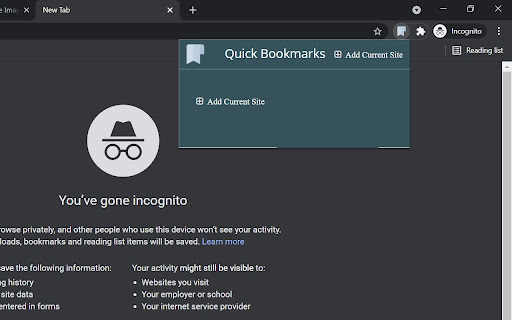


Bookmark your favorite site and quickly view it! This extension will let you bookmark your favorite websites instantly along with features like edit and delete. With a simplistic and minimalistic look it still gives you the instant performance. Hope you all enjoy it!

Locker – Hide & Lock Tabs, Private Bookmarks
Protect your tabs and bookmarks. Hide everything in one click — even in incognito. Hide, lock, and protect your tabs — instantly. Locker gives you full control over your privacy, even in incognito mode. ✔ Hide sensitive tabs in one click ✔ Lock access with password ✔ Keep bookmarks completely private (encrypted) ✔ Work in incognito without leaving traces ✔ Sync safely across devices Perfect if you: – share your laptop – work in public spaces – want to keep personal tabs truly private Locker is your private space inside the browser — simple, fast, and secure. Advanced features: – Organize bookmarks into folders and private collections – Save pages, articles, videos, and PDFs – Built-in AI summaries for saved content – Session manager to restore tabs anytime – Secure cloud sync across devices – Quick actions with QR codes and instant access Your personal encrypted vault for managing information — privately and effortlessly.

Privacy Bookmarks
Privacy Bookmarks is designed to help users manage their bookmarks with a focus on privacy. Privacy Bookmarks is designed to help users manage their bookmarks with a focus on privacy. With Privacy Bookmarks, you can save and organize links to your favorite websites, articles, videos, and more, all while ensuring that your data remains private and secure. *User Manual: 1. Click "Sign in" to log in your account. If you don’t have an account yet, click "Create a new account" to create one and log in. Please remember your password, as it is stored locally and cannot be recovered if lost. 2. Click "Add Current Tab" to add the currently active tab to your privacy bookmarks. 3. Also, you can drag and drop tabs in the right sidebar to add tab to your privacy bookmarks. 4. Click a bookmark in privacy bookmarks list to open it quickly and easily. 5. Hover over the three-dot icon to edit, delete, or open bookmark in incognito mode. 6. Finally, click "Sign out" to log out. Once signed out, no one can view your privacy bookmarks unless you log back in. * Key Features: - Your bookmarks are protected by your password to protect , so they are kept private and only you can access your bookmarks. - Quickly add the current active web to your privacy bookmarks with one click. - Drag and drop to easily add bookmarks. - Supports editing, deleting, and quickly opening your privacy bookmarks in normal mode or incognito mode. - Supports bookmarks search * Privacy-Focused: You can save and organize your favorites in your own account. Bookmarks can only be viewed once you have logged in. * Private Browsing: You can open bookmarks in an incognito window, and no browsing history is left. * No Tracking: Privacy Bookmarks doesn't track your activity or collect your data for advertising purposes.

Secure Bookmarks
Private Bookmarks Manager allows you to create password-protected private bookmark folders. Whether it's sensitive work materials, personal financial websites, or any webpages you don't want others to see, all can be securely stored in encrypted folders. This extension does not collect any user data, and all operations are performed locally. Your bookmark data is encrypted and saved through Chrome's sync feature, and only those who know the password can access the protected content. Main Features Selective encryption: You can decide which bookmarks need encryption protection and which remain public, with separate passwords for each encrypted folder Password protection: Protect your private bookmarks through strong password encryption technology Simple and convenient: Right-click on a webpage and select "Add to Private Bookmarks." Click the extension icon or press Ctrl + Shift + S to quickly access the bookmark management interface Security Using modern encryption technology to protect your data All passwords and sensitive information are processed locally and will not be uploaded to any server Encrypted data remains secure even when synced between devices

LinkSaver: Private Bookmark
Seamlessly maintain your own digital library, conveniently save and access your favorite links, all while protecting your privacy. Experience the ultimate convenience of effortlessly saving and organizing your favorite links with just a single click. With LinkSaver, you'll enjoy unparalleled control over your digital bookmarks, allowing you to create multiple lists, rename them at will, and easily segregate your links for quick and efficient access. LinkSaver prioritizes your peace of mind by implementing a thoughtful confirmation system whenever you choose to delete a list. No longer will you have to worry about losing valuable collections of links due to hasty actions. Your organization and hard work are safeguarded every step of the way. 🐣 Embrace the versatility of LinkSaver's intuitive interface. Two convenient methods await you to effortlessly save your cherished links. Utilize the "Save Current Tab" button to instantly capture the web page you're currently viewing. Alternatively, use the "Add Manually" button to seamlessly save any copied link that catches your attention. But there's more to LinkSaver than meets the eye. 📝 Recognizing the significance of customization, we empower you to rename link titles, giving them personalized meaning that resonates with your preferences. Experience the joy of curating a collection that reflects your unique interests, passions, and aspirations. 🔏 Most importantly, LinkSaver prioritizes your privacy above all else. This remarkable extension operates completely independent of the internet, meaning no connections to external servers, no cookies, and no cache. Your favorite links remain exclusively in your control, ensuring the utmost confidentiality and data privacy. Enjoy the peace of mind that comes with managing your cherished online resources without compromising your personal information.
