
haebcdjghingkcllppmokcikpjjagdii


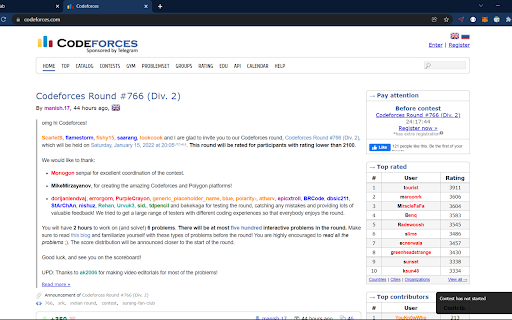
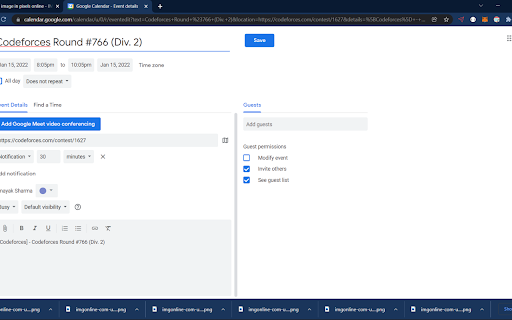
Calendar for all the upcoming contests on different competitive programming platforms like Codeforces, Codechef, Leetcode, etc. Extension for all the upcoming contests on different competitive programming platforms like Codeforces, Codechef, Leetcode. The application provides you an overview of all the upcoming contests, which helps competitive programmers to plan their schedule for the upcoming contests in a month. IMPORTANT: -Click on the extension icon to get all the Contests along with their portal links. -For more info click on "CpCalendar" to see the full calendar. You'll get all things there like add to calendar option and many more. With this extension, you can: -Contest's data gets updated after every hour. Kindly refresh page for having the changes. -Supports all the major competitive programming platforms like Leetcode, Codechef and Codeforces. (still working on adding more platforms) -Direct links to the contest page. -Add to Calendar so it'll give a reminder before the contest.

Competitive Companion
Parses competitive programming problems and sends them to various tools like CP Editor and CPH. Competitive Companion parses competitive programming problems and contests and sends the parsed data to various tools like CP Editor and CPH. At the moment it supports 117 online judges, including most major ones like AtCoder and Codeforces. Using it is very simple. Just install the extension, make sure you got one of the supported tools open, navigate to a problem page and click on the green plus icon in the top-left of your browser. On websites where Competitive Companion is able to parse contests, navigating to the page with all the problems and clicking on the green plus icon will download and parse all problems in the contest at once. You can also use the Ctrl+Shift+U shortcut instead of the green plus icon (configurable on chrome://extensions/shortcuts).

Carrot
Rating predictor for Codeforces For an active contest: Carrot calculates rating changes according the current standings when you open the ranklist, and displays them in a new column. Carrot also adds a column showing the delta required to rank up. The delta calculation is done in real time a̶n̶d̶ ̶i̶s̶ ̶1̶0̶0̶%̶ ̶a̶c̶c̶u̶r̶a̶t̶e̶ (see note below). For a finished contest: Carrot displays the final deltas of each contestant in a new column and shows their rank change, if any, in an adjacent column. For both active and finished contests, Carrot displays a column for performance, the rating at which the delta would be zero. Each of Carrot's columns can be toggled according to your preference, so as to not clutter the ranklist more than you would like. Carrot communicates only with the Codeforces API and runs entirely in the browser. Note: Since all required data is fetched and processed in the browser, Carrot is not ideal if you have a low data cap on your network. If so I recommend using CF-Predictor instead: https://codeforces.com/blog/entry/50411 Note: The rating calculation is no longer 100% accurate since the new rating system was introduced. See https://github.com/meooow25/carrot/pull/18 for details.

LeetCode Video Solutions
Watch free LeetCode video ▶ solutions on the problem page itself. MASSIVE UPDATE (again) 🎉: I have completely updated the extension to work with the NEW UI of LeetCode, including the dynamic UI layout. This has been long time coming and has been requested so many times by you guys. Thanks for supporting the extension so much and yeah, keep LeetCoding! (Stay tuned for more new exciting features) With LeetCode Video Solutions extension, you can watch helpful video solutions of a problem without leaving the problem page! Now you don't have to be distracted by watching cat videos on YouTube when you should be solving a LeetCode problem! When using the extension, you can see the solution videos' duration, upload date, views, channel and other information. The solutions are sourced from all over the internet and they are in different programming languages and cover different solving techniques and algorithms. Report any bugs/ suggest features to the developer: Soumya (@geekysrm) on Twitter 🐜 Don't forget to give a review on the Reviews tab if this extension helped you! :) ⭐ Buy Me a Coffee if you really love this and want to support me: https://coffee.soumya.dev/ ☕

Leetcode Enhancer
A browser extension to improve productivity on Leetcode. It is a light-weight browser extension which boosts your productivity by hiding unnecessary visual elements from the screen, enabling you to focus on what is important. You can change your preferences form the popup menu and find out what best suits your needs. Its has the following features: **[Supports new UI]** - Hide locked problems from the table - Hide / Show any table column - Highlight solved problems - Hide difficulty count - Hide solved problems STOP getting intimidated by difficulty and FOCUS on problem-solving!
