
gppgghbdlgkpcmmjchdjpelepnlnpfni
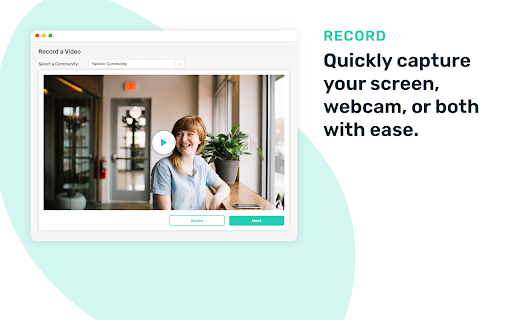


Capture your screen or webcam, effortlessly share your video, and track viewer engagement with OneDay! OneDay’s email extension is a powerful tool that makes it incredibly easy for you to record, share, and track videos straight from your inbox. With the screen recording feature, you can record yourself, your screen, or both, and send the video with just a few clicks. Both features are perfect for anyone looking to add a personal touch to their email communications and increase engagement and conversions. Key Features: - Record - Quickly capture your screen, webcam, or both with ease. - Customize - Enhance your recording by adding a personalized call-to-action. - Share - Directly embed your video in your email for seamless sharing. - Analyze - Monitor recipient engagement with your content in real-time. By using the OneDay Email Extension and Screen Recorder, you can stand out in a crowded inbox, increase engagement and conversions, and build stronger relationships with your prospects and clients. About OneDay OneDay helps businesses improve their sales, marketing, internal, and external communication strategies by enabling users to create high-quality personalized videos that increase engagement, conversions, and sales.

Loom – Screen Recorder & Screen Capture
Record your screen and camera with one click. Share that content in an instant with a link. Loom is the industry leading screen recording tool. Join more than 14 million people across 200,000 companies who use Loom to record their screen, share their thoughts visually, and provide asynchronous feedback. With Loom you can record your screen and instantly get a link to share with anyone. It’s the fastest and easiest way to screen capture and stay connected with your team. Whether you’re screen recording a product demo, giving feedback, or simply sharing your thoughts, Loom makes it simple to stay in the loop with async video. KEY FEATURES 📽️ Record your screen, camera, microphone, and internal audio 💾 Automatically save videos to the cloud and share them instantly with a link 💬 Get notified when someone views, reacts, or comments on your video 😀 Leave time-based comments and emoji reactions 📚 Manage your Loom video library on-the-go and across devices 🔒 Choose who can see your video with security and access controls ⏬ Download recordings to your camera roll 📽️ Screen Recorder 📽️ - Record your screen, camera, or both for free - iOS and Android apps to record your mobile phone - Record in 720p, 1080p, 1440p, or 4k HD - Add flair to your video with camera frames, backgrounds, and camera effects like blurring 💾 Video Hosting 💾 - Store your videos inside of Loom HQ - Upload Zoom and Google Meet recordings directly into Loom to search and find later - Create hashtags to keep track of important videos 🪄 Share With A Link 🪄 - Our recordings finish so fast that we had to file multiple patents - Anyone in the world can watch your screen recording for free - Share your videos to LinkedIn, Twitter, or publish to the Google Search index 🗣️ Drive Engagement 🗣️ - Use comments and emoji reactions to boost engagement - Respond with your own Loom in the comments to create a video message thread - Loom videos automatically display in Slack and Microsoft Teams ⏱️ Meeting Replacement ⏱️ - Send a Loom instead of having another standup meeting - Record a presentation with Loom and send it to your audience ahead of time - Screen record your next weekly update to add rich visual context and your own personal touch TRUSTED BY THE BEST Over 14 million people across 200,000 companies use Loom to record, share, and review asynchronous video. From HubSpot, to Atlassian, to Netflix, Loom is the screen recording and collaboration tool of choice for top companies. EVERYTHING YOU NEED AND MORE Using Loom, you can collaborate with your team, add time-stamped comments and reactions to those videos, and save videos you’ve recorded to your device. Now, you can spend less time crafting the perfect email between meetings, and say it with video using Loom. ABOUT LOOM Loom is the leading video communication platform for async work. Engineered for simplicity and speed, you can record, watch, and share videos to move work forward whether you're at your desk or on the move. LOOM IN THE NEWS "Why are we all trapped in enterprise chat apps if we talk 6X faster than we type, and our brain processes visual info 60,000X faster than text?...now is the time for Loom." – TechCrunch "It fills this gap between writing an email and taking the time to have a meeting or conference...it's rare to have something that's low friction and high impact, while also adding personal connection." – Forbes “Asynchronous video is catching on fast, and Loom thinks it's going to change the way we work. And maybe do everything else, too.” – Protocol

Dadan - Screen Recording & Annotation Tool
Record your mic, screen and camera with dadan. Share recorded video instantly with a link. Record your mic, screen and camera with dadan. Share recorded video instantly with a link. Dadan: Engage, Interact, and Manage Your Video Content Do you record a lot of videos, but wonder if they are truly effective? Are your viewers engaged? Do they take the right actions after watching your content? Dadan is your comprehensive platform to manage your entire video workflow. More than just a screen recording tool, Dadan enables you to create high-quality, interactive screen and webcam videos with audio, making every recording meaningful and action-driven. Key Features ✨ Create and Record ✨ 🎥 Record your screen, webcam, or both simultaneously 🖱️ Highlight your mouse to help viewers follow your actions ✍️ Annotate on screen while recording to draw attention to key elements ✂️ Use the built-in online video editor to trim clips, add annotations, update voiceovers, and apply zoom functions 🛠️ Use Cases for Screen Recorder 🛠️ 🛍️ Product Demos: Showcase your software or product features clearly and professionally 📘 Onboarding and Training: Guide new employees or users with step-by-step visual instructions 🎧 Customer Support: Explain solutions visually to reduce confusion and support tickets 📢 Project Updates: Share progress and walkthroughs with stakeholders or team members 🎓 Educational Content: Create video lessons, tutorials, or walkthroughs for learners 📅 Meeting Recording 📅 📌 Connect with Google and Outlook calendars to automatically record scheduled meetings 📝 Record and transcribe meetings into downloadable VTT files 🌎 Translate captions into over 100 languages for broader accessibility 🧩 Video Interactions 🧩 🔘 Call-to-action buttons 📊 Polls ❓ Quizzes ✅ True or False questions 💜 Ratings ✍️ Open-ended questions 📝 Custom text messages 🤖 Use AI to automatically generate relevant interactions 📨 Embed forms directly into your videos to capture viewer responses 🎨 Custom Branding 🎨 🖼️ Upload your logo to personalize your videos 🎨 Set your player page color to match your brand identity 🌐 Connect your own custom domain for a seamless viewer experience 🔒 Privacy Controls 🔒 🔑 Protect videos with passwords ⏳ Set link expiry dates and schedule availability 📵 Disable downloads to safeguard content 🚫 Restrict or revoke access at any time by making videos private 📤 Effortless Sharing 📤 📧 Share videos via email or direct link 👥 Create team workspaces for collaboration 🗂️ Organize videos using folders 📺 Build and share playlists or a public video profile With Dadan, you do not just create videos; you create experiences that engage, inform, and drive action. Start turning your video content into an interactive and productive asset today.

Vidline Screen Recorder
Quickly record screen with audio and camera. Instantly share videos with one click. Vidline helps you to record your screen and cam quickly, and share the recording instantly. You can record screen with camera and audio, share videos instantly with links, collaborate with teams, upload recordings to the cloud, or download videos, and more! Get Vidline now for free! No ads! No recording time limits! KEY FEATURE ⏺️ Record screen, camera, microphone and system audio 🔗 Share recordings instantly with links, viewers could watch the video without login 🔒 Choose if viewers could download and save your shared videos 💾 Save videos to the cloud, without occupying your computer space ⏬ Download HD screen recording files without watermark 💬 Comment and interact with people on videos 🖌️ Mark contents and explain clearly through annotation tools 🎬 Right click web to start recording quickly 🖥 Manage recorded videos easily in the video library 📀 Record videos of different resolution at 720p, 1080p, 2k and 4k RECORD SCREEN - Record videos at full screen, in a window, a browser tab, or custom area - Record system audio, microphone, output Bluetooth, earphone, voice - Select cloud recordings, recorded videos will directly save to the cloud, with no space occupied - Select local recordings, recorded videos will directly save to your computer RECORDING SCENARIO - Study: record videos of online courses and remote teaching, connect educators and students, record screen of research reports, useful information - Work: Screen record business meetings, zoom meetings and personal presentation - Entertain: Screencastify game videos, and share them with friends and family, capture live stream, facecam reaction, music video, Youtube video - Daily life: Record everything you think that is worth stored and memorized VIDEO NOTES FOR WORK - Create workspaces for teams to collaborate, store materials - Leave time-based comments, tag team members to notify them - Get notified immediately when someone comments - Save time for meeting arrangements ABOUT VIDLINE Vidline is a video recorder created for hybrid workplaces and remote workers. There are now countless uses for short videos in the workplace from daily standups to online classes, from bug reports to design demos. Vidline is trying to be the best easy-to-use screen recorder extension to help improve video communication and productivity in work, study and daily life. If you have any questions or feedback, please feel free to contact us at care@vidline.com. We’ll be always here to help along the way.

Zight Screen Recorder, Screenshot App
The best screen recorder for Chrome. Capture your screen, webcam, and instantly share videos and screenshots in seconds. The Ultimate Screen Recorder, Screenshot Tool, and GIF Maker for Chrome Capture your screen, webcam, annotate, and instantly share videos and screenshots in seconds. 1️⃣ Trusted by Over 5 Million Users Worldwide 🌍 2️⃣ Screen Recording and Screenshot Capture All-in-One 📷🎥 3️⃣ Instant Sharing with Shortlink URLs 🔗 4️⃣ Annotate Screenshots and Recordings Easily ✏️ 5️⃣ Capture Screen, Voice, and Webcam Together 🎤📹 6️⃣ Integrates Seamlessly with Your Favorite Apps 🤝 7️⃣ High-Quality HD Video Recording 🖥️ 8️⃣ Secure Sharing with Public or Private Links 🔒 9️⃣ Boost Productivity with Visual Communication ⚡ 🔟 Fast, Easy to Use, and No Ads 😊 🎥 Screen Recording • Capture your screen, webcam, and microphone at the same time • Record your desktop, a specific window, or just your webcam • Automatically upload and generate a shareable link when done • Share directly into Slack, Gmail, Jira, Asana, and other tools • Trim and edit recordings as needed • Capture Screenshots • Capture your entire screen or select specific areas. • Annotate Screenshots • Add text, arrows, lines, shapes, and emojis. • Highlight important parts or blur sensitive information. • Resize or crop screenshots as needed. • Save & Share • Instantly share with a shortlink URL. • Copy screenshots directly for quick pasting. • Add markups to screenshots and recordings • Use arrows, lines, shapes, text, or freehand drawing • Customize colors and callouts to communicate clearly and quickly • Generate a unique Request Video link • Anyone can record a video for you without installing anything or creating an account • You can reuse or expire the link at any time • Request Logs mode automatically captures browser console logs, network requests, and device info • Ideal for bug reporting, QA, customer support, and product feedback • Every submission is delivered as a video plus technical logs for complete developer-ready context • Share with a simple URL • Paste links into Slack, Gmail, Jira, Notion, and countless tools • Control privacy with public, private, and password-protected settings • Rich previews in email and collaboration apps, like Gmail • Embed files in blogs, docs, help centers, and more • Alt + Shift + V: Capture visible area • Alt + Shift + F: Capture full page • Alt + Shift + L: Start video recording • Smart Actions convert videos into step-by-step guides, SOPs, FAQs, or bug reports • Automatic transcription and captioning • Smart Titles created instantly for every video • Smart Summaries to help viewers consume content quickly • Full-text search across your video library • Transcribe in 50-plus languages • Smart Chapters for structured navigation and fast insight extraction Get Started for Free Sign up with no credit card required. Free and paid plans available. Zight for Teams, Business, and Enterprise • Single Sign-On • Custom branding on all download and share pages • Use your own custom domain • Advanced security controls • Embed anywhere across your knowledge base, docs, or product Connect With Us:
