
gpolcofcjjiooogejfbaamdgmgfehgff

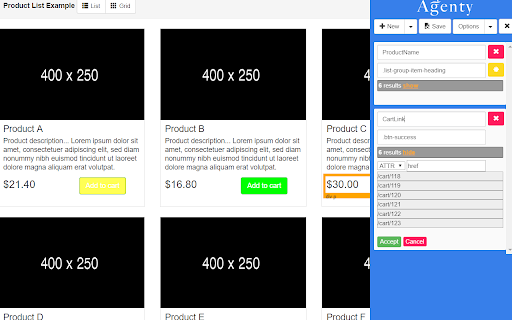
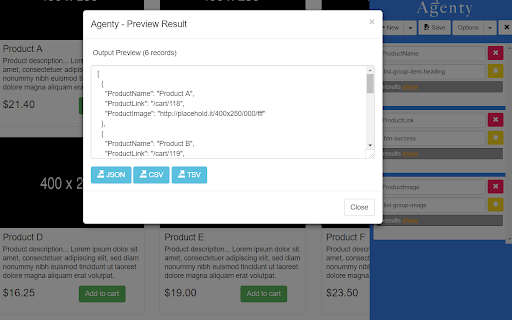
Web scraping software with AI to extract data from websites using point-and-click extension to get data from web crawling Real-time web data extraction preview and download into various formats like JSON, CSV or TSV. Build free web scraper scripts using the Chrome extension and host on Agenty cloud for batch URL for bulk extraction, and more advanced web scraping features: like Scheduling, Anonymous website proxies, Website Crawling, Scrape 100 or millions of web pages, Extract multiple website simultaneously, uploading data to server, FTP, S3 etc. Using the extension, you can build 3 types of agents - 1. Web scraping agents 2. Change detection agents 3. Web crawling agents How to use -------------------------------- 1. Go to website you want to extract and then launch the extension. 2. Select agent type under "Create new" or you can use sample agents template under my agents. 2. Click on a webpage element that you would like to extract (it will turn green). Agenty will then generate best CSS selector for that element, and will highlight (yellow) everything that is matched by that selector. 3. Now you can click on a highlighted element to remove it from the selector (red), or click on an un-highlighted element to add it to the extractor. Through this process of selection and rejection, Agenty will help you come up with the perfect CSS selector for your items need to be extracted. 4. Extract any number of fields with TEXT, HTML or ATTR (attributes) and instant output preview of extracted data. How to edit an agent ------------------------------- 1. Go to the website URL, where the agent was created 2. Launch the Agenty extension 3. Click on the open button beside your agent to open it in Agenty. 4. Now, you can add/change anything and save it back to your account. Features -------------------------------- 1. Extract any number of fields from a web-page. 2. Use the built-in CSS selector to generate pattern with one click. 3. Write your own custom CSS selector. 4. Choose the item you want to extract. E.g. TEXT, HTML or ATTR (Attribute) 5. See the result preview instantly as CSS selector selected. 5. Toggle the position left/right. 7. Export output in most popular file format JSON, CSV or TSV Whether you are scraping websites with Agenty or using the API in C#, Python, Node JS, Perl, Ruby, Java or JavaScript programming language. You can use this Chrome extension to auto-generate CSS selectors for web scraping or web automation with Playwright, Puppeteer and Selenium for website testing.

Spider Free - The simplest web scraper
Spider let's you turn websites into organized data, download them as JSON/CSV. No coding or configuration required. Spider is a smart point-and-click web scraping tool. With Spider, you can turn websites into organized data, download it as JSON or spreadsheet. There's no coding experience or configuration time involved, simply open the chrome extension and start clicking.

AnyPicker - A.I. powered No Code Web Scraper
AnyPicker is a free web data scraper. Powered by A.I. pattern recognition engine, You can scrape any website with just a few clicks. AnyPicker is a free and easy-to-use web data scraper. With a powerful A.I.-powered pattern recognition engine, You can extract any website data easily with just a few clicks. ↘️ Works With Any Web Site, Even Behind Logins ↘️ Export XLS Excel and CSV format ↘️ Scrape and Download Images ↘️ Full Support for Pagination and Infinite Scroll ↘️ Save Recipes For Repeat Scraping ↘️ Crawl Multiple Pages At the Same Time • Public business lead scraping, email collector, or public phone scraping • Scrape real estate data from Zillow, RedFin estate agent, or broker websites • Amazon, Shopify, BigCommerce, or any eCommerce platform data scraper for price monitoring, detailed description extraction; • Extract Amazon, Walmart, Etsy, Lazada, AliExpress product reviews, and work with any eCommerce website. • eBay listing scraper to track competition on eBay for SME owners and home businesses; • Scraping data on Yelp, Yellow Pages to optimize your eCommerce shops; • Contact scraping and data scraper for data extraction freelancers on Fiverr and Upwork; • Use AnyPicker for Data entry, automation form filling, and data extraction assistant for working from home or home business; • Scrape Website data scraping for SEO and content extraction tools; • Monitoring new job posting on Indeed or Monster, or any employer websites for job seekers; • Scrape Lead information from LinkedIn or Indeed and enter into Salesforce for potential sales opportunities and or recruiter job candidate database; • Gather data from any website for data mining purposes AnyPicker is perfect for • Salesperson for lead info gathering • Data Analyst for data mining • Amazon Sellers for review collecting • eBay Retailers for competition monitoring • Recruiters for job candidates collecting • Job Seekers monitoring job postings • Marketer Social media monitoring • Small business owners trying to monitor reviews and ratings • Rapportive LinkedIn Sales Navigator users AnyPicker is a simple data scraping tool to scrape web data or files. AnyPicker is also an image scraper or file scraper to extract image URLs and download images or files directly. AnyPicker can scrape images in URLs and then download them in batches. What are the alternatives if AnyPicker doesn't work in your case? Grepsr works excellent with some websites for web extraction; Instant Data Scraper can help you to detect data automatically and start to scrape on the same page easily; NoCoding Data Scraper (NDS) is good for workflow automation; SimpleScraper makes very intuitive previews and is easy to use; Distill helps you to monitor web elements and notify you when any changes; If you know to program, the following products will work out great for your needs: Octoparse, Axiom, and UI.Vision Please let us know if you have any feedback or feature requests:

Free Web Scraper: Fast, Simple Web Scraping
Blazing fast web scraping. Easily scrape any web page data into a spreadsheet table or CSV, for free. Free Web Scraper is the the ultimate web scraping tool for blazing fast data extraction from web pages! With Free Web Scraper, you can extract data from any website for free in record time, with just a few clicks. Here are some reasons why Free Web Scraper is the go-to tool for web scraping: ★ Lightning-fast data extraction - Free Web Scraper is the fastest way to get structured data from any website quickly and efficiently. No more clunky manual copying and pasting. ★ The friendliest interface - Free Web Scraper has a super simple interface, making it easy to extract data from any site without code. ★ Smart data scraping technology - Free Web Scraper uses smart data scraping technology to extract data from even the most complex websites, without any manual configuration required. ★ Customizable data extraction - With Free Web Scraper, you can customize your data extraction to extract exactly the data you need, without any unnecessary data cluttering up your results. ★ CSV and Spreadsheet Export - You can download your results as a CSV file or import into Data Blaze, the spreadsheet that lets you use your data anywhere. ★ Free to use - Free Web Scraper is completely free to use. Simply install the extension and start scraping! ★ E-commerce sites: Free Web Scraper can be used to scrape product data from e-commerce sites like Amazon, eBay, and Walmart. This data can then be used for price comparison, market research, and more. ★ Social media sites: Free Web Scraper can be used to scrape data from social media sites like Facebook, Twitter, and Instagram. This data can be used for social media monitoring, sentiment analysis, and more. ★ Job boards: Free Web Scraper can be used to scrape job postings from job boards like Indeed, Monster, and Glassdoor. This data can be used for job searching, applicant tracking, and more. ★ News sites: Free Web Scraper can be used to scrape news articles from sites like CNN, BBC, and The New York Times. ★ Real estate sites: Free Web Scraper can be used to scrape real estate data from sites like Zillow and Realtor.com. This data can be used for house hunting, property valuation, and more. ★ Stock trackers: Free Web Scraper can be used to scrape data from stock trackers like Yahoo Finance, Google Finance, and Nasdaq. This data can be used for stock market research, portfolio tracking, and more. Whether you're a seasoned web scraper or just getting started, Free Web Scraper is the ultimate tool for fast and efficient data extraction. Try it out today and see for yourself how easy web scraping can be!

Simple Web Scraper (Free)
Scraping the values of multiple web page META tags, JS variables, etc. at once. This tool is for bulk checking the values of multiple web page META tags, JavaScript variables and functions, Google Analytics function parameters, etc. at once. It is also possible to customize the tag to be checked and the function name / variable name. The results can be downloaded in CSV. Tags and attributes to be checked are freely customizable. In addition to meta tags, you can also specify the value of any HTML tag, such as bread crumbs, or the value of an attribute. Please set according to the markup rules of each site. The values of Java Script variables and function names can also be set as acquisition targets. Since the page is opened once in the browser and then the HTML is checked, the tags drawn in the tag manager are also checked. - The check results and registered configuration data are not sent to any servers. - According to correspond to manifest v3, analyzed via Google Analytics is stopped.
