
bjkpgfhekfmdffdphnniobddhkjlmmlj
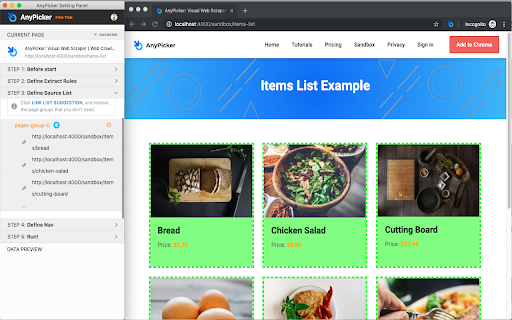

AnyPicker is a free web data scraper. Powered by A.I. pattern recognition engine, You can scrape any website with just a few clicks. AnyPicker is a free and easy-to-use web data scraper. With a powerful A.I.-powered pattern recognition engine, You can extract any website data easily with just a few clicks. ↘️ Works With Any Web Site, Even Behind Logins ↘️ Export XLS Excel and CSV format ↘️ Scrape and Download Images ↘️ Full Support for Pagination and Infinite Scroll ↘️ Save Recipes For Repeat Scraping ↘️ Crawl Multiple Pages At the Same Time • Public business lead scraping, email collector, or public phone scraping • Scrape real estate data from Zillow, RedFin estate agent, or broker websites • Amazon, Shopify, BigCommerce, or any eCommerce platform data scraper for price monitoring, detailed description extraction; • Extract Amazon, Walmart, Etsy, Lazada, AliExpress product reviews, and work with any eCommerce website. • eBay listing scraper to track competition on eBay for SME owners and home businesses; • Scraping data on Yelp, Yellow Pages to optimize your eCommerce shops; • Contact scraping and data scraper for data extraction freelancers on Fiverr and Upwork; • Use AnyPicker for Data entry, automation form filling, and data extraction assistant for working from home or home business; • Scrape Website data scraping for SEO and content extraction tools; • Monitoring new job posting on Indeed or Monster, or any employer websites for job seekers; • Scrape Lead information from LinkedIn or Indeed and enter into Salesforce for potential sales opportunities and or recruiter job candidate database; • Gather data from any website for data mining purposes AnyPicker is perfect for • Salesperson for lead info gathering • Data Analyst for data mining • Amazon Sellers for review collecting • eBay Retailers for competition monitoring • Recruiters for job candidates collecting • Job Seekers monitoring job postings • Marketer Social media monitoring • Small business owners trying to monitor reviews and ratings • Rapportive LinkedIn Sales Navigator users AnyPicker is a simple data scraping tool to scrape web data or files. AnyPicker is also an image scraper or file scraper to extract image URLs and download images or files directly. AnyPicker can scrape images in URLs and then download them in batches. What are the alternatives if AnyPicker doesn't work in your case? Grepsr works excellent with some websites for web extraction; Instant Data Scraper can help you to detect data automatically and start to scrape on the same page easily; NoCoding Data Scraper (NDS) is good for workflow automation; SimpleScraper makes very intuitive previews and is easy to use; Distill helps you to monitor web elements and notify you when any changes; If you know to program, the following products will work out great for your needs: Octoparse, Axiom, and UI.Vision Please let us know if you have any feedback or feature requests:

Data Scraper
extracts content from web pages, with the ability to navigate through multiple pages using pagination. Data Scraper is a powerful browser extension that enables you to easily extract content from web pages. With this extension, you can quickly and effortlessly scrape information from various websites without having to write any code. Whether you need to collect data for research, analysis, or any other purpose, Data Scraper can simplify the process and save you time. One of the key features of Data Scraper is its ability to navigate through multiple pages using pagination. This means that if you're trying to scrape data from a website that spans multiple pages, you can simply set up the extension to navigate through each page and collect the desired data. This feature is incredibly helpful if you're working with large data sets and need to automate the data collection process. Data Scraper also allows you to configure the specific data you want to extract from a web page. You can select which elements you want to scrape, such as text, links, images. The extension's user-friendly interface makes it easy to set up and run data scraping tasks. You can save and export your data in CSV format. With Data Scraper, you can streamline your web scraping process and focus on the insights and analysis that matter.

Grabbly
A web extraction tool that allows you to easily extract data with a single click. It accomplishes this by identifying the key areas of a website and then Grabbing the content. ★ The power of Artificial Intelligence will auto-detect the key data points on the page for you. ★ Convert web data to structured data. ★ Easy to use 1 click easy Grabbs. ★ Schedule reoccurring Grabbs. ★ Deep Web Extraction ★ Grabbs are secure. ★ Grabb lists and records! ➤ Please note, all extracted data belongs to you. Regardless of the plan type.

GrabzIt Web Scraping Assistant
Create Web Scrapes online easier than ever before with GrabzIt's Web Scraping Assistant. Supercharge your web scraping by easily bypassing strict browser security blocks. GrabzIt's Web Scraper Wizard allows you to extract data directly in your browser without downloading heavy software. While this works seamlessly for 95% of websites, some sites use strict security settings—like Content-Security-Policy (CSP) headers—that can block your access. This assistant extension acts as the perfect companion to solve those issues instantly. Perfect for: - Bypassing strict CSP headers that block data extraction. - Ensuring complex web pages render correctly inside the Web Scraper Wizard. - Speeding up your workflow with quick-action browser shortcuts. How It Works: To make your web scraping smooth and hassle-free, this extension safely disables specific security features only for requests originating from the GrabzIt Web Scraper Wizard. Additionally, it intelligently rewrites complex URLs to ensure the target website is represented accurately and reliably while you scrape. Bonus: Time-Saving Shortcuts! The Web Scraping Assistant also comes packed with handy quick-access shortcuts, allowing you to launch a scrape or convert the current webpage into other formats faster than ever before! Backed by GrabzIt Limited's enterprise-grade infrastructure. Fast, secure, and reliable.

Web Scraper - Free Web Scraping
Web data extraction tool with an easy point-and-click interface for modern web Free and easy to use web data extraction tool for everyone. With a simple point-and-click interface, the ability to extract thousands of records from a website takes only a few minutes of scraper setup. Web Scraper utilizes a modular structure that is made of selectors, which instruct the scraper on how to traverse the target site and what data to extract. Thanks to this structure, data mining from modern and dynamic websites such as Amazon, Tripadvisor, eBay, as well as from lesser-known sites is effortless. Data extraction is run on your browser and doesn’t require anything to be installed on your computer. You don't need Python, PHP, or JavaScript coding experience to start scraping. Additionally, it is possible to completely automate data extraction in Web Scraper Cloud. Once the data is scraped, download it as a CSV or XLSX file that can be further imported into Excel, Google Sheets, etc. Features Web Scraper is a simple web scraping tool that allows you to use many advanced features to get the exact information you are looking for. It offers features like: * Data scraping from multiple pages; * Multiple data extraction types (text, images, URL’s, and more); * Scraping data from dynamic pages (JavaScript + AJAX, infinite scroll); * Browsing scraped data; * Exporting scraped data from a website to Excel; It is dependent only on the web browser; therefore, no extra software needed for you to start scraping. How to begin scraping? There are only a couple of steps you will need to learn in order to master web scraping: 1. Install the extension and open the Web Scraper tab in developer tools (which has to be placed at the bottom of the screen); 2. Create a new sitemap; 3. Add data extraction selectors to the sitemap; 4. Lastly, launch the scraper and export scraped data. It’s as easy as that! What can Web Scraper be used for? * Lead generation - email, phone number, other contact detail related data mining from various websites; * E-commerce - product data extraction, product price scraping, description, URL extraction, image retrieving, etc; * Website content crawling - extract information from news portals, blogs, forums and so on; * Retail monitoring - monitor product performance, competitor or supplier stock and pricing, etc; * Brand monitoring - product review, social content crawling for sentiment analysis; * Business intelligence - gather data for key business decisions, learn from your competitors; * Big data extraction for machine learning, marketing, business strategy developments, researches; * And much more. Web scraping can be a little bit difficult at first, that's why we have created informational guides that can help you. For video tutorials, documentation, how-to’s, playground web pages and blog, visit our website: https://www.webscraper.io/ If you want to discuss web scraping, request features, ask questions or submit bugs, visit our friendly forum here: https://forum.webscraper.io/ Regarding the privacy policy of our product, see “Browser Extension Privacy Policy” at https://webscraper.io/extension-privacy-policy Thank you for choosing us!
