
gpnmpnhiimfmafenhcojmfaejljffhpn
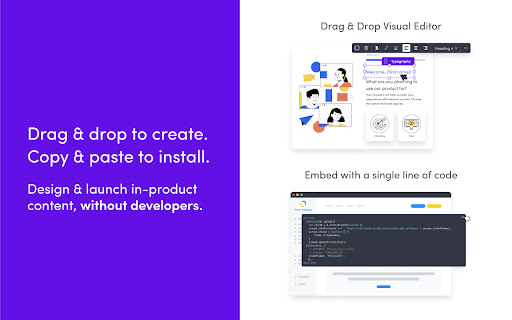
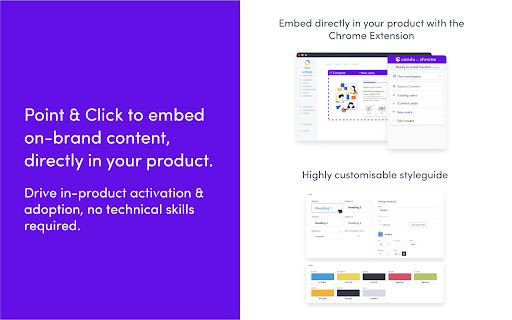
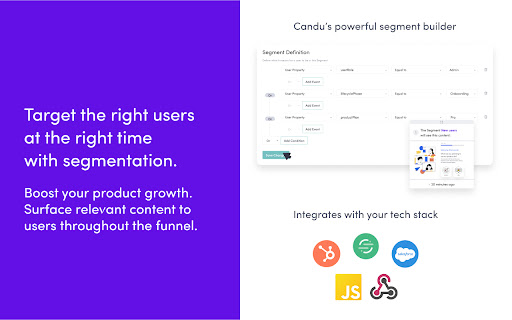
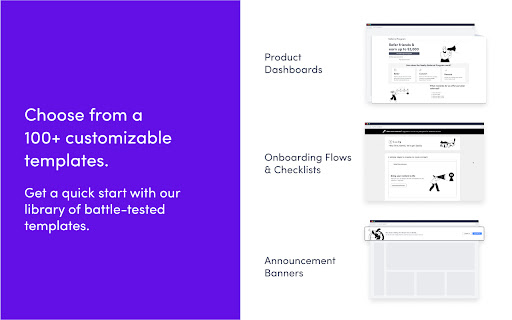

Install the Candu Chrome Extension to preview and publish experiences like homepages & empty states, into your product. After using the Candu Editor to create your content, use the extension to preview what your experience will look like before you make it live to your users! Point and click to see how it will embed into your existing UI or overlay on top of it. Happy with your design? Simply hit save to publish it! Creating & launching native-looking, high-quality UX has never been faster or easier.

Usetiful - Digital Adoption Platform
Interactive product tours, smart tips and checklists for digital products. Usetiful is a Digital Adoption Platform that improves onboarding and user experience in your digital products. With the Usetiful extension you can: ✅ Seamlessly preview any Usetiful content like product tours and checklists in your browser, ensuring perfect alignment with your website’s design before going live. ✅ Quickly select and sync website elements with the Usetiful editor for easy updates. ✅ Use the extension to demonstrate Usetiful features on third-party platforms where direct installation isn’t possible, ideal for internal training and demos. Streamline your content creation without touching single line of code.

Reader Mode Premium
A feature-packed distraction-free web reader with dyslexia support and research tools Reader Mode is a feature-packed Chrome reading extension and web app that removes clutter, ads and distractions, while also includes dyslexia support, bookmarking, annotating, highlighting, text-to-speech and many other features all in one tool. Features: ✔ Distraction-free and ad-free "Reader Mode" ✔ Deletion of unwanted elements ✔ Theme customization ✔ Custom theme ✔ Custom CSS ✔ Print pages ✔ Fullscreen mode ✔ Auto-run ability ✔ Save edited pages ✔ Share To Twitter ✔ Dyslexia Fonts ✔ Dyslexia Ruler ✔ Text To Speech ✔ Article Outline ✔ Text annotating and highlighting ✔ Notes List ✔ Auto-scroll functionality ✔ Dark Panel Mode ✔ Google Search ✔ Google Translate ✔ Remove footer option ✔ Cloud storage ✔ Share pages in Reader Mode format ✔ Read-it-later mode ✔ Full-text search ✔ Favourites ✔ Organization folders ✔ Tags for pages ✔ Sync styles & settings To see all the features and learn more, check out https://readermode.io Version 1.2.8 (22/4/2020) -Fixed saving and fetching article’s data issue -Fixed tag’s close button color on dark mode Version 1.2.6 (22/4/2020) -Fixed links not working after deletion mode -Remove auto-close ability for OptionsSavedPanel -Set max-width for all elements to 100% Version 1.2.5 (15/4/2020) -Added Tags feature -Title, Description and Author is now editable -Author is default to “Unknown author” if not found -Show “Saved” notice if article is already saved -Auto-saved page when highlighting Version 1.2.1 -Added sync styles -Fixed outline li default style -Removed default line-height css from default and app -Removed inline css styles -Removed Headings from settings -Removed cr-saved-info and cd-footer default colors -Fixed TTS Pitch not saving issue Version 1.1.6 -Added indicator when the main menu is active -Moved Custom CSS settings panel to the bottom -Fixed auto height for options panel -Fixed some font styles not saving issue -Rearranged font options position -Added premium fonts Version 1.1.5 -Used global address for Google Search -Updated description -Included li tag in text color changes Version 1.1.4 -Fixed notes dissapearance -Auto hide “Saved Panel” -Updated the color of ReaderMode’s icon Version 1.0.9 - Fixed reader’s width not-saving issue - Fixed overflow text for meta info - Added style for quotes content - Fixed auto-run rules grammar mistakes - Removed Helvetica Neue font - Set default font as Arial - Notes List is set to “Show” by default

Replug | URL Shortener & Links Management
Shorten, track and optimize your links with catchy call-to-actions, retargeting pixels, branded links and powerful analytics. Replug is a feature-rich URL shortener tool that lets you create simple short links or branded short links (custom domain short links). Install Replug URL shortener chrome extension to get the most out of the links you share. Click on the extension icon in the toolbar to quickly create the shortened link of the page you’re visiting. Replug is not just a link shortener tool; it’s an all-in-one link management tool that lets you track and optimize your links with catchy call-to-actions, retargeting pixels, branded links, and powerful analytics. Shorten Links: Easily shorten long and unattractive URLs to short links in just a few clicks. Branded Short Links: Create branded short links or custom domain links to build and improve your brand authority. For example, turn any link like “www.thirdpartywebsite.com/link” to “your brand.co/link”. Call-to-actions (CTAs): Add CTAs to your shortened links (even third party links) to collect leads, drive traffic to your website and increase conversions. Edit Short Links: Easily change or edit the destination URL of your short links. Social Media Bio Links: Create beautiful landing pages for your the bio links of Instagram, TikTok and other social media platforms. You can create bio links landing pages from our dashboard by signing in to your account. Custom Widgets: Add 3rd party widgets to your links. For example, opt-in forms from tools like Optinmonster, Sumo, Poptin or your own lead forms. Retargeting Pixels: Replug allows you to add retargeting pixels to your links and retarget anyone who clicks on your links. QR Generator: Easily a smart QR code with every branded short link you create. Advanced Link Analytics: Make informed decisions by analyzing KPIs such as clicks, impressions, conversions, visitors by country, visitors by source, and many more. Password Protected Links: Restrict access to your links by protecting them with passwords. Other replug features include UTM Builder, RSS Automation, Deep Links, Automated Reports, and tags. Visit https://replug.io to create your account and use our advanced features.

typedesk Canned Responses
Boost your productivity effortlessly! Automate typing tasks, streamline with canned responses, text snippets, and automation. Typedesk is the leading app to reclaim time wasted typing the same things over and over again! Create text templates of your every day sentences and messages, and typedesk makes reusing them quick and easy. Use the / character followed by your custom shortcuts to quickly insert your response. For instance, typedesk can transform "/eml" into your email address, or "/tmpl" into a full email with your opening line and signature. Need something more visual? Hit Alt+C and typedesk's search bar opens up instantly to quickly and easily find and insert the responses you need. ➤ It works where you do Whether you need your snippets within your email client, word document, code editor or backoffice, typedesk works out of the box with all the apps and websites you use daily. Our apps for Windows, Mac and all the major browsers are giving you typing superpowers everywhere you work! ➤ Powerful variables for personalised responses Personalising messages can be daunting, let alone making sure you didn't leave a placeholder before hitting "Send"! typedesk's powerful engine allows you to create interactive forms to personalise each response quickly and easily so you always hit the right spot! ➤ Designed for teams typedesk has been designed from the ground up to work great with teams. Invite as many users as you want on your account, and share one or more folders with specific permissions for each user. ➤ Built for privacy Unlike most text expanders, typedesk never listens to your keyboard before you request it with a shortcut. Your data is encrypted with LUKS and SSL to ensure complete peace of mind. Need your responses outside of your browser? No problem, get our apps for Windows and Mac to experience the same typing speed in your favorite native apps. ➤ Don't take our word for it! "We're loving typedesk! It's easy to use, and saves us tons of time when it comes to sending emails to our customers." Seb Fontan, Founder @ TripHitz Marketing Agency "We keep finding new ways to use typedesk. It started with the obvious canned email responses, especially for the repetitive emails we get every day. Recently, we've implemented it with social media posts, especially YouTube videos descriptions, and this is where Variables comes in handy." Ninos M., Creative Director "The set up was quick and painless and adding in new templates or using the templates after they are added takes no time at all, making working with emails a short and simple process." Tori, Customer Success @ BookRetreats
