
gpmodmeblccallcadopbcoeoejepgpnb

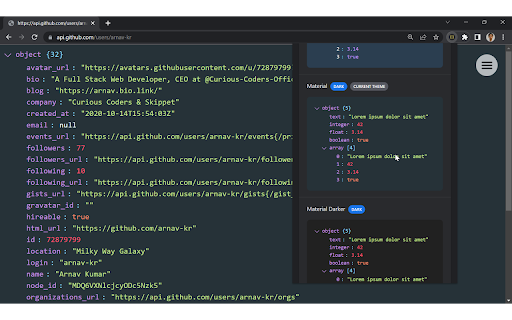

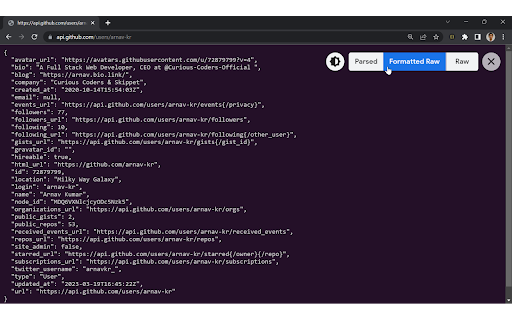

Formats JSON automatically! Open Source, Available with 60+ Themes, Syntax Highlighting, automatically linkifies links and more. JSON Formatter automatically formats and prettifies JSON in Chrome. It comes with support for syntax highlighting and over 60 themes. It also makes links clickable automatically and has multiple modes to view JSON, including Parsed Mode, Formatted Raw Mode, and Raw Mode. You can toggle between modes using shortcut keys: Features: ● Over 60 themes for both light and dark mode ● Syntax highlighting ● Works offline ● No tracking or analytics ● Word wrapping and sorting order to stay organized ● Works with any JSON webpage ● Makes links clickable ● Formats JSON automatically ● Raw, Formatted Raw, and Parsed Mode ● Remembers theme preferences ● Shortcut keys for ease of use ● Collapsible toolbar Note: By default, the extension theme is "System Default." It will change according to your browser's theme. If you want it to be the theme of your choice, you have to set it from the "Extension Settings" or "Extension Options." To change the default formatting option and other settings, set your desired option in the extension settings. To make JSON Formatter work properly on all kinds of sites, in the extension permissions, change "Allow this extension to read and change all your data on websites you visit" from "On Click" to "On all sites," if not already set. To use JSON Formatter in local files, enable "Allow access to file URLs" in the extension settings. To use JSON Formatter in Incognito mode, enable "Allow in Incognito" in the extension settings. Bug reports and suggestions: https://github.com/arnav-kr/json-formatter/issues

JSON Formatter
The original JSON Formatter, now with optional dark mode 🌚 Auto-formats JSON when you load it in a browser tab. - Fast, even on very long JSON pages - Dark mode - Syntax highlighting - Collapsible trees, with indent guides - Clickable URLs - Negligible performance impact on non-JSON pages (less than 1 millisecond) - Works on any valid JSON page – URL doesn't matter - Buttons for toggling between raw and parsed JSON - FIXED: Exports the parsed JSON to window.json so you can explore it in Dev Tools Note: this extension might clash with other browser extensions that modify the DOM before it runs. If it doesn't seem to be working, try disabling other extensions. If it clashes with an extension you need, open an issue and I'll try to find a solution. PRIVACY No tracking, no advertising, and nothing else nefarious.

JSON Formatter 格式化
JSON格式化,可以多窗口多开,方便对比JSON入参和数据出参,现已支持粘贴图片到工作区。Makes JSON easy to read and compare, Image contrast is now supported. Right-click, Beautiful, fold, compare JSON, You deserve it. 右键选择JSON Formatter,好看的,可折叠,可比较JSO的工具,你值得拥有!

JSON Formatter
based on https://github.com/callumlocke/json-formatter add force to return application/json content-type action; change the font; fixed JSONP leading semicolon bug; dark mode.

JSON Viewer
Most aesthetic & customizable JSON/JSONP viewer with themes, custom search, syntax highlighting/checking & copy features. 🧩 JSON Viewer – The Ultimate JSON & JSONP Formatter for Chrome Beautiful, blazing-fast, and fully customizable. Visualize and format JSON like never before with 27 themes, collapsible nodes, raw/highlight toggles, and advanced editing options – all in one lightweight Chrome extension. 🔥 Why Choose JSON Viewer? Make raw JSON readable, searchable, and stunningly presented. Whether you’re a developer, data analyst, or API tester – this is the must-have tool in your browser. 🎨 27 Gorgeous Built-in Themes – Choose what suits your eyes 🧩 Fully Customizable – Colors, tab size, formatting limits, line numbers, and more 📎 Collapsible Nodes – Navigate complex objects with ease 🔍 Clickable URLs & Omnibox Support – Type json + TAB to paste and preview JSON instantly 📁 Works with Local Files – Just enable permissions in the Extensions page 🔄 Scratchpad Mode – Type, paste, and format JSON in a standalone editor 📊 Sort by Keys + Editable JSON – Tweak and analyze live data ⏱️ Header Options – Add timestamp and source URL to your previews ⚙️ Quick Tips 💡 Enable Incognito and Local File Access in chrome://extensions for full functionality 🛠️ Conflicts with other JSON formatters? Disable the others for best results 🔁 After updates, Chrome may reset permissions—simply recheck the access boxes if needed 🌐 Perfect for: REST API developers Front-end and back-end engineers Anyone working with structured data in the browser 📥 Install now to transform the way you view JSON in Chrome!
