
gpmgkanebgbahkpdkiamedclngmdbbdd
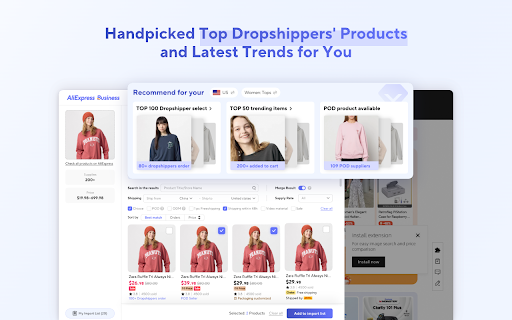


AliExpress Business Plugin for screenshots, product searches, and Supplier Optimization. 🌟Aliexpress Business Plugin: Smarter Image Searches & Product Management🌟 The AliExpress Business Plugin is designed for dropshippers, offering advanced tools to boost efficiency in sourcing and managing products. With features like image-based sourcing, real-time supplier switching, and browsing history tracking, it streamlines your operations and maximizes your potential. -------------------------------------------------------------------------------------------------------------------------------------------- 💡Core Features: 🌍Advanced Image Search for AliExpress Products -Quickly find identical products on AliExpress with powerful image search technology. Filter results by logistics, suppliers, and promotions to secure the best deals efficiently. 🤖Real-Time Supplier Optimize -Seamlessly optimize suppliers to find better pricing and ensure stock availability, keeping your operations cost-effective and smooth. 👉Browsing History Tracking -Keep track of products you’ve explored on AliExpress with detailed browsing history. Never miss a sourcing opportunity again. Whether you’re scaling your business or optimizing daily tasks, the AliExpress Business Plugin is your essential tool for smarter, faster, and more effective dropshipping. -------------------------------------------------------------------------------------------------------------------------------------------- Support and Contact: - If you have any questions or suggestions, please contact us at: aeplugin@alibaba-inc.com

Alibaba Lens: Official Alibaba.com Image Search Tool for Wholesale Supply
Alibaba Lens: A new way of searching for products on e-commerce websites This is your smart shopping companion for discovering similar products across multiple e-commerce platforms. Snap a screenshot or hit “Find Similar” in your Chrome interface. We will uncover matching products from across the internet, including thousands of high-quality Alibaba.com suppliers. 💡 Key Features 👉 Discover, Compare & Source with Ease 🔍 Visual Search Tool for Shopping: Screenshot any product or click “Find Similar” to detect matching items from millions of products across the web and on Alibaba.com. 💸 Instant Price Comparison: Compare prices for similar products, discover competitive wholesale price behind retail markup, and unlock more cost-effective options. 🏭 Source Supplier Info: Get source supplier details from Alibaba.com, explore product customization options, and access direct links for bulk orders—perfect for wholesalers and business owners. 👉 Seamless Shopping Experience 🌐 Works Everywhere: Browse the site you like—e-commerce, social media, blogs—and Alibaba Lens finds similar products no matter where you are online. 🖱️ One-Click Operation: Quick access via a button for instant product searches and deal discovery. 👉 Shop Smarter, Source Faster 🔗 Instant Product Links: Jump directly to matching product pages with one click to view specs, prices, and supplier info. ⏱️ Save Time & Money: No more manual searching and comparing—Alibaba Lens handles it all instantly to help in your procurement and purchasing. 🖱️ How to Use Alibaba Lens ● Easy Installation: Click “Add to Chrome” and pin the extension to your browser toolbar. ● Start Browsing: Visit any website—shopping platforms, product pages, blogs, or images. ● Launch Alibaba Lens Search: ● Method 1: Click the “Find Similar” button on any image. ● Method 2: Screenshot any area or item of interest. ● Explore Results: Instantly view matched products, prices, and supplier details. ❓ Frequently Asked Questions 📌 What websites does Alibaba Lens work on? Alibaba Lens works on most websites you browse in Google Chrome—from shopping platforms (Amazon, eBay, Shopify, etc.) to lifestyle blogs, news, and even social media. If there’s an image, you can search with it! 📌 Can I use Alibaba Lens for wholesale purchasing? Absolutely. Alibaba Lens is designed for both retailers and wholesalers. It prioritizes wholesale listings from Alibaba.com and provides supplier info for global sourcing. 📌 Do I need an Alibaba.com account? No account needed to search and compare. If you wish to contact suppliers or place orders, you’ll be redirected to Alibaba.com where you can sign up or log in. 📌 Is Alibaba Lens free? Yes! The extension is free for unlimited searches and price comparisons. 📌 Will the plugin affect my browsing speed? No. Alibaba Lens is lightweight, optimized for speed, and runs only when you activate it. It's designed to run efficiently and respect your privacy. 🏆 Why Choose Alibaba Lens? ● Find similar products by image across the web ● Save money by comparing prices ● Compare suppliers instantly for bulk sourcing ● Effortlessly transition from browsing to buying Install the FREE Alibaba Lens extension today and discover a smarter, faster, and more cost-effective way to shop and source online!

AliSave Pro - Download AliExpress Images
This extension allows you to easily save images and videos from AliExpress & Alibaba to your computer. You will be able to download product images and review images in one click with the best quality possible! 🔥 Must have for dropshipping business. 💻 How to use: 1. Install the extension by clicking the "Add to chrome" button. 2. Open an AliExpress product page. 3. Click on the download buttons. ⚡️ Key Features: ✔️ Download slider images. ✔️ Download color images. ✔️ Download description images. ✔️ Download review images. ✔️ Download product's video. ✔️ Download a text file with product information. ✔️ Get the best quality image download. ✔️ Download as .Zip. ✔️ Convert WEBP images to JPG, PNG. ✔️ Optional image compression level. Try it now and experience the powerful features of AliSave Pro! Affiliate Disclosure: By installing the AliSave Pro Chrome extension, you accept the terms of the «Terms of Use» and allow redirecting you to the links of the affiliate program AliExpress & Alibaba. Terms of Use — https://alisavepro.com/terms-of-use. If you do not agree with these terms, you may choose to uninstall the extension at any time. We value your trust and transparency in how our extension operates.

Fiidom - AI-Powered Solution for eCommerce
Save time and scale your profits with Fiidom AI for content marketing and dropshipping. Available on Shopify. Fiidom simplifies eCommerce with AI-driven tools that help merchants optimize, automate, and scale their businesses effortlessly. Whether you're running a dropshipping store or a traditional online shop, Fiidom equips you with exclusive features to boost efficiency and profits. Use the Fiidom Chrome Extension independently or in combination with Fiidom's Shopify apps for advanced capabilities. 🏆 Fiidom AI Dropship ✔ Discover Winning Products – Access real-time, trending, and best-selling AliExpress products tailored to your niche. ✔ Get Smart Insights – No more guesswork. Fiidom AI provides in-depth product analysis and winning strategies to stay ahead of competitors. ✔ Import in One Click – Seamlessly copy product details and images from AliExpress to your store. ✔ Optimized Pricing – AI-driven pricing recommendations help maximize profit and ensure market competitiveness. ✨ Fiidom AI Content ✔ SEO-Optimized Product Descriptions – Generate engaging, structured, and keyword-rich product content that attracts buyers and boosts search rankings. ✔ AI-generated content adjustments, AI Blogs, AI Ads, AI Email Marketing, and AI Social Media Posts. ⚡ Fiidom Chrome Extension: 1. Install the Fiidom Chrome extension. 2. Sign up with your Google account. 3. Browse AliExpress products and click the Fiidom bar or icon on the right to see product insights. 4. Visit any Shopify store, select a product, and click the Fiidom bar or icon on the right to reveal store and product insights. 🛒 Fiidom Shopify App: 1. Install the Fiidom apps from the official Shopify App Store: https://apps.shopify.com/partners/fiidom 2. Access powerful AI tools directly in your Shopify store. 🚀 Grow Your Business With AI-Powered Tools at No Cost! Enjoy Fiidom’s powerful features with free monthly credits. — For questions or feedback, reach us at support@fiidom.com

Zopi AI Extension - AliExpress, Temu & Amazon Dropship
Import products and fulfill orders from AliExpress & Temu to Shopify in one click. Zopi Extension is your all-in-one dropshipping assistant for importing products and placing orders from AliExpress & Temu to Shopify stores. Simplify your sourcing and fulfillment workflow with faster product imports, bulk order processing, and seamless automation. Key Features of Zopi Extension ◾️ Import Products from AliExpress & Temu Quickly import products from AliExpress & Temu to your Shopify store in just a few clicks. Easily copy product details, images, variants, and pricing to launch products faster. ◾️ One-Click Order Fulfillment Place AliExpress & Temu orders directly from your Shopify orders with a streamlined fulfillment flow that saves time and reduces manual work. ◾️ Bulk Order Processing Fulfill multiple orders at once to speed up your dropshipping operations and improve efficiency during high-volume sales periods. ◾️ Automated Order Syncing Automatically sync Shopify orders with AliExpress & Temu suppliers to simplify order management and reduce fulfillment errors. ◾️ Faster Dropshipping Workflow Manage importing, sourcing, and order fulfillment in one place to streamline your day-to-day dropshipping operations. How to Get Started with Zopi Extension 1. Install the Zopi Chrome Extension. 2. Open AliExpress or Temu product pages. 3. Import products directly to your Shopify store. 4. Sync customer orders from Shopify. 5. Place and fulfill AliExpress & Temu orders with ease. Need help or have feedback? Contact us anytime at support@zopi.io — we’re here to help you grow your dropshipping business.
