
gofaiibillcpfajafckhoieamembimje
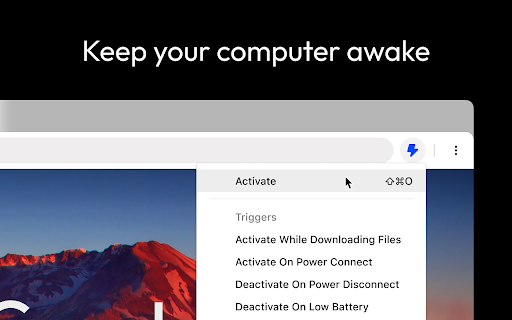
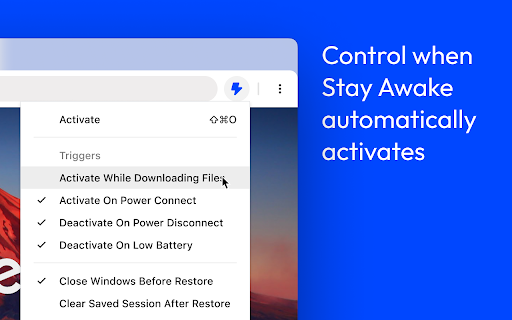

Keep your system and display awake whenever you need it or during long downloads. Introducing Stay Awake, the keep awake extension for Google Chrome™. Keep your system awake on demand whenever you want or let Stay Awake automatically activate during downloads. Whenever you need your system to stay awake, simply activate the extension by clicking the extension icon and choosing "Activate" or using the keyboard shortcut Ctrl+Shift+O / Command+Shift+O at any time. Tired of downloads being unexpectedly interrupted by your system going to sleep? Enable the "Activate while downloading files" option and Stay Awake will automatically activate while a download is is progress. Once all your downloads are complete, Stay Awake will deactivate itself, allowing your system to rest peacefully. Activate the extension by clicking the extension icon and choosing "Activate" or use the keyboard shortcut Ctrl+Shift+O / Command+Shift+O at any time. The arrow keys can be used to navigate the menu or keyboard shortcuts can be used to quickly access the menu items. Once installed, you can access the extension by clicking the extension icon in the toolbar. - Click Activate or use the global shortcut Command+Shift+O to enable the extension. - Manage preferences from the popup.

Keep Awake
Chromium/Chrome extension to override system power-saving settings. ------------------------------------------ This extension makes it easy to temporarily disable power management on Chrome OS. It adds an icon in the upper-right corner of the browser that can be clicked to switch between modes where the screen is kept on (sun icon), the system is prevented from sleeping (sunset), or power-saving settings are left unchanged (moon). * Will this extension prevent a Chromebook from suspending when its lid is closed? No, but if an external display is connected, recent versions of Chrome OS will remain awake when the lid is closed. * What's the difference between the "screen is kept on" and "system is prevented from sleeping" modes? When the system is prevented from sleeping (sunset icon), network connections will remain active; this may be useful if using e.g. the Secure Shell app. The screen will still dim and turn off eventually, though. In the "screen is kept on" mode (sun icon), the system will avoid sleeping and the display will additionally remain on. * What do the icons mean? The sun icon means that the screen will be kept on. The moon icon means that the system will behave the same way that it would if the extension were not installed. The sunset icon is a middle ground: the system will avoid sleeping (as described above) but the screen will still turn off. | Release notes for version 1.9.1 (1.9.0 was never published): - It was updated to Manifest Version 3. - Updated the manifest.json file with more values. - Added more icon image sizes. | Release notes for version 1.8 (1.7 was never published): - Removed windows.onCreated hack added to work around http://crbug.com/222473 on Chrome OS.

Stay Awake Extension
Use this extension to keep your device awake without interruptions while working, reading, or streaming. Tired of your screen going dark while working or watching something important? The Stay Awake Extension is a simple tool that keeps your display awake with just one click. Whether you're reading, streaming, or attending meetings, it prevents unwanted screen timeouts. A green icon means your display stays on, and red means it’s off. Perfect for anyone looking to stay focused without interruptions. Prevents Sleep: Keeps your screen awake during work or streaming. Install the Stay Awake chrome Extension from the Chrome Web Store. Click the Extension Icon in your browser toolbar to open it. Check the Color Indicator: If the icon turns green, it means the display will stay awake and won't turn off. If the icon turns red, it means the extension is off, and your display may go to sleep as per usual settings. Toggle the Extension on or off anytime by clicking the icon again, depending on whether you want the screen to stay awake or follow your system’s power settings. The Stay Awake Extension helps you stay focused by preventing your screen from dimming or locking. No need to adjust settings or keep moving your mouse—just click and work without interruptions. Perfect for students, remote workers, streamers, and readers—anyone who needs their screen to stay on during long tasks like studying, coding, or watching videos.

No Sleep Screen
chrome extension to prevent screen from sleeping due to inactivity or other os settings chrome extension to prevent screen from sleeping due to inactivity or other os settings

Keep Awake your System or Display
Keep your system or display from going to sleep with just one click! Keep Awake -- Prevent your system or display from going to sleep with one click Keep Awake adds a one-click toolbar toggle that prevents your computer from sleeping. No settings to configure, no complicated options -- just click the Keep Awake icon to stop your system or display from going to sleep, and click again to turn it off. Your computer goes to sleep at the worst times -- during presentations, downloads, long installations, video calls, or when you step away briefly. Keep Awake gives you instant control. One click on the Keep Awake button and your system stays awake for as long as you need it. ✅ Click the Keep Awake toolbar button to prevent sleep -- click again to allow sleep ✅ Choose between System mode (prevents full system sleep) or Display mode (keeps only the screen on) ✅ Keep Awake shows clear ON/OFF status in the toolbar icon and notifications ✅ Right-click the Keep Awake icon to switch between System and Display mode ✅ Lightweight and fast -- Keep Awake uses minimal resources and works entirely offline ✅ Prevent sleep during presentations, screen sharing, or video calls ✅ Keep your system running during long downloads, uploads, or file transfers ✅ Stop the display from dimming while reading long articles or documentation ✅ Keep your computer awake during software installations or system updates ✅ Prevent screen lock when monitoring dashboards, logs, or live data Keep Awake is designed for anyone who needs reliable control over their computer's sleep behavior. Whether you are a developer, presenter, remote worker, or power user, Keep Awake saves you from constantly adjusting your power settings. ✔️ Free and open source ✔️ No data collection, no tracking, no ads ✔️ Works on Chrome and Microsoft Edge ✔️ Lightweight -- minimal resource usage, works offline ✔️ Manifest V3 compliant for maximum security and performance Install Keep Awake now and never worry about your computer sleeping at the wrong time again.
