
gnpcigljiekghnhokkfmpjnodcgoehfe
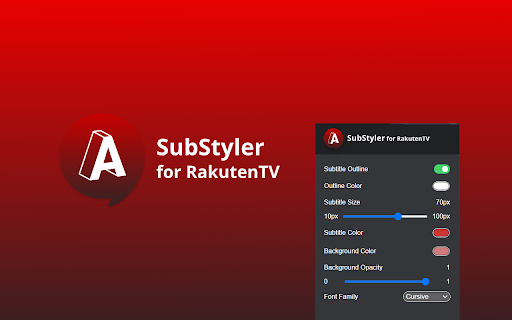
Extension to customize captions and subtitles on Rakuten TV. Change text size, font, color and add background. Wake up your inner artist and express your creativity by customizing RakutenTV subtitle style. Even though you usually don’t use movie captions, you may consider starting after checking out all the settings this extension has to offer. ✅Now you’re able to: 1️⃣Choose custom text color,🎨 2️⃣Adjust text size,📏 3️⃣Add text outline and choose its color,🌈 4️⃣Add text background, choose its color and adjust the opacity🔠 5️⃣Choose font family🖋 ♾️Feeling artistic? Here’s another bonus: all the colors can be chosen either from a built-in color picker or by entering RGB value, creating almost endless style possibilities. Take the subtitle customization to the next level with RakutenTV SubStyler and let your imagination run wild!!😊 Too many options? Worry not! Check out some basic settings, such as text size and background. All you need to do is add Rakuten TV SubStyler extension to your browser, manage available options in the control panel and adjust subtitles to your own preferences. It’s as simple as that!🤏 ⚠️ ❗**Disclaimer: All product and company names are trademarks or registered trademarks of their respective holders. This extension holds no association or affiliation with them or any third-party companies.**❗⚠️

Theme & Color Changer for YouTube - Colorize YouTube
Change color theme on YouTube™ to any colors you like! Create your own custom color theme Theme & Color Changer for YouTube is not just an extension; it's your personal designer, your magical brush that transforms your YouTube into something special, unique, and incredibly stylish. Imagine over 50 different pre-set color themes, and that's not all! With the color constructor, you can create your own unique themes. No limits, just your imagination! 🖌️ Over 50 Pre-set Themes Imagine your YouTube can look completely different every day. Today you choose a gentle pastel theme, tomorrow a bright neon color, and the day after tomorrow, dark and mysterious goth. All this is possible thanks to more than 50 pre-set themes that include all possible options for any mood. 🌈 Pastel Paradise: for those who love tenderness and calm. 🎃 Gothic Night: for true fans of darkness and mystery. 🕶️ Retro Blast: return to the '80s with bright and neon YouTube colors. 🌌 Galactic Journey: for those who dream of stars and space. 🍭 Candy Rainbow: bright and sweet colors for the boldest. 🎨 YouTube Color Constructor If none of the pre-set themes match your unique taste, don't worry! Our color constructor is what you need. You can create your own themes, choose any color, combine shades, and even add gradients. Your YouTube can be absolutely anything: from the color of your favorite sweater to the color of your cat's eyes. Your custom YouTube is now in your hands! 🕺 Ease and Convenience You don't need to be a tech genius to enjoy all the benefits of "Theme & Color Changer for YouTube". Installing the extension takes just a few seconds, and you're ready to change colors and themes at your discretion. Just a few clicks, and your YouTube looks completely different. Mood Change: Choose a YouTube theme according to your mood or season. A new day, a new theme! Personalization: Make your YouTube unique, reflecting your personality. Engage Friends: Surprise your friends with a new colorful YouTube and share your creative themes for YouTube. Fun Process: Play with YouTube colors, experiment, and enjoy the result. It's real fun! Don't miss the chance to turn YouTube into a colorful experience. Download "Theme & Color Changer for YouTube" right now and enjoy all the benefits of this wonderful extension. Trust us, your eyes will thank you, and your mood will improve with every new YouTube color. Other functionality: - On clicking on the more option in the popup, the YouTube tools page is redirected to youtube.com.

YouTube Theme Vision
Customize YouTube with new styles, colors, and fonts. Enhance your viewing experience for free! YouTube Theme Vision is an incredibly popular Chrome extension, known for its ease of use and versatility. It allows users to fully transform the look of YouTube with solid color themes or personalized backgrounds. Choose from two modes: the "Dove" mode, which simply changes the background color, and the "Spirit" mode, which features stunning glassy, translucent effects and beautiful dynamic backgrounds. Users can also pick from a wide range of custom colors, ensuring a personal touch. With a focus on performance, it’s designed to run smoothly even on mid-range systems. A high graphics option is available for users with powerful devices, but it’s also optimized so that lower-end systems stay responsive without freezing. You can also use the Focus Mode to declutter YouTube—disable sections like Shorts, sidebars, or ads, so you stay fully immersed in your content. And with StayFresh, your live chat stays smooth and fast—ideal for those with slower internet or older devices—keeping your stream seamless. Plus, the Peace Time Reminder lets users set quiet hours, gently reminding them to reduce volume at night. And with global font customization, you can choose the best fonts for your language, whether it’s Arabic, Japanese, Korean, English, or more. Privacy is a priority—no tracking, no ads, just a secure, personalized YouTube experience. Join thousands of users and upgrade your YouTube today—one click, a lifetime of customization.

Sublo - Subtitle Translator for Netflix, HBO Max, Disney+ & More
Translate subtitles into 40+ languages on Netflix, HBO Max, Amazon Prime, Disney+ and more. Watch any show in your language. Sublo – Subtitle Translation for Netflix, HBO Max, Amazon Prime & More Watch any show or movie in your language — or learn a new one — with real-time subtitle translation across all major streaming platforms. Sublo adds a second subtitle track directly on top of your video player. While the original subtitles run as usual, Sublo simultaneously shows a translated version in any of 30+ languages — no extensions to disable, no settings to dig through, no interruptions to your watching experience. Install Sublo from the Chrome Web Store Open Netflix, HBO Max, Prime Video, Disney+, or any other supported platform Start playing a video with subtitles enabled Sublo automatically detects the subtitles and displays the translation below or above them Customize font size, color, position, and opacity directly from the popup That's it. No account required to get started. Watch your favorite Shows with translated Subtitles on Netflix, HBO Max, Prime, Disney+, YouTube and many more. Unlimited subtitle translation — no daily cap Everything in Free Upgrade directly from the extension popup or at subloapp.com. Font size (12–48px) Font color Background color and opacity Font weight (normal or bold) Position (top or bottom of screen) Edge offset Two subtitle tracks can be configured independently — for example, show the original English at the bottom and a German translation directly above it. DESIGNED FOR 🎓 Language learners — Immerse yourself in your target language while keeping the original as a safety net. Studies show that reading subtitles in both your native language and your target language significantly accelerates vocabulary acquisition and listening comprehension. 🌍 Bilingual households — One family member wants German, another wants English? Run both at the same time without compromise. 🌐 International viewers — Access content in languages you're comfortable with, regardless of what the platform natively supports. 🎬 Film enthusiasts — Watch foreign-language films with subtitles in your language while preserving the original dialogue for a more authentic experience. Sublo does not collect or store any personal data. Subtitle content is sent to our translation service to generate translations, but is never stored or associated with your identity. No browsing history is recorded. The extension only activates on supported streaming platforms. Does Sublo work in fullscreen? Yes. Sublo is designed to work in fullscreen mode across all supported platforms. The overlay repositions automatically when you enter or exit fullscreen. Do I need to create an account? No. The free plan works immediately after installation without any registration. To unlock Pro, you purchase a license key which you enter once in the popup — no account, no password. Will Sublo interfere with the platform's built-in subtitles? No. Sublo runs alongside the platform's existing subtitle system without modifying it. The original subtitles are unaffected. Which languages can be translated? Any of the 30+ languages listed above can be used as source or target language. Auto-detect is also available for the source language. What happens when the free daily limit is reached? Sublo stops showing the translated subtitle track. The original subtitles on the platform continue to work normally. The limit resets at midnight. Is my video content or subtitle data sold to third parties? No. Subtitle text is only used to generate translations and is never sold or shared with third parties. See our privacy policy for full details. Does it work with anime on Crunchyroll? Yes, Crunchyroll is fully supported. Sublo uses a PerformanceObserver to detect subtitle file requests at the network level, making it compatible even with streaming platforms that load subtitles via Web Workers or background processes. It supports WebVTT, TTML/IMSC, and SRT subtitle formats. DASH manifest parsing allows Sublo to proactively load segmented subtitle tracks without requiring any user interaction beyond enabling subtitles once in the player. Sublo is built and maintained independently. For support or feedback, contact info@trackable.pro or visit subloapp.com. Sublo is not affiliated with Netflix, HBO Max, Amazon, Disney, Apple, or any other streaming platform mentioned above. All trademarks belong to their respective owners.

YouTube RuTube & VK Video Transcript — Subtitle Translation, Text & Summary
Translate subtitles, get video summaries with key points, timestamps and quotes, extract video text from Youtube, RuTube, VK Video.… ✦ Video summary, transcript, and subtitle translation for YouTube, RuTube and VK Video Transcript Pro is a Chrome extension that lets you extract text from video, download subtitles, translate subtitles, and generate an AI video summary in seconds. Works on YouTube, RuTube and VK Video. Perfect for: — video to text — video transcript — subtitles download — translate subtitles — AI video summary — summarize YouTube videos Get a video summary directly in your browser. — key points — main ideas — structured summary — timestamps for navigation Works with: lectures, podcasts, interviews, long-form videos. Before generating the full summary, you instantly see: — what the video is about — the main idea — whether it’s worth watching Helps you decide in seconds. Translate video subtitles directly in the player: Useful for: foreign videos, learning, research. — full video transcript — text with timestamps — copy text easily Useful for: editing, translation, content analysis. ⚡ HOW TO SUMMARIZE A VIDEO Open a video Click “Transcript” Get video text Generate summary 👤 WHO IS IT FOR — students — researchers — analysts — content creators — anyone who works with video Subtitles are processed in the browser. Summaries and translation are processed on the server.
