
gnnecemmbmmndkehiaakohldifipncah
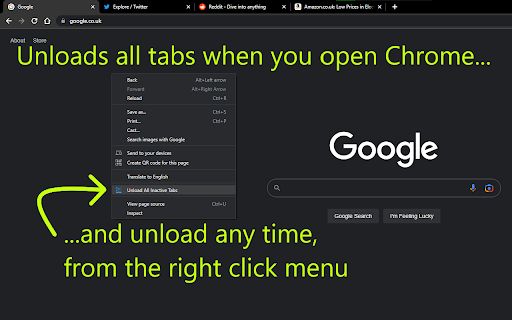


When you open chrome, and it restores all your tabs, this extension unloads all tabs except the active tab When you open Chrome, start up Chrome... Chrome might restore all your tabs from your last session. This extension will unload all those tabs, so you aren't wasting computer resources loading those webpages. As soon as you click on an unloaded tab, it will load the webpage as normal. Firefox browser does this by default, and now, with this extension, you can have this feature in Chrome too. It was also pointed out to me, that you might want certain websites to never be unloaded. For example, your email. So, there is a settings page where you can add websites that you NEVER want this extension to unload. I didn't like that I would open Chrome and all my tabs would start loading. I don't need all of them to load, I might not even click on most of them. I liked that in Firefox, I didn't need to worry about how many tabs I had open, since I knew when I restarted the browser, none of those tabs would load until I clicked on them (but the tabs were still there, ready to be clicked if I wanted them). After some research, I found that Chrome does have this feature, but it's only available to extensions. So, I created this extension for myself, so I can once again use Chrome with tonnes of tabs open, and not worry about wasting my computer's resources on those tabs. Besides unloading all tabs when you open Chrome... 1) Added a right click menu option: you can click this option and it will unload all your inactive tabs immediately. 2) There is a settings page where you can add websites to never be unloaded. For instance, you might want your email to stay loaded. That's it. This is a very lightweight extension. Enjoy :) Note: This extension only unloads tabs: a) when you open Chrome, or b) when you click the menu item. It doesn't unload tabs at any other time. Permissions Explained: "Read your browsing history" - this is used for the exceptions list, the extension checks if the tab's web url matches the url you want to be ignored. This extension doesn't look at or use your browsing history. Credits: The extension icon, the computer with 3 gears, was created by phatplus on freeicons.io (https://freeicons.io/profile/51091).

Save Tabs Chrome
Organize browser with Save Tabs chrome extension. Restore chrome session in one click. Save tab groups, manage and export tabs The Save Tabs Chrome app will help you never lose your research again. This powerful tab extension protects your work, organizes research sessions, and lets you switch between different contexts instantly. Your pages are stored locally, organized into named groups, and ready to restore anytime. 🔷 Why You Need This Extension 💡 Ever lost hours of research to a browser session crash? Need to reopen chrome tabs after an unexpected restart? Our tool solves these problems and more. Whether you're managing multiple projects, conducting deep research, or simply need better organization, this tool transforms how you work with browser. 🔷 Core Features 1️⃣ Instant Saving. Click once and your entire browser session is captured – titles, URLs, and exact order preserved in milliseconds. The save tabs chrome extension works faster than bookmarking and keeps everything organized. 2️⃣ Smart Organization. Create unlimited collections for different contexts. Group tabs chrome by project, topic, or purpose. Keep "Monday Research," "Client Work," and "Weekend Reading" separate and accessible. 3️⃣ Quick Restore. Our chrome session saver lets you restore browsing session with a single click. Open entire groups or cherry-pick individual pages. Everything reopens in the original order, so you pick up exactly where you stopped. 4️⃣ Powerful Search. Search tabs across all collections instantly. Find anything by title, URL, or group name, even if you forgot where you stored it. 5️⃣ Selective Control. Don't want to save all tabs chrome? Select specific pages and capture only what matters. You control what stored and what doesn't. 6️⃣ Multi-Window Support. Working across multiple browser windows? No problem. This Save Tabs Chrome tool opens across all windows and keeps your multi-window workflows organized effortlessly. 7️⃣ Export & Backup. Export any collection to CSV format. Save tab groups to cloud storage, email to colleagues, or transfer between computers. Your data stays portable and shareable. 8️⃣ Offline Ready. Full functionality without internet. The extension Save tabs chrome locally uses storage API. Lightweight design won't slow your browser down. 🔷 How It Works ✓ Saving Process: Click the toolbar icon. Done – everything is stored and searchable ✓ Restoring Process: Browse your collections. Click to restore chrome session instantly Continue from exactly where you left off 🔷 Real-World Solutions ▶️ Research Management. Collecting information over days or weeks? Save tabs in chrome as you find them. Add more tomorrow. Your research survives crashes, restarts, and accidental closures. ▶️ Context Switching Made Easy. Stop manually reopening everything when switching between work and personal projects. The save tabs chrome app lets you transition instantly. Each workspace stays preserved and ready. ▶️ Crash Protection Computer froze? Unexpected update? Battery died during presentation? Your collections remain safe. Tab save functionality ensures nothing is ever truly lost. ▶️ Shared Computer Solution. Family needs the computer? Save and close tabs - Chrome makes it easy with our extension, let others use the browser, then restore everything when you return. Your workspace stays private and recoverable. ▶️ Reading List Control. Stop keeping 20+ "read later" pages open forever. Keep articles in collections, read when ready, keep your browser running smoothly. ▶️ Long-Term Projects. Managing multiple topics simultaneously? This Chrome save tabs tool keeps everything organized by purpose. "Client Meeting Prep," "Q4 Report Research," "Technical Documentation" – each context preserved separately. 🔷 Privacy Commitment Your data stays on your device. We use local storage only. No external servers, no tracking, no analytics, no data selling. When you save browser session data, it stays yours completely. 🔷 How to save tabs in chrome Getting started is simple. Install the extension, click the icon, and your first collection is created. Name it something memorable. From there, you can create unlimited collections for different purposes. 🔷 Coming Soon ⭐ Auto-Backup. Scheduled automatic exports protect against data loss. Set it once, forget about it forever. ⭐ Cross-Device Sync. Access collections from any computer. Seamless synchronization across all devices makes the save tabs chrome app even more powerful. ⭐ Share via Link. Generate shareable links for collections. Send resources to teammates without file attachments. Perfect for collaborative research. 🔷 Why Not Regular Bookmarks? Bookmarks pile up endlessly without context. They lose their original purpose. This tool organizes by intent and preserves your complete working environment. You restore entire workspaces, not just individual pages. 🔷 Get Started Today Your browser deserves better management. Download the chrome tab saver extension today and transform how you handle work forever.

List All Tabs
Display all open tabs as a list, allowing easy switching, closing and muting/unmuting

Clear Tabs
This extension clears all but the active tab in your browser. UPDATE v2: Complete code refactor for manifest v3! Have a lot of open tabs you want to easily close? Quickly close all of your open tabs except the one in current window with this extension. Easily re-open all of your previously closed tabs. The first click of the extension icon closes all of open tabs except for the current one in browser window. Made a mistake? Just click again when "1 R" is displayed on the extension's icon to re-open the tabs you just closed. "Clear Tabs" allows you to quickly close all open tabs in Chrome, except for your currently selected tab. Just click the extension icon! The extension also counts how many tabs you have open. Simple, easy, memory efficient, and privacy safe. Built for ease of use and privacy! Please keep the following features in mind: Only tabs in the current Chrome window will close, it will not close tabs on other Chrome window sessions. If you create a new tab, remove a tab, or change window focus, your previously closed tabs will NOT be recoverable. Tabs are only recoverable when the "R" recovery badge is visible in the extension icon. The recovery feature is for accidental clicks only, not a "tab saver" function. PRIVACY POLICY: This extension does NOT collect any personal information from the user: We have no way to collect data or store it. It will work with and without an internet connection because it does not need one to work, since data is never sent to any third party. Permissions used: TABS: To open and close tabs. STORAGE: To maintain extension state when background process is suspended. Version History 2.0.1 -- Overcome Chromium bug where events in chrome extension background service workers are ignored. 2.0.0 -- Complete code re-factor. Update all code with static-typing using ES2020 standards. Now using Manifest v3. Extension now releases memory and processor when not in use. 1.0.0 -- Initial public release. 1.0.1 -- Improper recovery fixed when only two tabs open. 1.0.2 -- Package integrity error. 1.0.3 -- Icon working with Firefox extension. 1.0.4 -- Fixed error: Too many open tabs caused them not to be able to be restored. - Performance improvement on closing tabs. - First attempt at getting extension to work with Firefox for Android. 1.0.5 -- Performance improvements. Finally fixed all bugs that would not allow a restore with a high number of tabs open.

Bookmark All Tabs
A Chrome extension that allows you to bookmark all open tabs with one click. Choose to save to a new or existing bookmark folder. Bookmark All Tabs is a simple and convenient Chrome extension that allows you to bookmark all open tabs with just one click. Key Features: 1. Save Tabs to Folders: Choose to save tabs in a new bookmark folder or an existing one. 2. Auto-Title Folders: Automatically title the folder with the current date, time, or the most common words found in the tab titles. 3. Access Recent Folders: Select a recently opened bookmark folder for quick saving. 4. View and Select Tabs: View all open tabs in a list and pick the ones you’d like to bookmark. 5. Copy URLs and Titles: Copy URLs or titles of selected tabs to the clipboard for easy sharing or organization. How to Use: 1. Open the Extension: Click the extension icon in your browser. 2. Choose a Folder: Select an existing bookmark folder or create a new one. For new folders, you can auto-title them with the current date, time, or common words from tab titles. 3. Bookmark Tabs: Once a folder is selected, click "Bookmark All Tabs" to save the tabs. We hope you find Bookmark All Tabs to be a useful and time-saving extension. Thank you for using it!
