
gmpgngmmcocpbfagngjgoccchlnhmphn
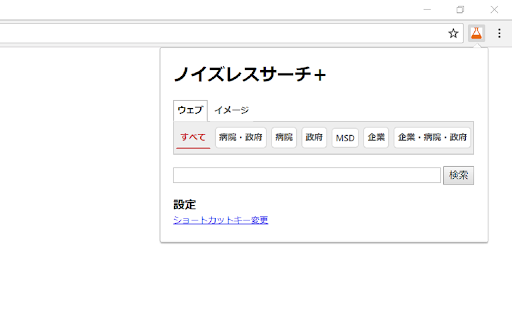
ノイズレスサーチの検索エンジンを利用して、正確な情報に簡単にアクセスできる拡張機能です。 Google検索の結果に邪魔なサイトが多くて、欲しい情報にすぐに辿り着けないなんて経験ありませんか? そんな時にはパソ活ラボ様のノイズレスサーチが非常に便利です。 ノイズレスサーチ+は、そのノイズレスサーチの検索結果に素早くアクセスできるChrome拡張機能です。 使い方は非常にシンプルで、 1. alt+N(Windows)、またはoption+N(Mac) (またはアイコンをクリック) 2. 検索窓に検索文字列を入力 3. Enterキーを押す (または検索ボタンをクリック) だけです。 ドメイン絞り込みに関しましては、以下のパソ活ラボ様のサイトをご参照ください。 http://pasokatu.com/14565#site ■ 履歴 2022/06/13 - V1.3 - プログラムポリシーの更新に準拠 2019/09/23 - V1.2 - 右クリックメニュー追加 2018/05/03 - V1.1 - 公開

uAutoPagerize
A browser Extension for auto loading paginated web pages!!! *What's this This is an extension that provides infinite scrolling on various sites. It is a derivative of AutoPagerize. It is an extension that automatically loads and appends the "next page" in search engine, blogs, etc. * How to use When you scroll to the bottom of the page, the page will be added without your permission. When you cannot use the comment box due to the addition, click the green icon in the page to pause it. This may not work well on sites that change pages dynamically using JavaScript. In that case, right-click on the toolbar icon and select "Disable on this page".

はちまバスター
はちまやJINへのリンクを無効にします。 リンクのURLかテキストにはちま・JINのURLが含まれるとき、そのリンクを無効にします。 リンクの右クリックやオプションから任意のサイトをフィルターに追加できます。 オプションからは以下の設定も可能です。 ・Googleの検索結果では検閲した事も表示しない ・Twitterで検閲対象のリンクが含まれるツイートを表示しない 以下は更新履歴です。 バージョン0.24.0 全体的に高速化しました 追加で読み込んだノードをバッチ処理するようにしました ポップアップから無効->有効と切り替えたときバッチ処理するようにしました ポップアップに表示される処理時間を「検閲処理時間」から「スクリプト全体の処理時間」に変更しました バンドルサイズを縮小しました デフォルトのプリセットにx.com/[はちま|JIN]を追加しました Xでカードの短縮URL(t.co)のリンク先を事前に取得できなくなったため、単純に href を見るようにしました バージョン0.23.1 オプション「Googleの検索結果で検閲した事も表示しない」が機能しなくなったのを修正しました。報告ありがとうございました。 バージョン0.23.0 デフォルトで「大量のノードが更新されたときは検査しない」を有効にしました。 また、オプションの「大量のノードが更新されたときは検査しない」を「大量のノードが更新されたときでも検査する」に変更しました。 バージョン0.22.1 YouTubeで重くなる報告をいただいていますが再現できません。 YouTubeではiframeの検査をしないようにしてみました。 バージョン0.22.0 動的に変更されたノードを検査するときエラーが出ることがあったのを修正しました。 使用しているライブラリのバージョンをアップしました。 バージョン0.21.2 右クリックからのNG登録が機能していなかったのを修正しました。 バージョン0.21.1 短縮URLに"^https?://bnc\.lt/.+"を追加しました。 編集機能はやる気がでたら作ります。 バージョン0.21.0 Manifest v3に移行しました。 短縮URLの展開結果はキャッシュされますが、 サービスワーカーが終了すると破棄されます。 バージョン0.20.6 Discord でクラッシュしないようにしました。 ただし、Discordでは ・無効と有効の動的な切り替えができません ・censored をクリックすると画像を開いてしまいます バージョン0.20.1-4 不具合の報告ありがとうございます。 ・「検索結果全体が非表示になる」バグを修正しました ・不要なリンクの検査をすることがあったのを修正しました ・iframe の検査で重くなるバグを修正しました バージョン0.20.0 ・オプションで履歴との一致を確認しながらフィルタの入力ができるようにしました。「閲覧履歴の読み取りと変更」の権限が必要になります。 ・「非表示」の設定をオンにしたときの Google や Twitter での動作を調整しました バージョン0.19.0 ・「Googleの検索結果で検閲した事も表示しない」をオンの状態で、マッチするカード(トップニュースなど)があった場合にすべてのカードが非表示になっていたのを修正しました ・検閲したいサイトを開いてしまった場合の動作をダイアログからレイヤーでの表示に変更しました バージョン0.18.2 ・フィルタに空文字が含まれるないように修正しました バージョン0.18.1 ・「検閲対象のリンクが含まれるツイートを表示しない」をTweetDeckにも対応しました バージョン0.18.0 ・オプションに「Twitterでリンクを含むツイートを非表示にする」を追加しました ・コンテキストメニューから正規表現を登録する際に短縮URLを展開するようにしました ・t.coを展開してチェックするようにしました バージョン0.17.0 ・リンクの右クリックからNGリストに登録できるようにしました バージョン0.16.0 ・ポップアップから現在のページをNGリストに登録できるようにしました ・iframe が検査されないことがあったのを修正しました ・短縮URL が検査されないことがあったのを修正しました バージョン0.15.0 ・オプションに「Googleの検索結果で検閲した事も表示しない」を追加しました バージョン0.14.0 ・ポップアップに「ずっと」を追加しました。オンにすると有効にするまで検査しないようにします。 ・ポップアップにそのページの処理にかかった時間、検閲したリンクの数、チェックしたリンクの数を表示するようにしました バージョン0.13.4 ・t.coを短縮URLとして扱わないようにしました バージョン0.13.3 ・環境によって短縮URLの展開をできない事があるようなのでデフォルトでオフにしました ・有効/無効を切り替えたときにアニメーションするようにしました バージョン0.13.2 ・オプションに「大文字小文字を区別する」を追加しました ・オプションにパフォーマンスの項目を有効・無効にしたときの参考値を記載しました バージョン0.13.1 ・高速化しました ・オプションに「テキストを検査しない」を追加しました ・短縮URLが展開できないときがあったので判定を入れました バージョン0.13.0 ・高速化しました ・短縮URLの展開をデフォルトで有効にしました ・短縮URLの展開を外部のAPIに頼らないようにしました ・ポップアップとオプションのデザインを変更しました バージョン0.12.0 バージョン0.11.4 短縮URLのAPI問い合わせに失敗したときに「アラートを抑制する」「短縮URLを開く」オプションを追加しました(ご提案ありがとうございます) バージョン0.11.3 ・カクつくのを確認したのでiframeへの対応はツイッターに限定しました バージョン0.11.0 ・iframe(ツイッターのカードなど)に対応しました ・リストの状態がクリアされてしまうバグを修正しました バージョン0.10.2 ・デフォルトのフィルタを修正しました(ご指摘ありがとうございます) ・about:blankなど無効なページでもアイコンが有効な状態を示すバグを修正しました バージョン0.10.1 ・オプションにツイートボタンをつけました ・ポップアップが正常に動作しないバグを修正しました ・ツイッターでの動作を調整しました バージョン0.10.0 ・リストの購読機能を追加しました バージョン0.9.0 ・アドレスバー右のアイコンから一時的に有効無効を切り替えられるようになりました バージョン0.8.3 ・NGサイトを開いて続行を選択したときに検閲しないようにしました バージョン0.8.2 ・高速化 ・バグの修正 バージョン0.8.0 ・オプションに"大量のノードが更新されたときは処理しない"を追加しました。 バージョン0.7.0 ・検査したリンク数を記録するようにしました。オプションから確認できます。 ・「短縮URLをクリックしたときに展開」の選択が反映されないのを修正しました。 バージョン0.6.0 ・パフォーマンスを改善しました。 バージョン0.5.0 ・"censored"にマウスカーソルを乗せたとき、マッチした正規表現を表示するようにしました。 ・オプションに はちまバスターNGリスト へのリンクを追加しました。 バージョン0.4.3 ・短縮URLのキャッシュ関係のバグを修正しました。 バージョン0.4.2 ・"表示の速いサイト"で動作しなくなっていたのを修正しました。 バージョン0.4.0 ・ツイッターの短縮URLに対応しました。この機能はデフォルトでオフです。オプションの注意書きをよく確認してからご利用ください。 バージョン0.3.0 ツイッターの一部リンクに対応しました。 バージョン0.1.0 ・ツール -> 拡張機能 -> はちまバスター -> オプションで無効にするリンクの正規表現の指定、確認ができるようになりました。

Douga Getter
You can easily download videos from popular video sites. Just click the extension icon, then select the video you want to download. The Douga Getter provides a feature that allows you to download videos from websites. On a page opened in your browser, it detects all the videos that have been loaded and notifies you on the action button. When you click the action button, a list of downloadable videos will appear, and you can click the one you want to download. By default, video files smaller than 2MB are not shown, so change the settings if necessary. Please note that Douga Getter takes no responsibility for the content you download. Therefore, before downloading, it is recommended that you check the copyright and permissions of the video. In Japan, it is prohibited by law to download videos that you know have been uploaded without the copyright holder’s permission. Please be mindful of this. We bear no responsibility for any incidents arising from the use of this extension. No guarantees are made regarding the operation of this extension. Use it at your own risk. Distribution of this extension may be discontinued without notice. There is no obligation to provide version upgrades, bug fixes, or other support. 1. Extension This extension does not collect, store, or transmit any personally identifiable information or usage data. All functionality runs entirely within the user’s local browser environment. 2. Service Website ( https://www.douga-getter.com/ ) Our official service website, which works in conjunction with the extension, may collect limited technical information and may use analytics tools (e.g. Google Analytics). • Collection The service website may collect anonymous technical data such as browser type, screen size, language settings, visit duration, and whether the content on the page is displayed correctly. Personally identifiable information is not collected. Please note: We do not collect or store any information about your personal activities, such as which pages you visit or what files you download. Your browsing and download history remain entirely private and are never transmitted to us. • Purpose Collected information is used only to understand general usage patterns, improve service functionality, and enhance user experience. • Sharing We do not sell, share, or disclose collected data to third parties. If analytics tools such as Google Analytics are used, data may be processed by those providers in accordance with their privacy policies. • Choices Users may opt out of Google Analytics data collection by using tools such as the Google Analytics Opt-out Browser Add-on, or by discontinuing use of the service website. • Updates This privacy policy may be updated from time to time. Any changes will be posted on the service website and/or the extension’s store listing page.

twitter画像原寸ボタン
This extension adds "Original" button on the image-embedded tweet in Twitter. Click the "Original" button to open image(s) in original size. [注 / Note] この拡張機能は、譲渡・売却の予定はありません。そのような連絡はお断りします。 I WILL NOT transfer/sell this extension under any condition. I REFUSE such requests.
