
gmiopfodlkpkngbhlogibegjoenhebli
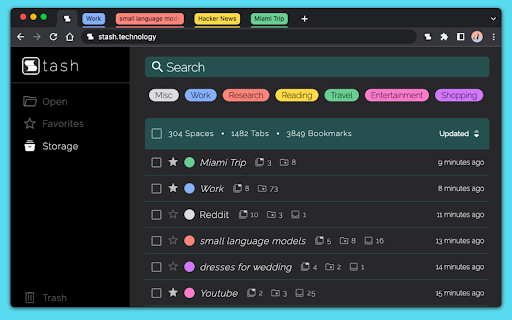


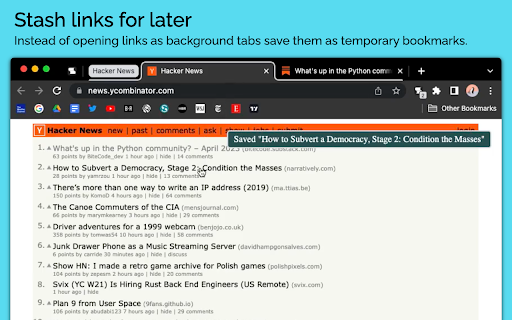
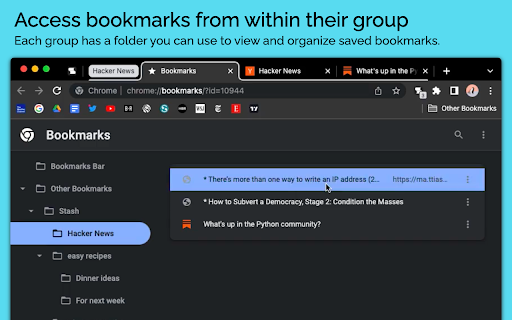
Smart tab groups and bookmarks that keep your browsing organized. Stash is a tab, bookmark, and session management extension that makes it easier than ever to stay organized, focused and productive. The extension enhances and integrates your browsers tab group and bookmark features to better support extensive browsing and research. 📑 SMART TAB GROUPS * Automatic grouping of related tabs * Group multiple tabs with keyboard shortcut or cmd/ctrl + click * Automatic collapsing of inactive tab groups * Automatic removal of active group’s title to save space on tab bar * Automatic navigation to last active tab when group is expanded 📂 SMART BOOKMARKS * Automatic creation of bookmark folder for each tab group * Save tabs and links to the active group’s folder with a single click * Save links as temporary bookmarks that get removed once opened * Create group specific bookmark bar that is shown the group is in use and hidden inactive * View and retrieve a group’s bookmarks from a tab within the group * Save or move tab to inactive group from the search bar 🕓 BETTER BROWSING HISTORY * Tab groups are persistent and can be restored if your browser closes or updates * View a history of your tab groups and jump back into past browsing sessions * Organize your history by favorites and categories DATA PRIVACY 🔒Stash was designed to ensure that your personal data remains private, secure and easily accessible. 🙈No signup required. All of your data is stored locally in your browser and none of your tab or bookmark data is sent to or stored on a remote server.

Tab Manager in Side Panel
Compatible with built-in and adds more easy-to-use features, lives in side panel This extension provides some easy and intuitive ways to manage all your tabs across all your windows in side panel. In particular, a simplified tree style tab feature can facilitate the management and deletion of many temporarily opened tabs. ✨ Help you easier to find the target tab ✨ 1. Support searching opened tabs and history. 2. Support show 7 most recent tabs. ✨ Help you easier to create and close tabs ✨ 1. Create a new adjacent child tab for any tab with one click. 2. Support tabGroup and display non-tabGroup tabs with auto group(one level tree), and you can close all tabs belong same tree by "Alt + click" close icon of the parent tab. ✨ Help you easier to navigate through tabs ✨ 1. Navigate to any tab across all your windows with one click, even when tab group which tab belongs to has been collapsed. 2. Collapse or expand all tab groups in same window with one click. 3. Collapse or expand any tab group with one click. 4. Press "Tab" and "Shift+Tab" to navigate and "Enter" to switch. ✨ Help you easier to organize tab and tab group ✨ 1. Drag some tab or tab group and drop into a new postion ✨✨ Bonus tips: 1. You can go to chrome://extensions/shortcuts and set your shortcut for any chrome extension. 2. You can go to chrome://settings/appearance and adjust side panel's some appearance, such as left or right postion, font size and page zoom. Tab Manager In Side Panel is designed to help you save time, reduce clutter, and improve your productivity when working with multiple tabs across multiple windows, such as easily managing and deleting many temporary opened tabs. It is lightweight, fast, easy to use and compatible with built-in features. If you are looking for a simple tab manager in side panel, give this extension a try! Here is recent change log: v1.4.5 Feature: improve search function v1.4.4: Feature: add simple view transition animation v1.4.3: Feature: support close tab in recent tabs v1.4.0: Feature: support drag and drop to organize tab and tab group v1.3.13: Feature: stick tab group name when scrolling tabs v1.3.9: Feature: support show 7 most recent tabs v1.3.5: Feature: indent tab by one click v1.3.2: Feature: simple dark mode v1.2.4: Feature: create a new adjacent tab from one tab with one click

Tabmanager.io - Tab Session Manager
Manage, save and restore your windows, tabs and sessions. Tabmanager.io is an all-in-one session, window and tab manager extension for Chrome that helps you manage your open tabs, tab-groups and windows in one convenient place. ★ Windows & Tabs Our manager empowers you to swiftly navigate through open windows and tabs using either your mouse or keyboard. You can effortlessly switch between tabs and windows, search and filter tabs by title or URL keywords, and efficiently manage various aspects of your tabs such as pinning, sorting, grouping tabs by domain, suspending, identifying tabs with sound, and removing duplicates. Additionally, you have the option to export your tabs and windows as files for backup, save tabs for future use, and synchronize them across multiple devices. Our manager presents a multiple column layout that enables you to gain a comprehensive overview of all your open windows and tabs while providing the flexibility to organize your windows by renaming them. Through simple drag and drop functionality, you can easily move tabs between windows, open them in new windows, or merge entire windows. The tab manager also offers convenient features to save tabs for later restoration. You can save specific tabs within a window, save all tabs within a window, or save the entire session encompassing all open windows. ★ Tab Groups The tab manager comes with built-in support for managing your tab-groups. You can easily create a new tab group, move groups between windows, merge tab groups, rename tab groups and save your tab groups and restore them with the window at a later time. ★ Session Manager The session manager provides a comprehensive view of all your saved sessions, allowing you to effortlessly manage and swiftly restore previously saved sessions. Our intelligent restore feature ensures that opening tabs in a new or existing window does not slow down your computer, as tabs are opened in a suspended state. You can also sync your saved sessions to the cloud, ensuring data integrity and accessibility across all your devices. ★ Session History You can access a timeline overview of your browser sessions, enabling you to easily restore individual windows or tabs from earlier points in time. Save session snapshots from either the manager or the menu, providing you with the flexibility to quit your browser or temporarily use a blank browser without the risk of losing your tabs. Enabling the auto-save session feature helps you track your local browser session history in case of a browser crash. Sessions in the session history is saved on your local machine and are not saved to the cloud. ▪ Overview of active Windows and Tabs ▪ Keyboard navigation support ▪ Rename Windows ▪ Switch between Tabs and Windows ▪ Multiple Window columns for wide screens ▪ Light/Dark theme ▪ Filter Tabs with search ▪ Drag and drop Tabs and Windows ▪ Merge Windows by drag and drop ▪ Group Tabs by domain ▪ Sort Tabs ▪ Remove duplicate Tabs ▪ Suspend/Discard Tabs from memory ▪ Find Tabs playing audio ▪ Mute/Unmute Tab playing audio ▪ Create new Tab-group ▪ Drag and Drop Tab-group ▪ Merge Tab-groups ▪ Save Tab-groups for later ▪ Save Tabs for later ▪ Save Windows for later ▪ Save Session for later ▪ Quickly restore Windows and Sessions ▪ Share Windows by URL ▪ Automatic Sessions history snapshot ▪ Take Session snapshots for easy restore later ▪ Export Tabs, Window or Session as JSON/CSV ▪ Import exported Tabs, Window or Session ▪ Backup & Sync ▪ Cloud Backups ▪ And more... Send us an email at support@tabmanager.io if you need support or have suggestions about missing features.

Auto Collapse for Tab Groups
Collapse your unfocused groups. Auto Collapse makes the tab bar less distracting by collapsing all unfocused Tab Groups (the feature introduced in Chrome 89). When you click on an ungrouped tab or a tab within one group, all other tab groups get collapsed.

Focus Tab Groups
Too many tabs? Say hello to effortless organization and seamless multi-tasking. Focus Tab Group keeps your browser organized by automatically highlighting, grouping, and arranging your most active tabs—while quietly minimizing the rest. Keep your browser calm, your mind clear, and your tabs under control. With this tool, you can: 🧘♂️ Stay focused with automatic tab highlighting and minimization—only what matters stays in view 🧠 Jump back in instantly with automatic reactivation of your recently used tabs 🗂️ Organize ideas effortlessly by creating new tab groups with one click or a simple drag-and-drop 📌 Keep your workspace intuitive by automatically arranging your most active tabs exactly where you expect them 🚀 Why Focus Tab Group? Focus Tab Group isn’t just another tab manager—it’s a smarter way to multitask. While other tools slow you down with cluttered menus and extra buttons, Focus Tab Group stays invisible, enhancing your browser’s natural flow without adding any new interface. Whether you’re a developer, a student deep in research, or anyone juggling multiple tasks, this tool helps you stay organized, focused, and in control—all without breaking your rhythm. It just works—quietly, intelligently, and right where you need it. ✨ Try it free and experience what effortless browser organization feels like. ❣️ THANK YOU! We’d love to hear your feedback or feature ideas: - tidytabgroups.github.io - discord.gg/aBdAfNfGEv - x.com/FocusTabGroups
