
gmgpcbbmghjlklnphdiindlkehjjniib
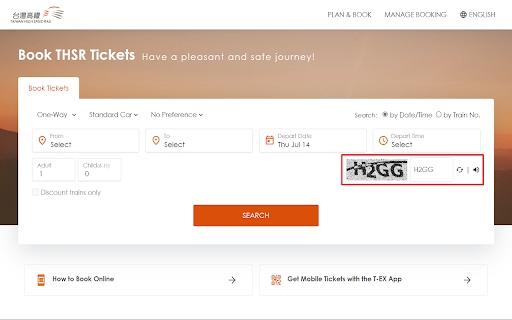
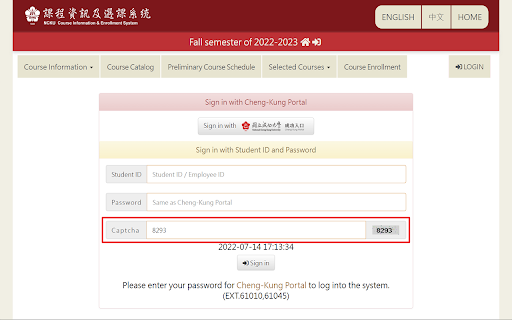


Automatically recognize and fill in the webpage captcha code. This easy-to-use extension do not need any your operate. Just install, and it will automatically recognize and fill in the captcha code of any support webpage. * Version 2.5 - Removed the support of Taiwan Railway member login/search/booking system. * Version 2.4 - Added the support of Taiwan Railway member login/search/booking system. * Version 2.2, 2.3 - Added the support of CHT member username password login. * Version 2.1 - Updated manifest_version. - Updated the way of detecting captcha. * Version 1.6 - Added the support of Sports Center booking system. * Version 1.5 - Code optimization. * Version 1.4 - Added the support of THSRC booking system. * Version 1.3 - Supported all system which have same captcha style. * Version 1.2 - Changed default locale to zh-TW. - Updated API response and modified the extension to match it. * Version 1.1 - Updated the way of detecting captcha. - Supported more system. * Version 1.0 - Created extension.

AutoVerify
AutoVerify - 极致验证码自动填写神器 (The Ultimate CAPTCHA Solver) 解锁全新的效率与精度层次,用AutoVerify Chrome插件自动识别和填写验证码。Unlock a new level of efficiency and accuracy, and stop wasting time on manual verifications. 不再手动输入验证码,让您的浏览体验达到前所未有的流畅。Streamline your browsing experience like never before. 这款插件是商业用户和需要快速、准确验证码解决方案的个人的理想选择。Ideal for business users and individuals who require fast, accurate CAPTCHA solutions. 高精度与高效率 (High Accuracy & Efficiency): 我们采用先进的OCR技术进行精确识别,为您节省宝贵的时间。Employ advanced OCR technology for precise recognition and save valuable time. 全面兼容 (Universal Compatibility): AutoVerify在多个网站和表单中都能完美运行。Works universally across multiple websites and forms. 用户友好 (User-Friendly): 只需一键,即可轻松激活并使用。Activate and use with a simple, one-click operation. 安全可靠 (Secure): 我们重视您的数据安全,所有信息都会被加密处理,绝不外泄。Your data is encrypted and never shared. 通过AutoVerify,您可以在浏览网页时摆脱繁琐的验证码环节,专注于更重要的事情。With AutoVerify, eliminate the hassle of CAPTCHAs and focus on what truly matters while browsing.

NTHU OAuth Decaptcha
Decaptcha the captcha code on NTHU OAuth page and automatically applied the value on the form.

Autofill AIMS captcha
The extension uses DOM manipulation and Machine Learning to guess and autofill AIMS captcha. User just needs to enter login details and the extension simply does the rest.

Captcha Solver: Auto Recognition and Bypass
2Captcha Solver plugin allows you to automatically solve CAPTCHAs found on any webpage. An official 2Captcha solver browser extension finds a CAPTCHAs on page and bypass automatically. Payment is debited only for automatic solved. ❗️ https://2Captcha.com account key is required for work. How to use: 1. Add extension to Chrome 2. Sign up on a https://2captcha.com 3. Deposit funds to the balance 4. Add an account key to the extension. The extension allows to bypass: ✅ Simple captcha - any image with symbols ✅ reCAPTCHA V2 / V2 Invisible / V3 / Enterprise ✅ GeeTest / V4 ✅ Arkose Labs Captcha / FunCaptcha ✅ Lemin ✅ Capy Puzzle Captcha ✅ Yandex Smart Captcha ✅ Cloudflare Turnstile ✅ Amazon AWS WAF Captcha ✅ CaptchaFox The extension is made for those users who can't bypass a captcha for some reason being either banned or not able to read or fill some. 2Captcha plugin — automatic solver, which help speed up the captcha bypass. How it works: - The extension goes through page's HTML code. If it contains a captcha code extension sends a request to server for resolution. - When captcha is solved, extension sets a solution inside HTML code of the page. Then it could be used automatically when user submits a filled form. - Keep in mind that solution is valid for 120 seconds only. It means you have 117-119 seconds to complete the form and submit it. - Submit forms automatically Enables automatic submission of forms upon receiving a resolution. Please be extra careful with this option. Some web forms doesn't have validation of data indicated. It leads to page refresh with an error message indicating fields to be filled. Extension will send a new resolution request to API and then will send a form again and again until you close this browser tab or you run out of balance on 2Captcha. - Delay You may set up a delayed automatic submission, indicating amount of seconds of the delay. - If error happens, repeat Try to send a request again if a solution didn't work or extension failed to send challenge to 2captcha.com. Please note, if a website refuse to accept a resolution from extension, will refresh a page and extension will detect it as a new page. Even if this option is not enabled, an extension send a request to server. - Delay You may set up a delay for repeat of submission, indicating amount of seconds of delay. - Enabled / Solve automatically Check options accordingly for every type. - Enabled Check a code of the page for this type of captcha - Solve automatically If set, an extension will send this challenge to server. API for resolution when found. If you leave it unchecked, an extension will add a "Solve with 2catpcha" button to this webpage. If the captcha is invisible, the button will be placed under form submission button. Please check screenshots below. - Use proxy Enable this option if you want a captcha to be solved via your proxy server. We recommend using residential proxies provided by 2Captcha -https://2captcha.com/proxy/residential-proxies - Proxy type Indicate proxy type. We only support HTTP. HTTPS. SOCKS4 and SOCKS5. We can't detect proxy type automatically so you have to indicate it. - login:password@123.123.123.123:3128 Indicate your proxy address, port and credentials accordingly. If your proxy doesn't need authorization, leave only IP and port: "123.123.123.123:3128" Don't forget to allow access to your proxy from our IP 138.201.188.166. Our requests will be tunneled from our gateway, so we will never have direct access to your proxy. - Image captcha solving settings The extension could not detect where is a captcha located and where exactly a resolution should be placed. So you have to indicate this for every website you will need to bypass on. To do so right click on a picture and choose "Solve this captcha" to let extension know where the element is located. Then do the same for resolution field, Right click on it and choose "Insert captcha resolution here". These parameters will be stored in the extension settings for this particular website.
