
gmgabcdklmfbnbpgdbfclbilfnplfpie
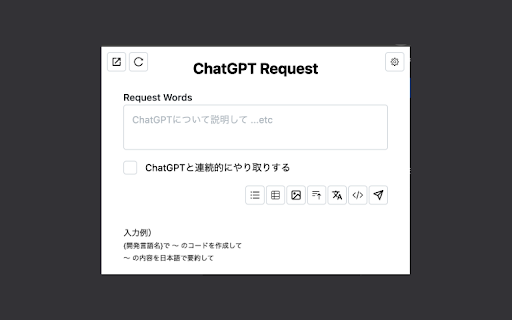
ChatGPTをポップアップで呼び出し、ボタンクリックで簡単に複雑なプロンプトを実行することができる拡張機能です! ChatGPTをChrome拡張機能のポップアップからスムーズにキーワード検索できるようにする拡張機能です。 実装している機能としては以下のとおりです! ・よく使うプロンプトを付与してキーワード検索できる ・ChatGPTの開いているタブを開く・リロードする ・ChatGPTのレスポンスをポップアップに表示する ・レスポンス結果をMarkdown形式でクリップボードに保存する

ChatGPT Sheets – Use ChatGPT for Sheets
Boost your Google Sheets with ChatGPT! Get instant answers, copy-paste solutions, and easy shortcuts with ChatGPT Sheets! Looking to elevate your business using ChatGPT for Google Sheets?🚀 The ChatGPT Extension for Google Sheets revolutionizes your workflow. HOW DOES ChatGPT HELP YOUR BUSINESS? ➡️Get instant results. ⏱️Our ChatGPT for Sheets extension enables a swift conversation window. ➡️Efficient copy-paste solutions. 🗓️ChatGPT for Google Sheets easily transfers new knowledge to your spreadsheet. ➡️User-friendly shortcuts. 🎯Every feature of ChatGPT for Sheets was implemented with YOU in mind. Wait no longer to boost your business! Let our ChatGPT in Google Sheets Extension let your productivity soar!🚀📈 In today's digital age, businesses are constantly in need of seamless tools and technologies that can simplify data handling and analytics. Amidst a plethora of available extensions and tools, the ChatGPT Extension for Google Sheets stands out as a beacon of innovation. Let's dive deeper into what makes this extension a game-changer for professionals across industries.🌟 MAIN FEATURES AND ADVANTAGES OF ChatGPT: 1. Seamless Integration🔗: The data analytics landscape is constantly evolving, making it essential for businesses to be equipped with tools that enable smooth transitions. Enter ChatGPT Extension for Google Sheets. This tool allows users to seamlessly integrate AI capabilities into their Google Sheets environment, eliminating the hassles of shifting between platforms and ensuring effortless information interpretation. 2. Dynamic Data Conversations💬: Gone are the days when you had to manually interpret complex data. With the ChatGPT Google spreadsheet, real-time interactions with your data are now possible. Imagine having an intelligent conversation with your spreadsheets, asking questions and receiving answers in real-time. This revolutionizes data understanding, making it more intuitive and actionable. 3. Collaboration Made Easy🤝: Modern businesses thrive on teamwork. The ChatGPT Extension for Google Sheets acts as a bridge, connecting team members and enabling them to derive insights from shared data effortlessly. It fosters a collaborative environment where numbers tell a story that everyone can understand. 4. Top-Tier Security🔐: Data security is a top concern for businesses today. With the ChatGPT Chrome Extension, there's no need to compromise on safety. Your data remains under stringent protection protocols, ensuring that you can analyze, share, and interpret your data with total peace of mind. The age of AI-powered solutions is here. These intelligent systems are not just about automation; they redefine how we perceive and interact with data. Among the forefront of these advancements is the ChatGPT Extension for Google spreadsheets. HERE'S HOW: 🎯Tailored AI Responses: GPT for Google spreadsheets isn’t just another tool. It actively learns and provides customized answers, ensuring precision, relevance, and clarity in every response.🌠 ♟️Broad Compatibility: In a diverse data landscape, the GPT for Sheets Extension stands out with its ability to accept a wide range of data formats and structures. This versatility ensures that no matter how your data is structured, the tool can handle it. 📊 🏄🏻♂️User-Centric Design: Beyond its technical prowess, every facet of the ChatGPT Extension for Google tables has been meticulously crafted with users in mind. The design emphasizes a user-friendly experience, ensuring that even those without a technical background can harness its power effortlessly. 👤 WHY EMBRACE ChatGPT FOR GOOGLE SHEETS? 🤔 In an era where data is the new gold, having tools that streamline its analysis is invaluable. The ChatGPT Extension offers: 1. Intelligent Data Processing: This isn’t just another analytics tool. The AI for Google Tables delves deep, offering not just numbers, but valuable insights that can shape business strategies. 🧠 2. Plug and Play: Simplicity is at the core of the ChatGPT plugin for Google Sheets. Without any complex setups, it integrates smoothly into your workflow. ⚙️ 3. Diverse Use Cases: Whether you’re a budding startup or a multinational corporation, ChatGPT for Google Sheets adapts to your unique requirements, proving its versatility across varied business landscapes. CONCLUSION: 💡 We stand on the brink of a new era in information analytics. Integrating AI with traditional spreadsheet tools like Google Sheets isn't just about staying updated; it's about anticipating the future. By investing in the ChatGPT for spreadsheets extension, you’re not just enhancing your data interpretation abilities; you’re also paving the way for unprecedented insights and business growth. 🚀 Dive into the realm of advanced data analytics with ChatGPT for Google Sheets. Embrace the future, redefine your data journey, and witness the revolution. Join the revolution. Download and use with pleasure!🔥📥

Save ChatGPT to Notion
Save ChatGPT conversations to Notion with one click. Bulk Export ChatGPT conversations ✨ Save, export, sync, and back up your ChatGPT conversations to Notion with ease! This extension helps you organize, archive, and preserve your AI interactions (including ChatGPT Group Chats) directly in your Notion workspace for long‑term reference and team collaboration. 🚀 Key Features (Export • Sync • Backup): • One‑click export: Instantly export/save any ChatGPT conversation to your Notion database • Auto Sync (NEW): Schedule automatic sync of your latest conversations to Notion — set intervals from 1 to 24 hours, keep the options page open, and let it run hands-free • ChatGPT Group Chats export: Export full history from https://chatgpt.com/gg/ into Notion (keeps authors and message order) • Selective export: Save only what you need - 1:1 chats: select one or multiple Q&A turns (prompt + reply) and export only those parts (auto‑tagged as "Part") - Group chats: select specific messages and export them as a single Notion page (auto‑tagged as "Group Chat" + "Selection") • Batch sync & backup: Sync multiple chats in bulk to build a durable backup/archive in Notion • Long chat splitting: Export very long conversations into multiple Notion sub-pages to keep Notion fast and stable • Batch sync Group Chats: Sync the latest 5 group chats (default) or sync all group chats (capped) • Copy to clipboard: Copy any group chat message as raw Markdown text with one click • Smart formatting: Preserves structure (Markdown, headings, tables, code blocks, images, lists) for readable Notion pages • Flexible options: Skip, overwrite, or duplicate existing pages to control versioning • Project sync: Export/sync entire ChatGPT projects into Notion with one flow • Team & personal: Works with personal and team ChatGPT accounts • Download from Notion: Once exported, use Notion's native Export to download Markdown/PDF for offline use • Clean UI: Modern interface with floating actions and inline controls • Deep Research support: Export the new ChatGPT Deep Research report format to Notion, save the full report as a child page, and keep it linked from the main conversation page • Deep Research cleanup: Automatically removes internal citation markers and export artifacts before saving to Notion • TextDocs tools integration: Export tool-generated TextDocs and related research documents as organized Notion child pages 🎯 Perfect for (Why to use it): • Researchers collecting AI insights • Students organizing study materials • Professionals documenting work discussions • Teams collaborating on AI projects • Teams using ChatGPT Group Chats for brainstorming and decisions • Anyone wanting to build a searchable knowledge base • Anyone who needs a reliable backup/archive of ChatGPT content in Notion 📝 How to use (Step‑by‑step): 1) Connect your Notion account (Notion OAuth) 2) Select a Notion database (the target for export/sync/backup) 3) Choose preferences (skip/overwrite/duplicate), then: • Export a full chat (including Group Chats) with one click, or • Select specific turns/messages and export only what you need • Enable Auto Sync to automatically sync your latest 28 conversations at scheduled intervals 4) Open in Notion to organize, tag, and download via Notion's native export (Markdown/PDF) 🔎 What you get in Notion: • Title: Uses the current page title • URL: Source link for context and de‑duplication • ChatTime: Conversation time (fallback to current time) • Tags: "Part" for partial exports; "Group Chat" / "Selection" for group chat exports 💡 Get started today and transform your ChatGPT conversations into an organized, searchable knowledge base in Notion — export, sync, and back up your AI knowledge with confidence. 2026-06-02 • Added support for the new ChatGPT Deep Research export format • Export Deep Research reports as linked Notion child pages from the main conversation page • Improved Deep Research formatting so Markdown headings, tables, lists, and code blocks render properly in Notion • Removed Deep Research citation marker artifacts such as internal `turn...search...` references before export • Improved tool document export flow for Deep Research and TextDocs-based content 2026-05-05 • Added intelligent rate limit protection for batch export — automatic random delay (1-2 seconds) between conversation fetches to prevent ChatGPT API 429 errors • Added immediate stop mechanism on rate limit detection — sync operations stop gracefully when rate limited, preserving already-synced conversations • Improved error handling — clear error messages guide users on how to resume sync after rate limits 2026-04-24 • Added real-time progress indicator for main export flow — see exactly what's happening during export • Added export settings panel in preview page — view and adjust formatting options without leaving the preview • Improved timestamp format for better searchability in Notion (now uses YYYY-MM-DD format) 2026-04-17 • Added a custom export preview page and selective export; optimized export formats. • Fixed the issue where exporting overly long conversations failed, preventing the 429 rate limit error from being triggered by the Notion API. 2026-03-25 • Fixed the skip behavior during batch export: when the "Skip" option is enabled, content that has already been exported will no longer be exported again. 2026-03-23 • Fixed the selective export issue for single conversation records • NEW — Support exporting very long conversations into multiple Notion sub-pages 2026-03-15: • Fixed and updated the personalized compatibility issues mentioned by users 2026-02-22: • New feature: support for filling in tags during export (only when exporting individually). 2026-02-07: • Fixed the "Invalid URL for link" error again, with a thorough fix. 2026-02-02: Fixed minor issues reported by users. 2026-01-27 • Fixed "Invalid URL for link" error: Resolved an issue where empty or invalid URLs in conversation content caused save failures. The extension now properly handles and removes invalid links while preserving text content, significantly improving save reliability. 2026-01-16 • NEW — Auto Sync: Schedule automatic sync of your latest 28 conversations to Notion at intervals from 1 to 24 hours. Keep the options page open and let it sync hands-free. Uses your current sync settings (skip/overwrite/duplicate). 2025-12-15 • NEW — ChatGPT Group Chats export: Export full group chat history from /gg/ pages to Notion • NEW — Group chat selective export: Select specific group chat messages and save them as a single Notion page • NEW — Group chats batch sync: Sync latest 5 (default) or sync all group chats (capped) • NEW — Copy message: Add a Copy button to each group chat message toolbar to copy raw Markdown text to clipboard 2025-01-08 • Added Deep Researcher support: Now supports exporting ChatGPT Deep Researcher document content to Notion with full formatting preservation • Added TextDocs tools integration: Export TextDocs tool documents as sub-pages in Notion for organized documentation structure 2025-09-27 • Fixed an issue where some content was not fully saved in certain cases 2025-09-17: Fixed API error during synchronization to Notion: Resolved the issue of synchronization failure caused by a validation_error from the Notion API. The problem was due to body.children[0].toggle.children[2].table.children.length exceeding the maximum limit of 100, leading to the error. Added a generic handling method: The system now intelligently handles similar errors, preventing interruptions during the synchronization process and improving system stability and compatibility. 2025-09-10:Fixed bug, head_2 title too long bug. 2025-09-03:NEW — Segment save on conversation detail: pick one or multiple Q&A turns and export just those parts to Notion (auto‑tagged as "Part"). 2025-08-29: Fixed the issue where Notion is empty after some users sync their data. 2025-08-29: Fix the issue of chat messages sorting. 2025-08-28: Fixed the issue with saving Projects. ChatGPT plus accounts now also support Projects, so they can be saved as well. 2025-08-26: Fix the issue when saving. 2025-07-14: 🛠 Fix bug. 2025-06-04: 🛠 Fix some data import failure issues, add successful records, and directly skip the configuration function. 2025-05-27:🛠 Fix the table problem in Markdown:"Content creation Failed. Fix the following: Number of cells in table row must match the table width of the parent table"

ChatGPT Enhancer
Enhance ChatGPT with collapsible responses, timeline navigation, and bulk controls. Organize long conversations distraction-free. ✨ Collapse & expand ChatGPT replies with one click ⏳ Navigate conversation timelines easily 📦 Bulk control for messages 🧹 Keep your chats clean

Prompti
Elevate your ChatGPT conversations with Prompti, a robust Chrome extension that aids in the construction of superior prompts. Unlock the Full Potential of ChatGPT with Prompti! Constructed with OpenAI's most advanced language model in mind, Prompti is a Chrome extension designed to seamlessly integrate with ChatGPT. Its main purpose is to enhance the quality of your interactions, providing guidance to craft efficient and impactful prompts. Why Prompti? ChatGPT is an incredible tool with vast potential, but getting the best out of it often depends on how well you phrase your prompts. Prompti offers an innovative solution to this challenge by offering tailored assistance to the user in constructing effective prompts, leading to more refined responses from ChatGPT. Key Features: Prompt Templates: Access an extensive collection of over 110+ pre-constructed prompt templates, primed for a diverse set of tasks. Tailored Inputs: Based on your chosen topic, Prompti provides tailored input suggestions that help craft more precise and effective prompts. Backend Prompting: Prompti takes prompt optimization a step farther by providing additional prompting based on the chosen topic, ensuring you secure the precise results you seek. Compatibility: Effortless integration with ChatGPT plugins with custom-made prompts designed to help you utilize the new features to their full potential User-Friendly Interface: Navigate with ease through our intuitive and user-friendly interface, suitable for both seasoned users and beginners. Unlock the Power of Precise Prompts Don’t let the complexity of prompt construction limit your interactions with ChatGPT. Let Prompti be your companion, guiding you to optimize your use of ChatGPT, and helping you generate more valuable, detailed, and relevant responses. Get started Today! Download Prompti - your personal ChatGPT companion, and make your interactions with ChatGPT more fruitful, engaging, and enjoyable.
