
glokkinohcdghiefeiiimjeccbdkjmng
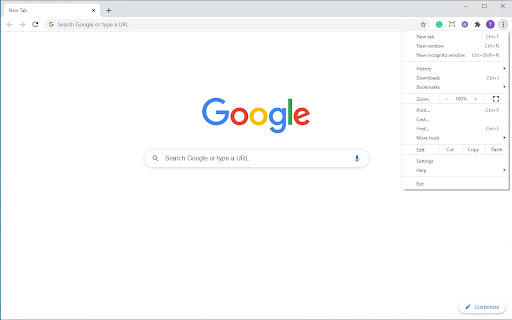

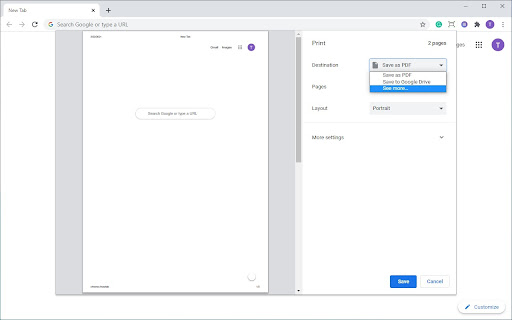

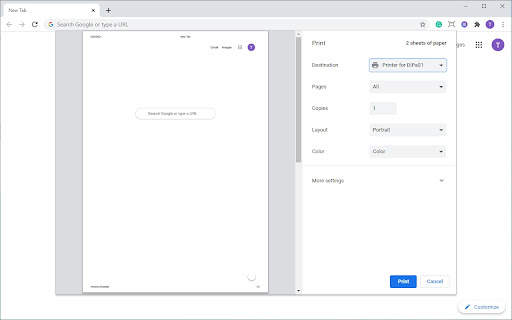
Enables printing from the Google Chrome browser to Dispatcher Paragon. The Dispatcher Paragon Chrome Print extension allows the release of a print job from a Google Chrome browser. The job is sent from the Google Chrome browser to the Dispatcher Paragon Chrome Print backend server, which is an independent component installed on a dedicated server. The backend server processes the job and sends it to Dispatcher Paragon. The print administrator registers a printer in Dispatcher Paragon Chrome Print backend server and assigns it to a user or role. A user will add the extension to the Google Chrome browser and configure the connection to the Dispatcher Paragon Chrome Print backend server. When the user is registered in the system, an assigned printer will be displayed in the list of available printers in the print dialog. The user can send a print job to this printer using all available print features and the print job will arrive to the Dispatcher Paragon.

Bulk Page Downloader
Detect all links on the page and bulk download web pages. Excellent support for GitBook and DeepWiki, and also works for batch… Detect all links on the page and bulk download web pages. Excellent support for GitBook and DeepWiki, and also works for batch downloading pages from other websites.

Save Anything on Anywhere
You can save manually your passwords, backup keys, and last night's dinner, ... anything your Google Password Manager! You can check your saved password on `chrome://settings/passwords`. 1. Click extension icon. 2. Then open dialog for inputting username and password. 3. Input username and password that you want to save. 4. Click submit button. (The information you inputted will not sent anywhere.)

iboss Classroom Management
The iboss platform enhances Google Classroom by adding more tools to help you manage student learning activities remotely, from any location. Whether you are in a brick-and-mortar classroom or teaching from a remote location, iboss Classroom Management empowers instructors with the tools to ensure students are focused on their assignments. The iboss platform natively integrates with Google Classroom to take full advantage of its capabilities. This integration enables you to visually monitor the screens for all of the students in any of your classrooms and manage student’s browsing activities, ensuring that they are focused and engaged on your lesson.

Page Cage
Loads a page inside a frame so it can't be seen by other extensions ⚠️ NOTICE: THIS EXTENSION HAS EVOLVED INTO PRIVACY BAR ⚠️ This legacy standalone tool is no longer actively maintained. The exact same functionality has been integrated, upgraded, and fully secured inside our flagship extension: Privacy Bar. Looking for pure Symmetric Encryption? Privacy Bar handles it entirely offline. Looking for Read-Once payloads? Privacy Bar generates self-destructing messages out of the box. Looking for Page Isolation/Sandboxing? Privacy Bar features an enhanced, isolated "Safe Space" tab like Page Cage, and has an additional mode for when you want to protect the browser from a potentially malicious page. 👉 Search the Chrome Web Store for "Privacy Bar" or visit privacybar.net to upgrade to the complete, modern suite. Hasn't it ever bothered you to see a password manager box popping unexpectedly and offer to save your login? Password managers can do this because they can see everything on that page, including all your precious private information. In fact, most extensions and add-ons installed on your browser can do it. Feeling better now? Now, you can open the page in incognito mode, which by default blocks all extensions from loading, but if you have allowed some extensions to load in this mode, it's rather tedious to go one by one making sure they are safe. Page Cage protects your private pages from intrusion by loading them inside a frame to which the other extensions do not have access. It's as simple as clicking the Page Cage icon and typing the URL. Since this is quite a neat to prevent from intrusion my encryption and security web apps, starting with version 1.0 there is a nifty list that allow you to load them without having to remember their URL. Not all pages will load, however, because many websites refuse to be placed inside a frame in order to prevent Clickjacking. This comes from the server so there's nothing that we can do about it. Please bear this in mind as you use Page Cage.
