
glodhcamfhgfndjmjmlccdoncljmgbhl
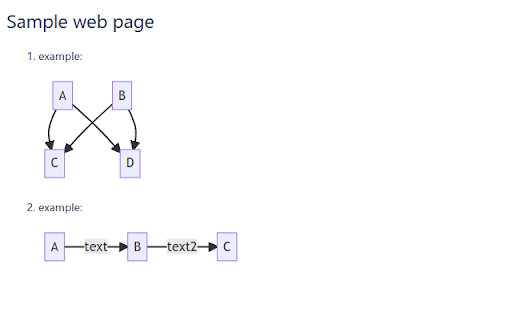
Browser extension to render Mermaid diagrams in web pages. Browser extension to render Mermaid diagrams in web pages. Supported web pages are: Bitbucket, Pandoc generated HTML files.

Mirror extension!
The mirror extension mirrors web pages! With the mirror extension it is now possible to turn your Internet around, using the MIRROR! extension. Free for educational, research and entertainment purposes. >>>Instructions:>>About Mirror Read

Screen Ruler
Use screen ruler for Chrome measure pixels on screen and as browser plugin. Get pixel ruler extension for website page dimensions. The ultimate page ruler chrome extension made for designers and developers. Whether you're building responsive interfaces or checking layouts, it streamlines your workflow. Quickly measure any digital component by px ruler on screen with professional precision. 📌 Key Advantages You'll Get 1️⃣ Compatible with any web page. 2️⃣ Keyboard shortcuts for actions. 3️⃣ Intuitive interface for your work. Get the data you need with our CSS ruler screen, designed for modern web development. It adapts seamlessly to different resolutions. Switch between modes instantly. 1. Drag-and-drop positioning for exact placement. 2. Customizable colors and transparency settings. 3. Keep the measuring area locked while scrolling. 4. Configurable alignment guides for consistency. 5. High performance across open browser pages. 💡 Perfect for Design Teams The Chrome ruler for screen saves valuable time when comparing mockups with live implementations. It helps you inspect spacing, margins, and proportions effortlessly to ensure your designs match specifications perfectly. 🔑 Use Cases for On Screen Ruler App 🎨 Instant Results You Need Work on pages with confidence using our chrome screen ruler that provides real-time feedback. And also analyze complex layouts. Help is always there. 🔆 Highlights of On Screen Ruler Pixels 🔸 Fully adjustable grid overlays for all verification. 🔸 Perfect accuracy for professional page projects. 🔸 Optimized performance with minimal resources. Transform your design process on screen ruler chrome functionality. Flexible configuration options let you adapt to match your workflow requirements. 🛠️ What's Inside Chrome Extension ➤ Full zoom support for high-DPI displays. ➤ Quick settings reset and save options. ➤ Lightweight code for instant app loading. ➤ Seamless integration with all web pages. ➤ Built-in help tips for users quick learning. The screen pixel ruler requires no third-party software installation. Measure layouts directly within your development environment. 1️⃣ Zero data collection — complete privacy protection for your professional work. 2️⃣ Page grid overlays help maintain consistent spacing throughout your projects. 3️⃣ Functions perfectly online without compromising pixel measurement accuracy. Standardize your design verification process across teams with pixel measure website capabilities. Ensure every component matches your specifications and maintains visual consistency using Chrome extension page ruler. 🍹 Drawing and Hover Options Enable screen ruler extension with two powerful techniques. Outline any area and pixel dimensions appear instantly. Q: What makes a screen ruler website different from desktop tools? A: It runs directly in your browser without any downloads or installations. Q: How does it compare to a typical addon? A: It offers advanced features like page grid overlays and other. Q: Does it support pixel measuring for responsive sites? A: Yes, with real-time accuracy down to 1-pixel precision across all sizes. 💎 Complete Page Layout Control Designers and developers can pixel measure website to their original plan and ensure brand consistency. You will receive regular updates for stability and page performance inside the screen ruler plugin chrome. ✅ Extension Components 📸 Showing the exact cursor position. 📸 Floating toolbar to access anywhere. 📸 Pause mode for page interaction. Teams rely on digital ruler on screen to catch alignment issues before they reach production. This speeds up client approvals and reduces revision cycles. ✏️ Works on Any Site with the Screen Ruler Chrome Extension ● Remains stable on infinite scroll and lazy-loaded pixel content. ● Supports right-to-left (RTL) layouts for international projects. ● Customize colors and opacity on screen rule for good visibility. ● Maintains accuracy on pages with transforms and animations. Screen ruler addon chrome transforms your workflow because it is a professional tool that brings precision to every project. Whether you're debugging or conducting reviews, app with pixel accuracy you can trust. Install now and experience the difference.

Grid Lines Ruler
Create grids on pages that provide the developers visual hints to help in developing the web app layouts. 1. Download and add this extension from Google Chrome. 2. Click on the extension to activate its working. 3. Drag from both Vertical ↕️ or Horizontal ↔️ from the main ruler to create grids. #️⃣ 4. Click on the intersection of vertical and horizontal grids to go into ruler mode. 5. Press and hold the “SHIFT” button to get a straight line. ✨Features ✨: 1. 🆓 & super Easy to set-up. 🆓 2. Creates vertical and horizontal grids. #️⃣ 3. A ruler 📏 to measure distance between your grids too. 📌Pin our extension to create and manage overlays on pages to provide you the visual hints to develop the web app layouts.

Window Resizer
Resize the browser window to emulate various screen resolutions. This extension re-sizes the browser's window in order to emulate various resolutions. It is particularly useful for web designers and developers by helping them test their layouts on different browser resolutions. The resolutions list is completely customizable (add/delete/re-order). You can set the window's width/height, window's position, preset icon (phone, tablet, laptop, desktop) and even the option to apply the new dimensions to the entire window or just to the viewport. The extension also features customizable global key shortcuts, an option to export your settings and import them on another computer and more! Please report all bugs (or suggestions) using the support link on the extension's details page.
